
介绍
Entity Culling – 1.16.5 – 2.1.4 and newer versions are only compatible with Optifine G8!
Entity Culling – 1.16.5 – 2.1.3 and older versions are only compatible with Optifine G7!
Entity Culling – 1.12.2 – 2.0.8 and newer versions are only compatible with Optifine G5!
Entity Culling – 1.12.2 – 2.0.7 and older versions are only compatible with Optifine F5!
This mod requires _MixinBootstrap_ (curseforge, modrinth) and _RenderLib_ (curseforge, modrinth) to run (MC 1.12.2 only)!
_Mixin 0.7-0.8 Compatibility_ (curseforge, modrinth) might be helpful when another mod uses an older mixin version and you are thus unable to launch the game (MC 1.12.2 only).
Entity Culling is a client-side performance mod that aims to skip rendering of hidden (tile-)entities.
In vanilla, it just renders all (tile-)entities that are in the field of view of the player. This means there may be hundreds of (tile-)entities eating your fps while you can’t even see them because they are hidden behind a wall.
Culling of hidden Entities
By default, this mod uses an OpenGL occlusion culling implementation which gives you pixel-perfect bounding box culling with only one frame delay and a very small overhead.
If your hardware does not support OpenGL 4.3 then this mod uses a raytraced culling implementation. The raytraced culling is more CPU intensive while the OpenGL culling is more GPU intensive and thus depending on your hardware you might want to prefer one over the other.
This can result in massive FPS improvements when a lot of (tile-)entities are on the screen but not visible because they are occluded.
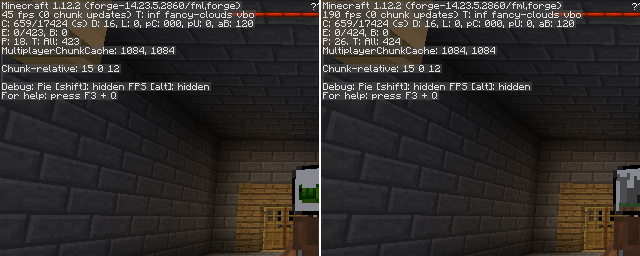
Test with EntityCulling-1.12.2-6.0.2 inside a Chocolate Quest Repoured dungeon with ~200 entities on screen shows huge improvements!


常见问题
实体剔除 支持哪些 Minecraft 版本?
实体剔除 支持 Minecraft Java 版 1.12.2–1.16.5,共 2 个版本,可用的加载器:Forge。下载时注意选择和你游戏版本一致的文件。
实体剔除 怎么安装?
先用 PCL2 或 HMCL 启动器安装对应版本的 Forge,再把下载的 .jar 文件放进游戏目录的 mods 文件夹,重新启动游戏即可。开启了版本隔离的,mods 文件夹在 versions/版本名 下面。运行环境:仅客户端。



评论
登录后评论和评分