Entity Collision Optimization
Optimizes entity collision checks, pushing queries, and nearby entity lookups to reduce overhead in entity-heavy areas.
介绍
Entity Collision Optimization
Less time searching for entities. Less overhead in crowded areas.
Entity Collision Optimization (ECOpt) optimizes entity collision checks, pushing queries, and nearby entity lookups. It targets workloads such as crowded mob farms and large piles of dropped items, where repeated queries can become expensive.
Minecraft 1.21.1 · NeoForge · No configuration required · MIT license
What does it optimize?
- Collision and pushing queries: Maintains candidate lists as entities enter and leave sections, reducing repeated filtering.
- Nearby entity lookups: Uses spatial indexing for repeated small-area queries to reduce the number of entities scanned.
- Block-state reads: Caches block states to reduce repeated lookups during collision processing.
- Collision checks and vertical movement: Uses early exits and fast paths to skip unnecessary work.
All optimizations are enabled automatically after installation.
Performance
The following results come from the project’s existing stress tests. Lower time is better. These measurements describe the tested workloads, rather than FPS or an expected speedup for every world.
Crowded mobs: 4,000 pigs
Pigs were placed in a 3 × 3 enclosure, with normal AI and gravity enabled and entity cramming damage disabled.
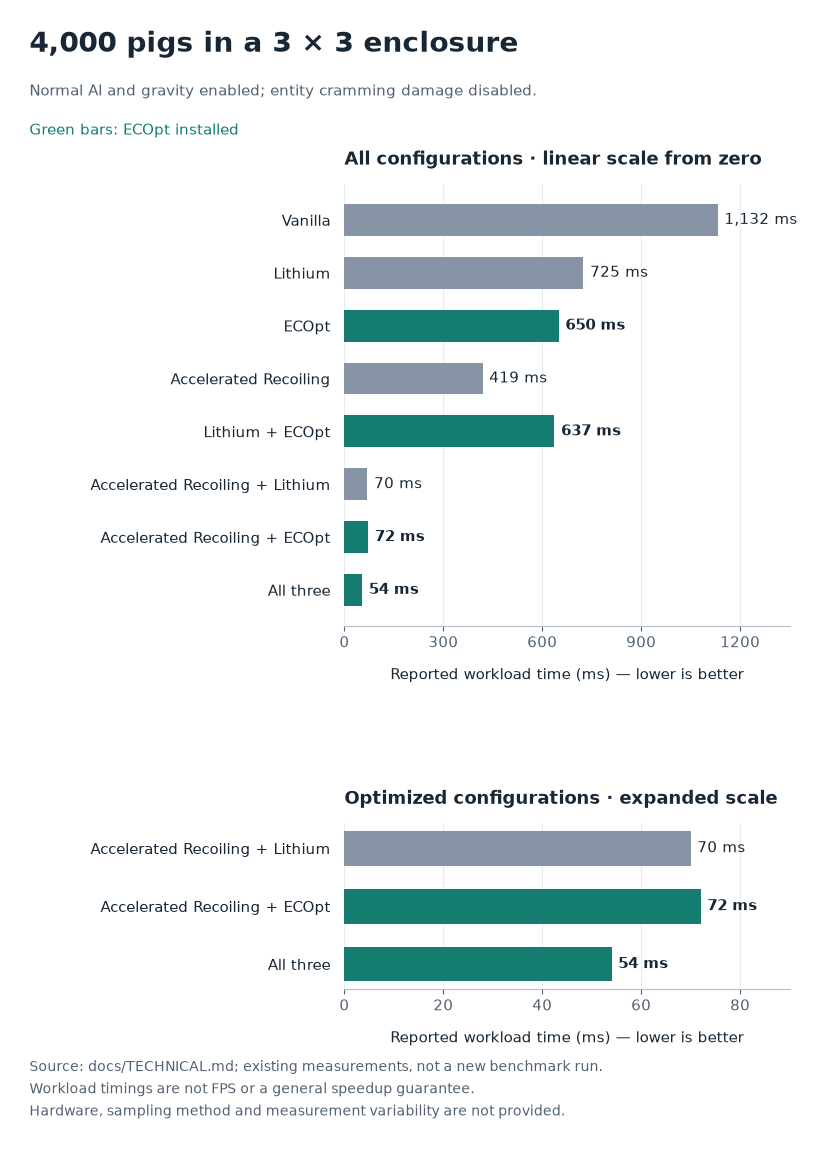
ECOpt alone reduced the reported workload time from 1,132 ms to 650 ms, a 42.6% reduction. Adding ECOpt to the tested Accelerated Recoiling + Lithium setup reduced it from 70 ms to 54 ms, a further 22.9% reduction.
Dropped items: 4,000 stationary entities
This test used 4,000 stationary dropped items, an extreme entity-query workload.
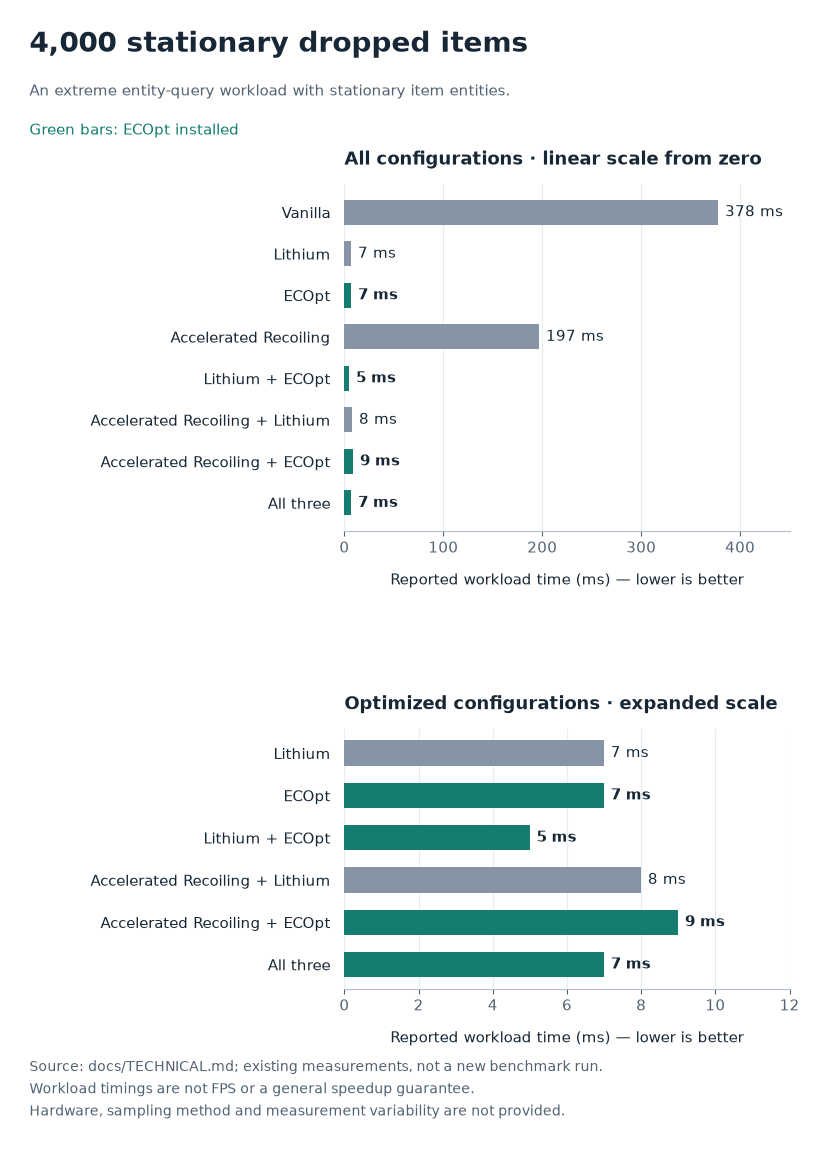
ECOpt alone reduced the reported workload time from 378 ms to 7 ms, a 98.1% reduction in this test. Lithium + ECOpt recorded the lowest time at 5 ms.
Full results
| Installed optimizations | 4,000 pigs | 4,000 dropped items |
|---|---|---|
| Vanilla | 1,132 ms | 378 ms |
| Lithium | 725 ms | 7 ms |
| ECOpt | 650 ms | 7 ms |
| Accelerated Recoiling | 419 ms | 197 ms |
| Lithium + ECOpt | 637 ms | 5 ms |
| Accelerated Recoiling + Lithium | 70 ms | 8 ms |
| Accelerated Recoiling + ECOpt | 72 ms | 9 ms |
| All three | 54 ms | 7 ms |
The full charts use linear axes starting at zero. The detail panels expand the smaller timings for readability and use separate, labeled scales.
Using ECOpt with other optimizations
The project’s tests include Lithium and Accelerated Recoiling, both individually and in combination with ECOpt. Their improvements overlap in some areas and complement each other in others, so performance gains do not simply add together.
In the crowded-pig test, the three-mod combination recorded the lowest time. In the stationary-item test, Lithium + ECOpt recorded the lowest time. Choose a combination based on your workload; results from these tested combinations do not establish compatibility with every version or modpack.
Known limitations
The spatial query index changes the order in which entities are returned. Large teleports within the same tick can also exceed the index’s movement allowance and may cause a query to miss an entity once. Keep these limitations in mind when testing modpacks with unusual entity movement or query behavior.
常见问题
Entity Collision Optimization 支持哪些 Minecraft 版本?
Entity Collision Optimization 支持 Minecraft Java 版 1.20.1–1.21.1,共 2 个版本,可用的加载器:Forge / NeoForge。下载时注意选择和你游戏版本一致的文件。
Entity Collision Optimization 怎么安装?
先用 PCL2 或 HMCL 启动器安装对应版本的 Forge / NeoForge,再把下载的 .jar 文件放进游戏目录的 mods 文件夹,重新启动游戏即可。开启了版本隔离的,mods 文件夹在 versions/版本名 下面。
First_sight 的其他作品
查看全部 →
aimbot
Super Lock

Fargo Soul
Fargo's Soul introduce a series of craftable accessories that provide various buffs and abilities.

TwilightSoul
Add a series of crossover items between Fargo's Soul Mod and The Twilight Forest.

Create Soul
Added several crossover items between Fargo's Souls and Create.
评论
登录后评论和评分