
截图



介绍
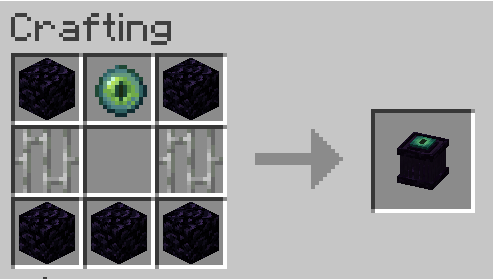
The endercage is a tool/block for capturing and easily transporting mobs. Other than that it also has some other functionalities including the ability to play sounds from contained entities and displaying the entity as decoration.
Features:
= General functionality:
-> Capture entities by rightclicking them with the cage.
-> Transfer entities between a placed cage and a cage in your hand by rightclicking them with it.
-> Entities inside the cage will play their ambient sound once in a while. You can mute a cage by rightclicking it with a feather and unmute it by rightclicking it with a noteblock.
= Redstone functionality:
-> If a cage is powered it will:
–>> Release the contained entity / capture the entity above if the block above is air.
–>> Steal from/give the contained entity to a cage above.
-> Noteblocks above cages will always play the ambient of the entity below, even if the cage is muted.
-> Comparators will output a redstone signal of 15 if the cage is filled and 0 if not.
= Misc:
-> If a filled endercage is placed in a itemframe it will just show the entitiy. If the itemframe is facing up the entity will stand normally.
There are some settings to enable/disable containment of hostiles (disabled by default), disable redstone functionality, mute them altogether and ban certain entities from being captured at all.
Note: If a entity renders as a question mark it errored while trying to render and its model got replaced with the “?” to prevent a crash. If released it will look normal.
常见问题
Endercage 支持哪些 Minecraft 版本?
Endercage 支持 Minecraft Java 版 1.20.1,可用的加载器:Fabric。下载时注意选择和你游戏版本一致的文件。
Endercage 怎么安装?
先用 PCL2 或 HMCL 启动器安装对应版本的 Fabric,再把下载的 .jar 文件放进游戏目录的 mods 文件夹,重新启动游戏即可。开启了版本隔离的,mods 文件夹在 versions/版本名 下面。运行环境:客户端和服务端都要装。
评论
登录后评论和评分