截图


介绍
![Contributors][contributors-url]
![Forks][forks-url]
![Stargazers][stars-url]
![Issues][issues-url]
![MIT License][license-url]
![LinkedIn][linkedin-url]
![Discord][discord-url]
![Modrinth][modrinth-url]
Enchantment Conflict
Stop to guess with enchants conflict/incompatible
·
<a href="https://github.com/syorito-hatsuki//issues”>Report Bug
·
<a href="https://github.com/syorito-hatsuki//issues”>Request Feature
Table of Contents
About The Project
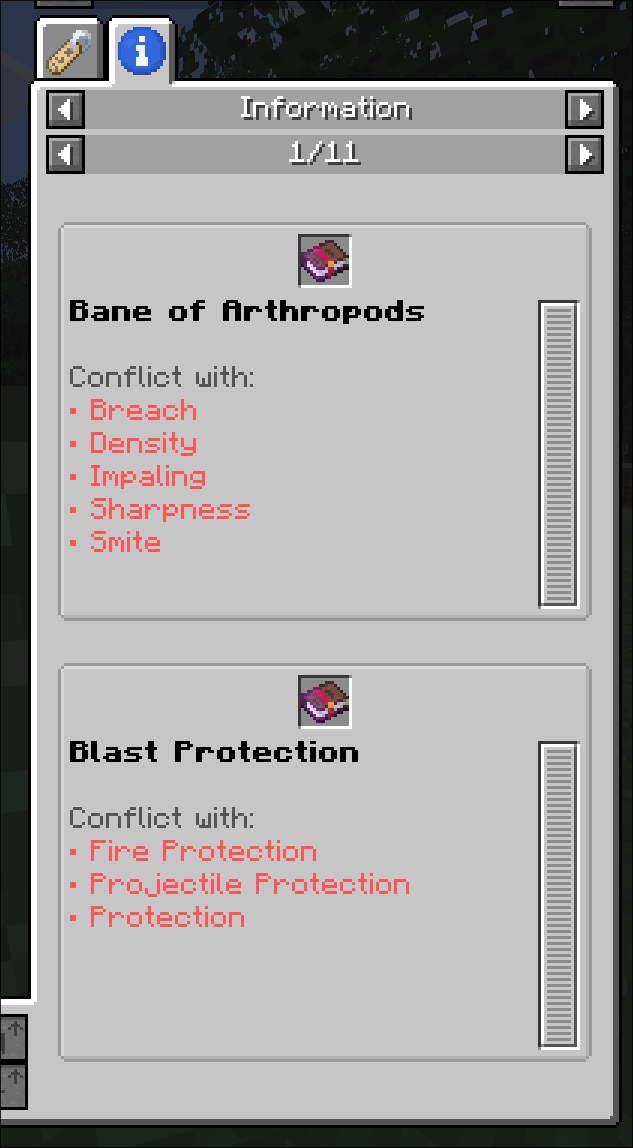
Add conflict / incompatibility tooltips to enchantment books to help you find out what enchantments are incompatible
with each other.
Built With



Usage
Default keybinds:
| Key | Action |
|———-|———————————|
| Left Alt | Expand tooltip to see conflicts |
Roadmap
- [ ] Config screen
See the [open issues](https://github.com/syorito-hatsuki//issues) for a full list of proposed features (and known
issues).
Contributing
Contributions are what make the open source community such an amazing place to learn, inspire, and create. Any
contributions you make are greatly appreciated.
If you have a suggestion that would make this better, please fork the repo and create a pull request. You can also
simply open an issue with the tag “enhancement”.
Don’t forget to give the project a star! Thanks again!
- Fork the Project
- Create your Feature Branch (
git checkout -b feature/AmazingFeature) - Commit your Changes (
git commit -m 'Add some AmazingFeature') - Push to the Branch (
git push origin feature/AmazingFeature) - Open a Pull Request
License
Distributed under the MIT License. See LICENSE.txt for more information.
常见问题
Enchantment Conflict 支持哪些 Minecraft 版本?
Enchantment Conflict 支持 Minecraft Java 版 26.1–26.3,共 5 个版本,可用的加载器:Fabric。下载时注意选择和你游戏版本一致的文件。
Enchantment Conflict 怎么安装?
先用 PCL2 或 HMCL 启动器安装对应版本的 Fabric,再把下载的 .jar 文件放进游戏目录的 mods 文件夹,重新启动游戏即可。开启了版本隔离的,mods 文件夹在 versions/版本名 下面。运行环境:仅客户端。
syorito-hatsuki 的其他作品
查看全部 →ModMenu Badges Lib
更多徽章!!!

Yet Another Cobblestone Generator
灵活可自定义的发电机

Ducky Updater Lib
一个用于检查 Modrinth 上模组更新的简易前置库。

Death Counter
带客户端网页界面的死亡计数器
评论
登录后评论和评分