
ElytraHUD+
Minimalist elytra HUD — durability, rockets, and flight speed at a glance. Fully customizable with a live preview.
截图
介绍


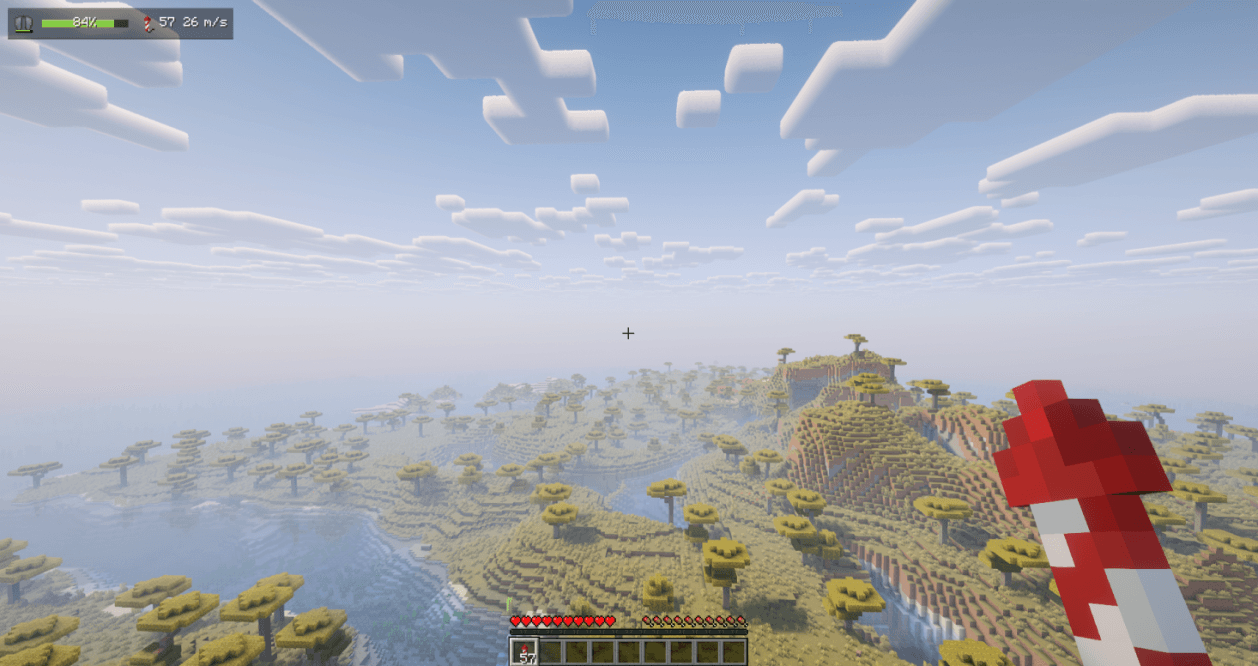
A clean, minimalist HUD that keeps the one thing that matters while flying — how much elytra you have left — right where you can see it, without cluttering your screen. At a glance it shows your elytra durability, how many firework rockets you are carrying, and your current flight speed, all in a single compact row.
Client-side only (no server installation required). Fully compatible with singleplayer and multiplayer.
Dependencies: Fabric needs Fabric API and Architectury API. NeoForge needs Architectury API. Forge needs no additional dependencies.
Free to use in any modpack — public or private, no permission needed.
What it does
- Durability Bar — a live bar that smoothly shifts green → amber → red as your elytra wears down, with the remaining percentage or the exact value.
- Low-Durability Warning — a pulsing warning so you know when to land or swap wings (configurable threshold).
- Rocket Count — firework rockets in your inventory and offhand.
- Flight Speed — your current flight speed.
- Item Icons — real elytra and rocket item icons, drawn straight from the game.
- Accessory Slots — optional support for elytra worn in Trinkets, Accessories, Curios, or Trinkets Updated slots.
- Modded Gliders — optional support for chest-slot gliders (netherite, wooden, etc.).
Configuration
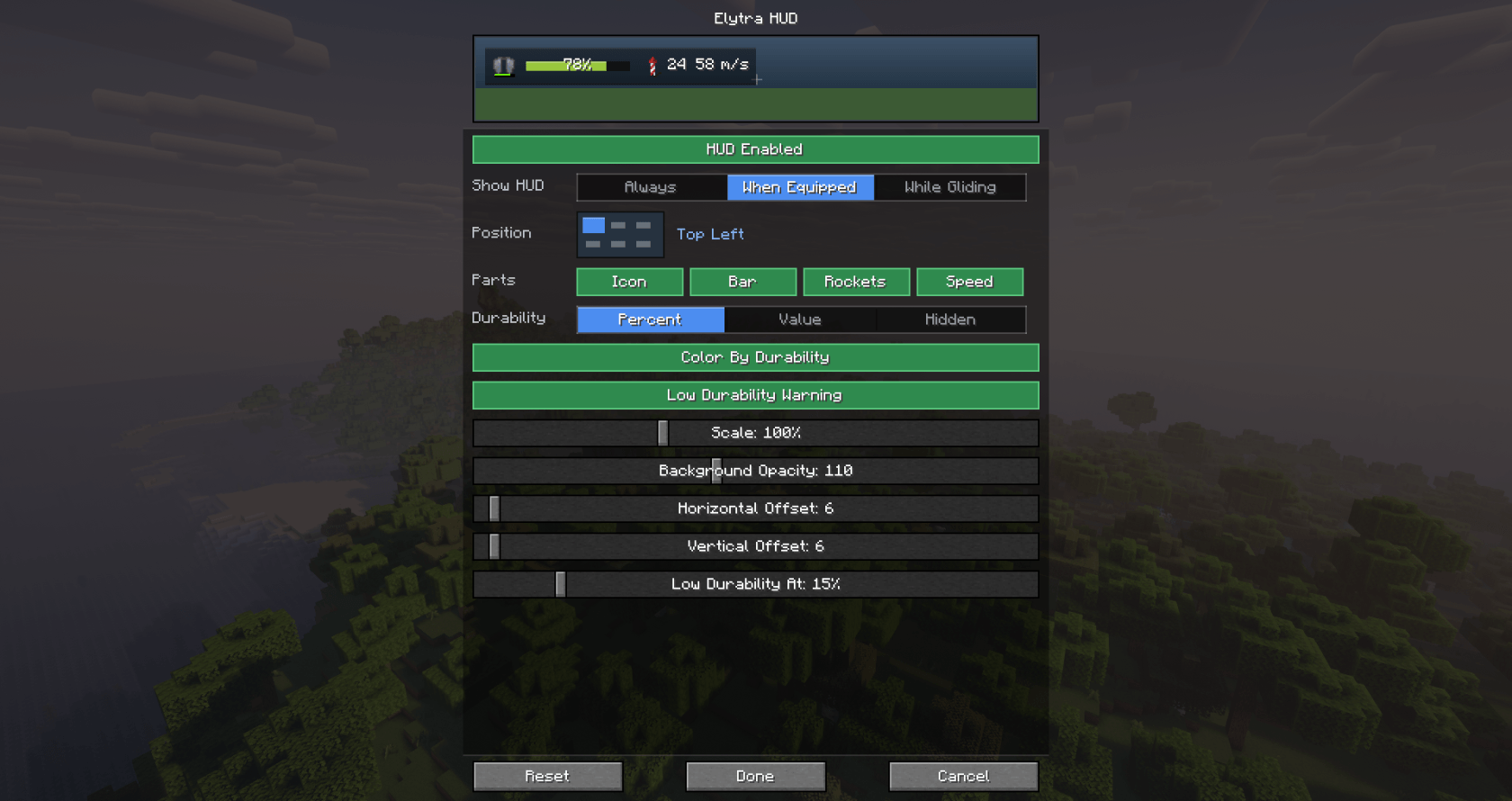
All HUD elements are fully customizable with a live in-settings preview — what you configure is exactly what you get in game. Choose when it appears (Always, only When Equipped, or only While Gliding), place it in any of six screen positions from a visual grid, with free offsets and 50–200% scaling, toggle each element (icon, bar, rockets, speed), switch durability text between percent, value, or hidden, and tune background opacity, color-by-durability, and the low-durability warning.
Open the settings screen with the /elytrahud command (alias /ehud) or a customizable hotkey. On NeoForge you can also open it from the in-game mod list.
Details
- Drawn as part of the in-game HUD, just above the chat, so it never covers the player list, subtitles, or open screens.
- All settings are stored locally in
config/elytrahud.json. An unreadable file is kept asconfig/elytrahud.json.bakbefore defaults are written. - Fully translated into 10 languages: English, Russian, Simplified Chinese, Spanish, French, German, Japanese, Brazilian Portuguese, Korean, and Italian.
Feedback
Please report any bugs, errors, or feature suggestions on Discord: https://discord.gg/HTkn94BXmA
More mods by Nikrecs: Double Jump Enchant · PerformanceHUD
My other mods that I recommend.
常见问题
ElytraHUD+ 支持哪些 Minecraft 版本?
ElytraHUD+ 支持 Minecraft Java 版 1.19.2–26.3,共 8 个版本,可用的加载器:Fabric / Forge / NeoForge。下载时注意选择和你游戏版本一致的文件。
ElytraHUD+ 怎么安装?
先用 PCL2 或 HMCL 启动器安装对应版本的 Fabric / Forge / NeoForge,再把下载的 .jar 文件放进游戏目录的 mods 文件夹,重新启动游戏即可。开启了版本隔离的,mods 文件夹在 versions/版本名 下面。
Nikrecs 的其他作品
查看全部 →
DeathCompass
重生时自动获得一个指南针,精准指向你上次死亡的位置。

Terralith: River In Jungle
Terralith 附属模组,新增宽阔蜿蜒、拥有自然缓坡河岸的丛林河流,告别原版那些细小的溪流。
Swing Through Grass
挥剑扫过草丛也能命中生物:攻击不再被高草、蕨类和植物挡掉,让你的剑能穿过枝叶击中目标。轻量级服务端模组,无需客户端安装。

PerformanceHUD
Lightweight client-side HUD showing FPS, RAM, entities, chunks, ping, and CPU in one customizable corner overlay.
评论
登录后评论和评分