
介绍
中文介绍正在准备中,下面暂时显示原文。
EEJS
Create custom processed types for Emendatus Enigmatica with KubeJS!
How to use
First you need textures for your parts that can be placed in `kubejs/assets/eejs/textures/items/templates/<processedtype>/<n>.png`.
These textures can have multiple layers like every other Emendatus Enigmatica processed type.
Then in a KubeJS startup script you can use the new `EmendatusEvents.partRegistry` event to create a new processed type like below:
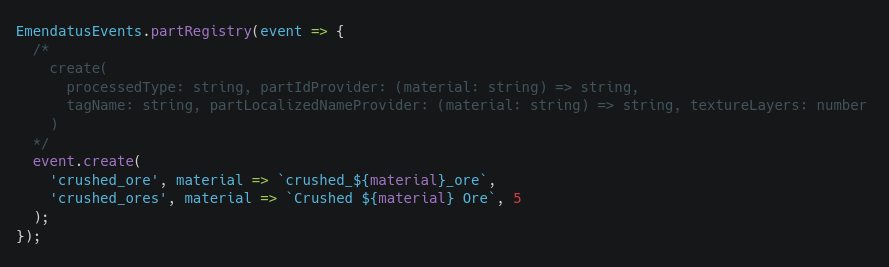
After you’ve created the processed type you can just add it to your Emendatus Enigmatica materials’ processed types list.
常见问题
EEJS 支持哪些 Minecraft 版本?
EEJS 支持 Minecraft Java 版 1.19.2,可用的加载器:Forge。下载时注意选择和你游戏版本一致的文件。
EEJS 怎么安装?
先用 PCL2 或 HMCL 启动器安装对应版本的 Forge,再把下载的 .jar 文件放进游戏目录的 mods 文件夹,重新启动游戏即可。开启了版本隔离的,mods 文件夹在 versions/版本名 下面。
评论
登录后评论和评分