
EchoSight
Turns Minecraft's audio into readable HUD: every sound gets a direction, distance and priority on a threat ring, plus a reworked subtitle panel. Built for deaf and hard-of-hearing players. Client-side, no mixins, no ESP.
截图


介绍
EchoSight
Accessibility and sound awareness for Minecraft. Client-side, Fabric, works on any server.
Half of Minecraft’s life-or-death information is audio: the creeper’s hiss, the cave spider behind you, a drawn bowstring, drowning. For deaf and hard-of-hearing players — and for anyone playing with the sound off — that channel simply isn’t there. Vanilla subtitles tell you something happened. They don’t tell you where, how far, or how much it matters.
EchoSight classifies every sound the client plays and renders it as direction, distance and priority.
Features
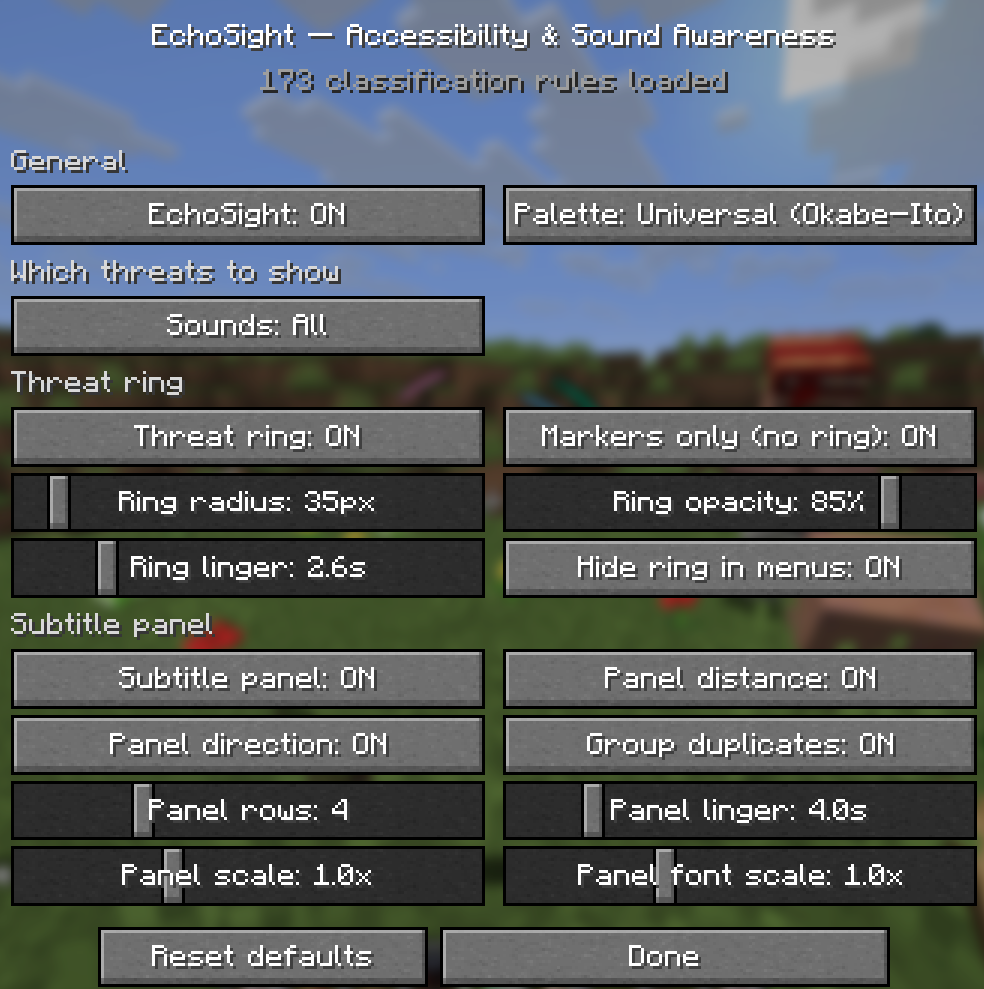
Directional threat ring
Every sound becomes an arc around your crosshair:
| Channel | Encodes |
| — | — |
| Angle | Bearing — recomputed every frame, so arcs sweep as you turn |
| Track (3 rings) | Distance band: ≤12 / ≤32 / >32 blocks |
| Thickness | Severity — readable without colour |
| Colour | Sound identity — different mobs and events stay distinguishable |
Priority classification
- Lethal — primed creeper, warden, ghast fireball, TNT
- Dangerous — cave spider, lava, incoming arrows
- Informational — item pickup, XP, villagers, doors, chests
Four presets, one button
All → All except noise (default) → Significant only → Lethal only.
Per-sound overrides always beat the preset, in both directions.
Colour-blind-safe palettes
Okabe–Ito base plus deuteranopia, protanopia, tritanopia and monochrome variants. Severity stays readable from arc thickness, and every subtitle row carries a distinct shape glyph — colour is never the only channel.
Reworked subtitle panel
Grouping and dedup (a retriggering source is one row with a repeat count, not a flood), live distance in blocks, a bearing pointer, and priority ordering — a lethal row is never pushed off the bottom by chatter.
Continuous sounds are actually continuous
A jukebox stays on the HUD for as long as the record is really playing, not for two seconds after someone pressed play. Sources are re-published while the engine still has them playing and you’re still inside their audible radius — walk up and it appears, walk away and it decays.
Optional screen-edge pulse
A “tactile” cue for critical sounds. Off by default, severity-gated, smooth decay rather than a strobe — anything that flashes the whole screen is opt-in, because for photosensitive players it’s a hazard, not an aid.
In-game tuning
A per-event screen built from the sounds you have actually heard: searchable, filterable down to changed by me or no rule, with hit counts and “last heard” per row. Neither settings screen pauses the game, and the ring stays visible over both — you tune radius, opacity and linger against live sound.
15 languages
English, Russian, Spanish, Portuguese (BR), French, German, Italian, Dutch, Polish, Ukrainian, Turkish, Simplified and Traditional Chinese, Japanese, Korean. Sound names come from Minecraft’s own subtitle keys, so they follow your client language too.
Fair play — this is not an ESP
The boundary is enforced in code, not just intent:
- EchoSight only sees sounds the client actually received and started playing — it hooks the same
SoundEventListenerthat vanilla subtitles use. - No entity lookups, no raycasts, no level queries anywhere in the sound path. The sound event id is the only information source, so a mob behind a wall is exactly as identifiable to you as it is to a hearing player — no more.
- Sounds with no meaningful direction (UI, music, listener-relative) get no bearing instead of being misleadingly pinned to your feet.
- Nothing is shown that vanilla audio would not still be carrying.
One deliberate exception, in the other direction: EchoSight is not gated on your volume sliders. It works with master volume at zero — which is the entire point for its audience.
Installation
- Minecraft 26.2 with Fabric Loader ≥ 0.19.3 and Java 25
- Install Fabric API
- Drop the jar into
.minecraft/mods/
Client-side only — works on any server, including vanilla. Mod Menu is optional; with it installed, settings are also reachable from the Configure button.
| Key | Action |
| — | — |
| K | Open EchoSight settings |
| unbound | Toggle EchoSight on/off |
Config lives at .minecraft/config/echosight.json, but every setting is reachable from the UI — hand-editing is never required.
For resource pack authors
Rules are data-driven. Drop a JSON file at assets/<namespace>/echosight/rules/<anything>.json in any resource pack — no mod dependency, no code. Packs merge in load order, and F3+T reloads them.
{
“category_fallback”: { “hostile”: “dangerous” },
“rules”: [
{ “match”: “minecraft:entity.creeper.primed”, “severity”: “lethal”, “glyph”: “burst” },
{ “prefix”: “minecraft:entity.warden.”, “severity”: “lethal”, “glyph”: “eye” },
{ “match”: “mymod:entity.thing.growl”, “severity”: “dangerous”, “label”: “mymod.echosight.thing” }
]
}
| Field | Meaning |
| — | — |
| match | Full sound id; * wildcards allowed |
| prefix | Any id starting with this |
| severity | lethal \| dangerous \| info \| ignored |
| glyph | burst spike fang eye flow block dot dash |
| label | Optional translation key overriding the vanilla subtitle |
| replace | Top-level; discards everything merged before this file |
Match priority: exact id → pattern with the most literal characters → SoundSource fallback. The shipped ruleset writes explicit rules for 618 of 26.2’s 1873 sound ids and leaves the rest to their category on purpose — the rules exist where the category is wrong. Unrecognised sounds still surface via the fallback rather than silently vanishing.
Technical notes
- Zero mixins. Sound capture uses the sanctioned
SoundManager.addListenerhook; the HUD uses Fabric’sHudElementRegistry. No mixin fragility across updates. - Bearings come from the audio engine’s own listener transform, not player yaw — so on-screen direction matches the ear you’d have heard it in, and stays correct in third person and spectator.
- Vanilla subtitles are wrapped, not removed — turning the panel off falls back cleanly to vanilla rendering.
- Glyphs and arcs are procedural, not textured — crisp at every GUI scale.
By Shinoame.
常见问题
EchoSight 支持哪些 Minecraft 版本?
EchoSight 支持 Minecraft Java 版 1.21.11–26.3,共 6 个版本,可用的加载器:Fabric。下载时注意选择和你游戏版本一致的文件。
EchoSight 怎么安装?
先用 PCL2 或 HMCL 启动器安装对应版本的 Fabric,再把下载的 .jar 文件放进游戏目录的 mods 文件夹,重新启动游戏即可。开启了版本隔离的,mods 文件夹在 versions/版本名 下面。运行环境:仅客户端。

评论
登录后评论和评分