
截图

介绍

Team up with your Friends!
A Survival-Friendly Datapack/Mod that makes playing in Teams with your Friends super easy
There are a whopping 15 Teams included, meaning one Team for every Non-White Dye in the game.
Why join a Team?
- Your Name will have the Teams Color
- Friendly Fire is disabled (You won’t accidentally hit your Teammates in group fights)
- Your Death Messages and your Nametag will only be visible for Team Members
- Chat with team members by using /teammsg
How to join a Team
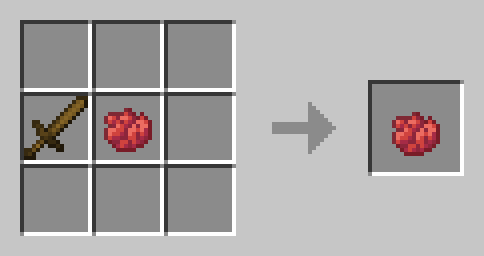
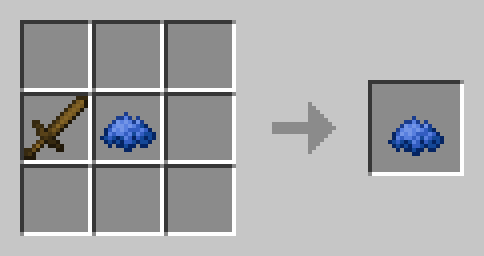
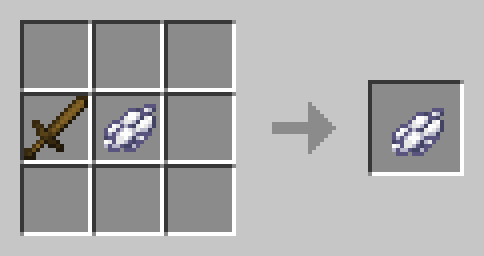
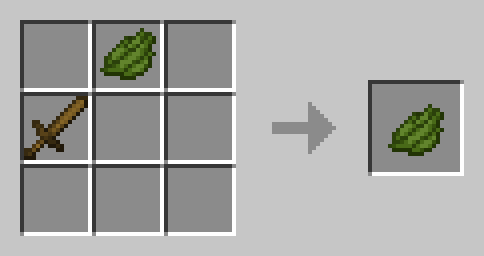
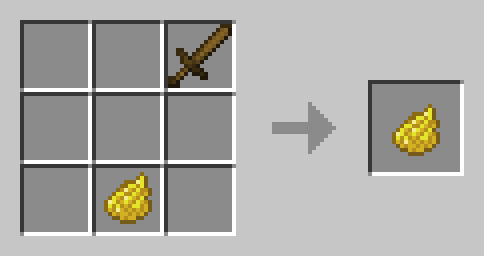
To join a Team, simply put a Wooden Sword and an according Dye (Red, Blue Green, Yellow, Pink, Orange etc.) in the crafting Grid and click on the Dye in the output box. You will automatically join the Team with the color of the Dye!
I don’t like my Team!
To leave your Team, use White Dye instead 🙁 You don’t need to leave your Team to switch Teams.
🛠️ Installation
Datapack Installation Guide
Copy the .zip archive into the “.minecraft/saves/yourworldname/datapacks” folder, where yourworldname is the name of your world.
Mod installation Guide
Copy the .jar archive into the folder your Mod Loader of choice provides.
❗Issues & Suggestions
If you encounter any Issues with this Datapack/Mod, please report them on my Discord
常见问题
easyTeams 支持哪些 Minecraft 版本?
easyTeams 支持 Minecraft Java 版 1.20.5–1.21.4,共 7 个版本,可用的加载器:Fabric / Forge / NeoForge / Quilt。下载时注意选择和你游戏版本一致的文件。
easyTeams 怎么安装?
先用 PCL2 或 HMCL 启动器安装对应版本的 Fabric / Forge / NeoForge / Quilt,再把下载的 .jar 文件放进游戏目录的 mods 文件夹,重新启动游戏即可。开启了版本隔离的,mods 文件夹在 versions/版本名 下面。运行环境:客户端 / 服务端。
fishbowlforever 的其他作品
查看全部 →
Sky Artifacts (Change Weather & Time)
Change Time, Freeze Time, Stop and Start Rain & Thunder with powerful Artifacts!

Nostalgic Bed
Replaces the modern Bed crafting system with the oldschool nostalgic Red Bed Recipe.

Builders Dream
Adds more than 100 Craftable Mini-Blocks which will make your Builds stand out!
No Raw Ore
Ore Blocks drop themselves, instead of Raw Ore, like in older Versions
评论
登录后评论和评分