
截图
介绍
Easy Server Optimizer (ESO)
High-Performance Deep-Pipeline Optimization Mod for Minecraft 1.20.1 (Forge)
ESO is a lightweight, zero-dependency server-side optimization mod designed specifically for heavy 1.20.1 modpacks and dedicated servers. It goes beyond basic mob limiters by directly overhauling low-level Netty network pipelines, native hardware compression, chunk streaming, and real-time TPS scaling.
🛡️ Server-Side Required, Client-Optional:
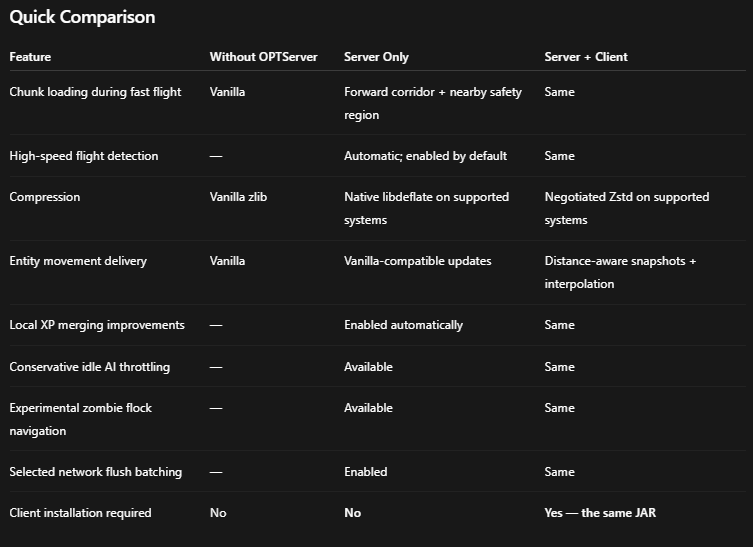
Works 100% server-side on dedicated servers or singleplayer worlds. If clients also install ESO, it automatically unlocks bidirectional optimizations (Zstd Level 3 compression negotiation and client-side entity motion interpolation).
🚀 Deep-Level Engine Overhauls
-
Hardware-Accelerated Native Compression: Bundled native
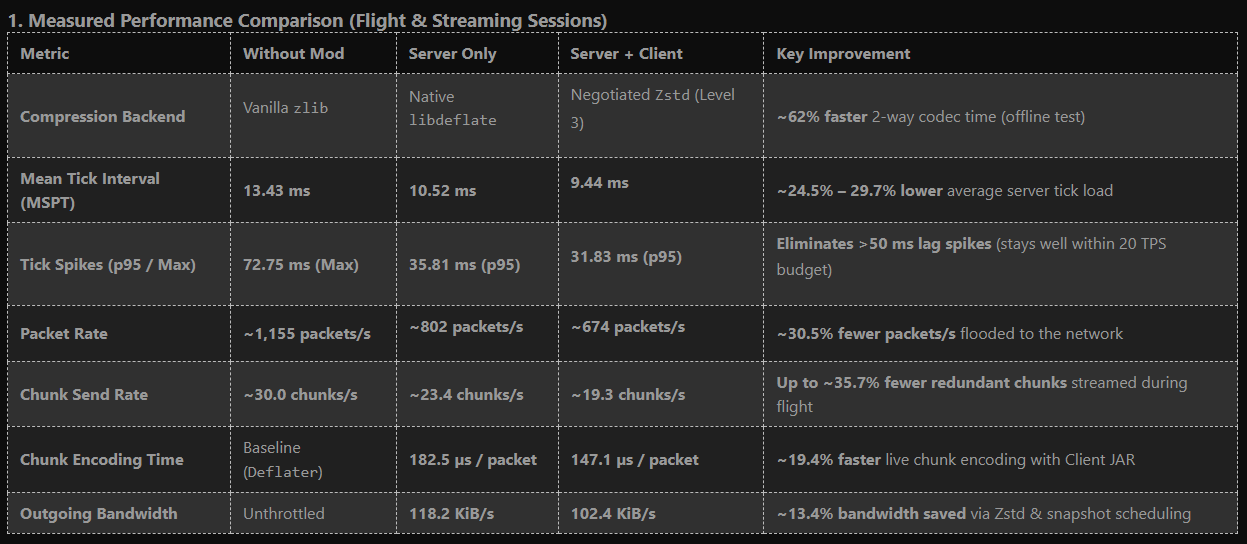
libdeflate 1.25(Server-Only fallback) and auto-negotiatedZstd Level 3(Server + Client). Compresses packets directly via Off-Heap Direct-Buffers, cutting compression CPU overhead by up to 80% without generating JVM heap garbage. -
Directional Flight Corridors (
flightchunks): Uses player velocity vectors to predict and pre-load chunks ahead during high-speed travel (Elytra/Creative), eliminating stutter while suppressing tens of thousands of redundant chunk-unload packets. -
Netty Pipeline Flush Batching: Intelligent 2ms / 128-request packet batching that prevents socket congestion and stabilizes packet flow under heavy loads.
-
Distance-Aware Motion Snapshots & Interpolation: Cuts distant entity movement packets by over 60% when running Server + Client, relying on smooth client-side trajectory interpolation (up to 12 ticks).
-
Smart Mob & AI Logic: Includes collective Zombie Flock pathfinding ($A^*$ shared leader routes), automated projectile limiters, and smart local XP merging.
📈 Adaptive Real-Time TPS Scaling
ESO continuously monitors server tick health and dynamically adapts constraints:
-
🟢 Normal TPS: Unrestricted simulation distances and full mob tick fidelity.
-
🟡 Minor Drops: Gentle, dynamic reduction of non-essential view and simulation distances.
-
🟠 Severe Drops: Stricter entity limits, aggressive item lifespans, and background AI throttling.
-
🔴 Critical Lag: Emergency safeguards (temporary pause on daylight/weather calculations, non-essential entity tick freezing).
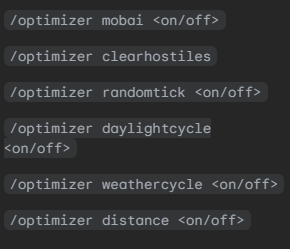
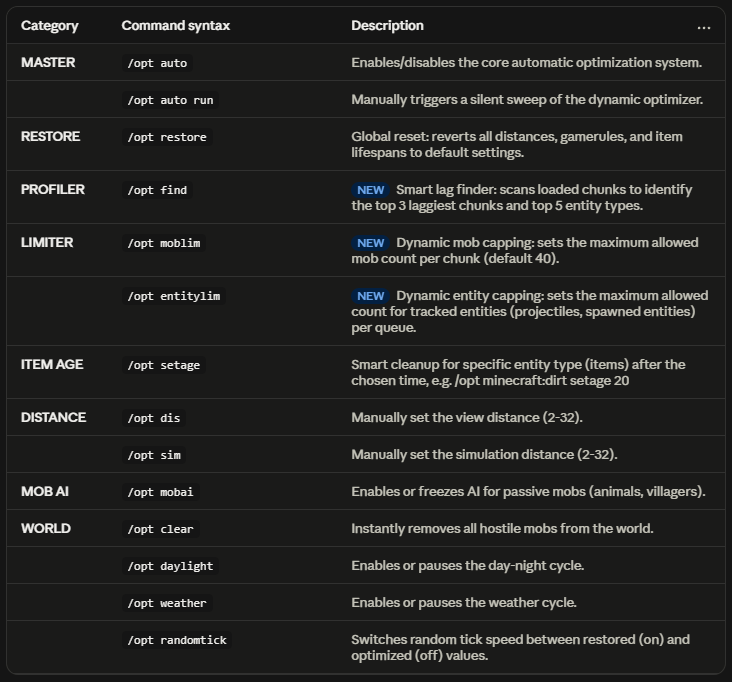
Manual commands are available via /eso or /opt, but the mod works completely out of the box with zero configuration required.
🖥️ Platform Support
-
Windows (x86_64): Full native hardware acceleration out of the box (
libdeflate&Zstd). -
Linux & Other Platforms: Fully compatible with all core optimizations (Flight Corridors, Netty batching, AI & TPS scaling). Packet compression gracefully falls back to optimized direct-buffer Deflater pathways.
⚠️ Compatibility & Incompatibilities
To prevent pipeline collisions, packet drops, or duplicate logic loops:
-
❌ Krypton / Krypton Reforged: Incompatible / Do NOT install together. ESO already implements low-level Netty batching and native compression. Running both causes Netty pipeline hook collisions.
-
⚠️ Connectivity / Packet Fixer: Redundant. Avoid installing third-party packet manipulators alongside ESO.
-
ℹ️ Simple Mob Limiters / Despawn Tweaks: Redundant. Built-in projectile caps, flock pathfinding, and adaptive item lifespans already handle entity bloat natively.
-
✅ Fully Compatible With: FerriteCore, ModernFix, Embeddium/Rubidium, Canary/Radon, and all standard tech/magic/dimension modpacks.
❤️ Feedback & Benchmarks
Run /eso bench in-game to measure compression times, packet drops, and network throughput on your machine. Feel free to leave issue reports, benchmark logs, and suggestions!
常见问题
Easy Server Optimizer (ESO) 支持哪些 Minecraft 版本?
Easy Server Optimizer (ESO) 支持 Minecraft Java 版 1.16.5–26.1,共 7 个版本,可用的加载器:Forge / NeoForge。下载时注意选择和你游戏版本一致的文件。
Easy Server Optimizer (ESO) 怎么安装?
先用 PCL2 或 HMCL 启动器安装对应版本的 Forge / NeoForge,再把下载的 .jar 文件放进游戏目录的 mods 文件夹,重新启动游戏即可。开启了版本隔离的,mods 文件夹在 versions/版本名 下面。
_dynobot 的其他作品
查看全部 →
Easy Server Optimizer(ESO)
Live, adaptive server optimization — install and forget.

Medieval Slayer Z
Face endless zombie hordes with the fluid, brutal combat of Epic Fight. Every swing matters

ALL YOU NEED: APOCALYPSE
Apocalyptic Weather, No nether, no the end,...

CardEngine
Create RPG upgrade cards that boost Minecraft attributes—or attributes from other mods—without coding.
评论
登录后评论和评分