Dynmap – Grief Prevention Addon
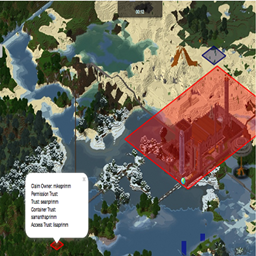
Addon module to Dynmap to display Grief Prevention Area's on a Dynmap.
介绍
This Dynmap Addon has been provided by Almura Development Studios and is a continuation of a previous module by MikePrimm.
This addon allows for the displaying of Grief Prevention areas on a Dynmap within the SpongeForge environment.
Dynmap-GriefPrevention provides a simple way to add visibility of GriefPrevention claims to Dynmap’s maps. The plugin depends on the presence of both Dynmap and GriefPrevention, and interacts directly with the GriefPrevention API. Updates to claims are automatically updated (on a settable period – default is once per 5 minutes (300 seconds)). By default, the plugin will be active after simply installing it (by unzipping the distribution into the plugins/ directory and restarting the server.
Visibility of regions can be controlled via the ‘visibleregions’ and ‘hiddenregions’ settings. Besides listing the owners of the regions to be made visible or hidden, entries with the format ‘world:<worldname>’ can be used to make all claims on a given world visible or hidden.
Also, the display of the region outlines can be restricted to a minimum zoom-in level, via the ‘minzoom’ setting. When non-zero, this setting causes the region outlines to only be displayed at or beyond the given zoom-in level.
Configuration:
After the first load, there will be a config.yml file in the plugins/Dynmap-GriefPrevention directory. Details of the default configuration, and all the provided settings, can be found here
常见问题
Dynmap – Grief Prevention Addon 支持哪些 Minecraft 版本?
Dynmap – Grief Prevention Addon 支持 Minecraft Java 版 1.12.2,可用的加载器:Forge。下载时注意选择和你游戏版本一致的文件。
Dynmap – Grief Prevention Addon 怎么安装?
先用 PCL2 或 HMCL 启动器安装对应版本的 Forge,再把下载的 .jar 文件放进游戏目录的 mods 文件夹,重新启动游戏即可。开启了版本隔离的,mods 文件夹在 versions/版本名 下面。

评论
登录后评论和评分