
Durability Alarm
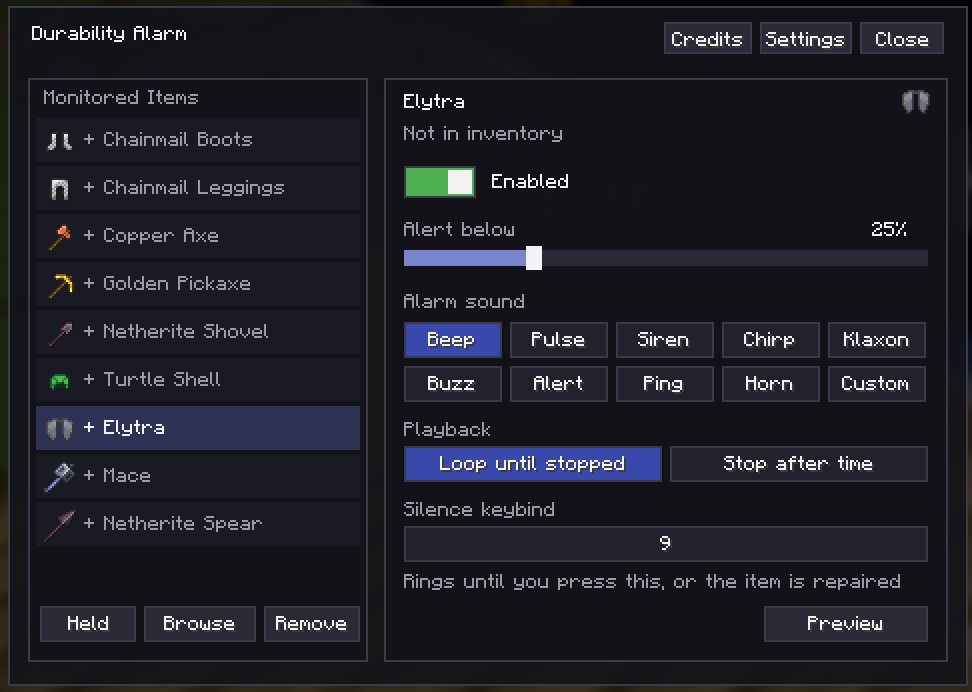
Create an alarm for any item with a durability bar, literally anything! pick a sound, or upload a custom one, also comes with custom messages on durability treshold reached, and item highligh if below durability!
截图
介绍
‼️ When you get this mod, the first thing to do is to go to your keybinds, and add a keybind to open the UI Of this mod, after that you can start using the mod!
❗Use this With GUI Scale 3 Or Below – Gui Scale 2 Recommended
💚 Create an alarm for any item with a durability bar, literally anything! pick a sound, or upload a custom one, also comes with custom messages on durability treshold reached, and item highligh if below durability!
Comes with 9 Sounds already made:
- Beep
- Klaxon
- Chirp
- Horn
- Buzz
- Pulse
- Ping
- Siren
- Alert
💗 All these sounds do NOT use any vanilla sounds, instead they are custom for the Mod itself!
🟠 Upload Custom sounds with .ogg Format using path or simply by moving them in a folder [Depending On Your Launcher!] — Still In-Dev, Migh Be Buggy!
🥇 Extra Features:
- Pick a Durability Treshold, once it goes under the chosen %, it plays an alarm.
- Alarms can be chosen differently for each item!
- Different Tresholds Per Item
- Pick between Infinite Alarm: Stops when you click a chosen keybind
- Timed Alarm: stops after selected amount of seconds [also can be stopped by keybind]
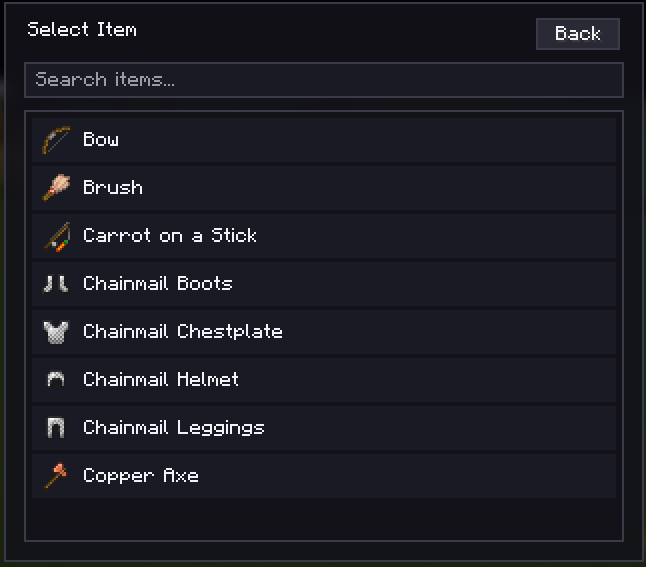
- Either pick an item for the browser, or pick the item you selected!
- Great UI
- Drag monitored items by holding left click on them, then dragging it and changing the order of it!
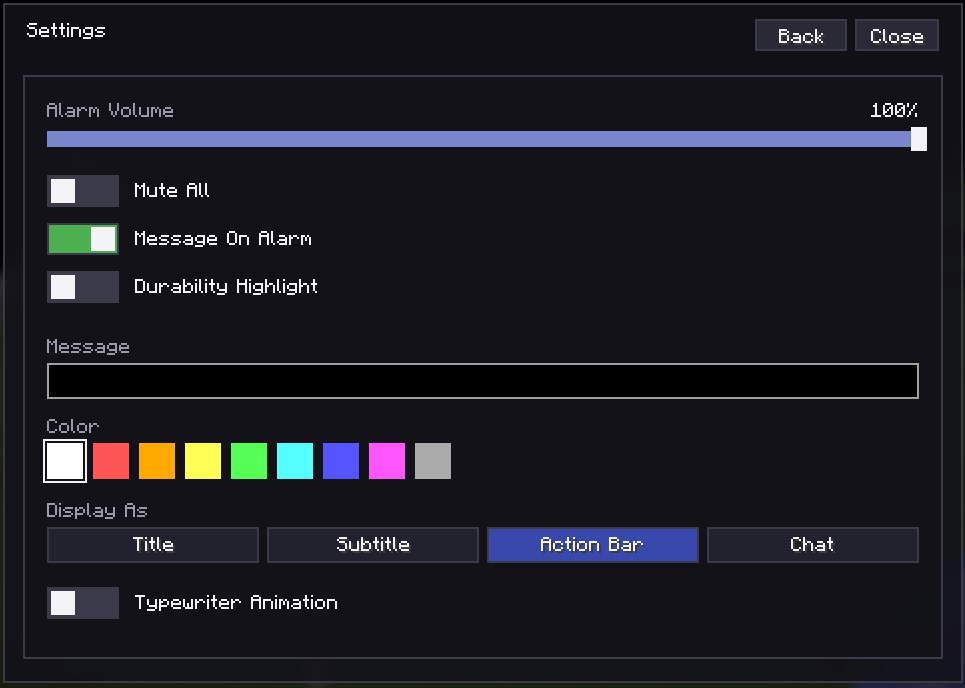
⚙️Settings Tab:
- Mute All
- Alarm Loudness Slider
- Highligh Items Toggle [If an item alarm starts, it will Highligh that item, coloring the background with the chosen color!]
- Custom Message Toggle [Customizable: Pick own message, color, where to show (Action bar, title, subtitle, Chat) and optional Typewriter Animation!]
常见问题
Durability Alarm 支持哪些 Minecraft 版本?
Durability Alarm 支持 Minecraft Java 版 1.21.11,可用的加载器:Fabric。下载时注意选择和你游戏版本一致的文件。
Durability Alarm 怎么安装?
先用 PCL2 或 HMCL 启动器安装对应版本的 Fabric,再把下载的 .jar 文件放进游戏目录的 mods 文件夹,重新启动游戏即可。开启了版本隔离的,mods 文件夹在 versions/版本名 下面。运行环境:仅客户端。
Quexos 的其他作品
查看全部 →
Rainbow Outlines
将鼠标悬停在方块上时,显示彩虹色方块轮廓!

God Mace
Animated Rainbow Mace Texture!

Quexo’s Golden Stuff
Quexo's Custom Golden Stuff! [Recolored] Mainly For Mace PVP, But Other Stuff Too!

Pink Outlines
Replace the minecraft block hover dark gray outline with a pastel pink one!
评论
登录后评论和评分