Durability HUD | Tools & Armor
See the remaining durability of your held item, armor, and off-hand gear in a compact on-screen panel.
截图
介绍
Durability HUD | Tools & Armor
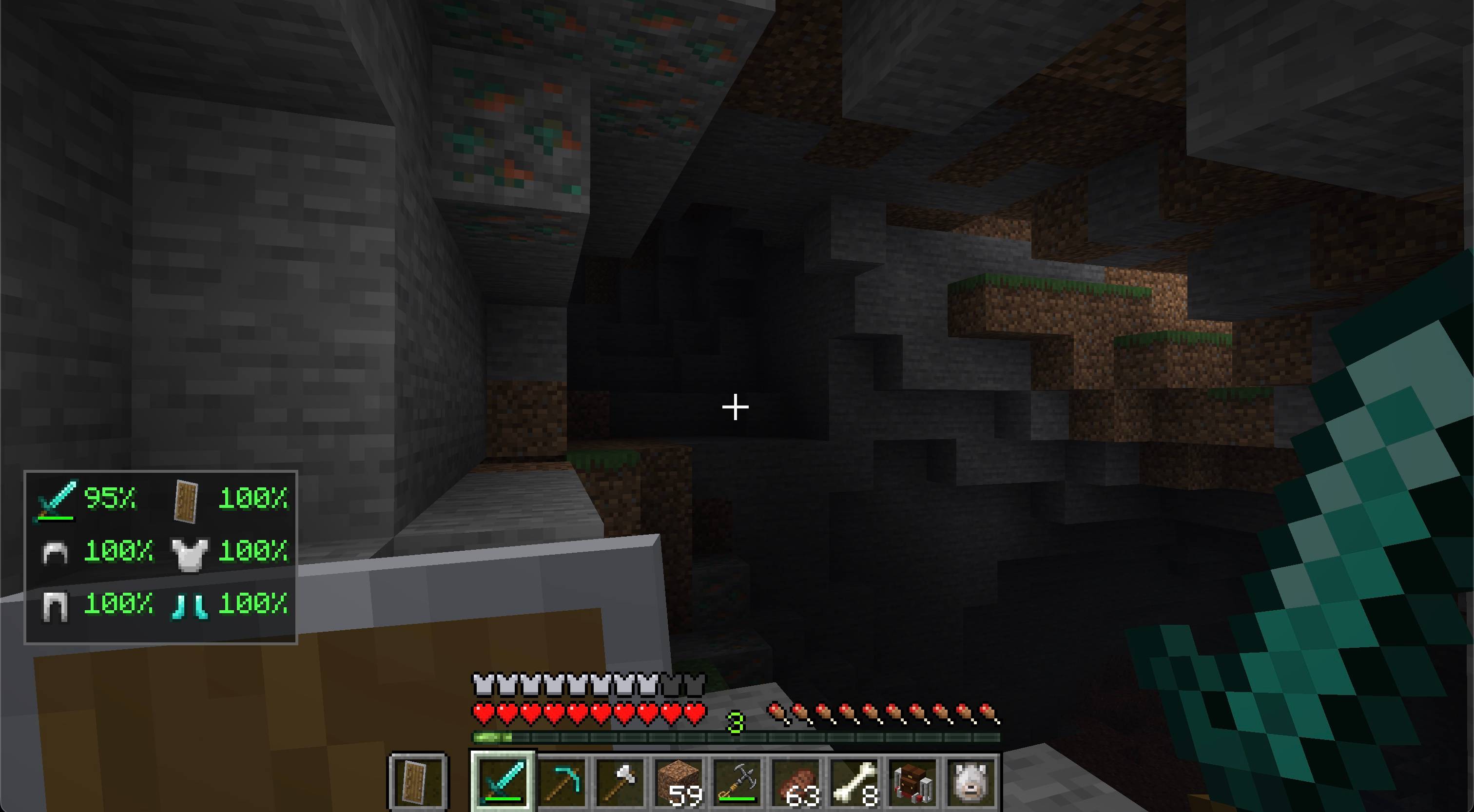
Durability HUD keeps the condition of your equipped gear visible without opening the inventory.
Features
- Shows remaining durability as a percentage in a compact two-column layout
- Keeps every equipment slot in a stable position as items are changed
- Tracks the main-hand item, helmet, chestplate, leggings, boots, and off-hand item
- Uses each item’s real icon and vanilla durability bar
- Smoothly shifts durability text from green through yellow and orange to red as equipment wears out
- Updates immediately as equipment changes or takes damage
- Hides slots that do not contain a damageable item
- Supports compatible modded items that use standard durability
- Can be toggled with H by default and remembers the setting
- Dedicated Fabric and NeoForge builds
How to use
Equip a damageable item in your main hand or off hand, or wear damageable armor. The panel appears automatically and shows the remaining durability of each item as a percentage. Empty and non-damageable slots stay blank. Press H to hide or show the panel; you can change this key in Minecraft’s Controls menu. Your choice is saved between sessions.
Installation
Install matching Durability HUD and Zero Lib builds on the client. Installing both on a server is safe but not required for the HUD. Architectury API is also required; Fabric installations additionally require Fabric API.
Requirements
- Minecraft Java Edition 26.2
- Java 25 or newer
- Zero Lib 1.0.3 or newer
- Architectury API
- Fabric API on Fabric
License
Copyright © 2026 Zero Team. All rights reserved. Personal play, multiplayer servers, and free modpacks distributed through CurseForge or Modrinth are permitted under the license included with the mod. Rehosting or redistributing the files elsewhere requires prior written permission.
常见问题
Durability HUD | Tools & Armor 支持哪些 Minecraft 版本?
Durability HUD | Tools & Armor 支持 Minecraft Java 版 26.2–26.3,共 2 个版本,可用的加载器:Fabric / NeoForge。下载时注意选择和你游戏版本一致的文件。
Durability HUD | Tools & Armor 怎么安装?
先用 PCL2 或 HMCL 启动器安装对应版本的 Fabric / NeoForge,再把下载的 .jar 文件放进游戏目录的 mods 文件夹,重新启动游戏即可。开启了版本隔离的,mods 文件夹在 versions/版本名 下面。
zeroteam 的其他作品
查看全部 →
Zero Lib
Zero Team 的 Fabric 和 NeoForge 模组所需的跨加载器共享运行时前置库。
Gravestone | Death Grave & Loot Protection
玩家死亡时,自动在世界中放置一座安全的 3D 墓碑,保护你的物品栏。
Tanks | Drivable Battle Tank
驾驶可制作的战斗坦克,炮塔可独立瞄准,还能发射爆炸弹药。

Gravestone ZT
Automatically protects your inventory on player death by placing a safe 3D gravestone in the world.
评论
登录后评论和评分