DrawerStorage KeyChain
Add an item and combine three drawer keys (drawer key, quantity key and concealment key) to control the drawer's state.
介绍
Add an item and combine three drawer keys (drawer key, quantity key and concealment key) to control the drawer state.
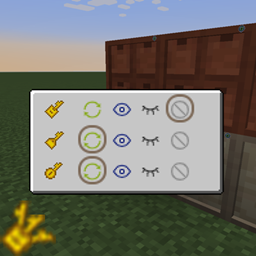
Shift right click to open the GUI and adjust the corresponding state of each key: change, show, hide and ban. After modification, right clicking the drawer or drawer manager is equivalent to setting the corresponding state of three keys at one time.
- Change: default, It is equivalent to using the corresponding key directly
- Show: It is equivalent to the state of using the key for the first time (so the display of concealment key is actually hidden)
- Hide: The state of the drawer when the key is not used
- Ban: Do not change the corresponding status.

增加一个物品,将三把抽屉钥匙(抽屉钥匙,数量钥匙,遮蔽钥匙)合并,便于控制抽屉状态。
Shift 右键使用可以打开 GUI 调整每把钥匙对应的状态:切换,显示,隐藏,禁止。修改后右键抽屉或抽屉管理器相当于一次性设置三把钥匙的对应状态。
- 切换:默认,相当于直接使用对应钥匙
- 显示:相当于第一次使用钥匙的状态(所以隐蔽钥匙的显示实际是隐藏)
- 隐藏:不使用钥匙时的状态
- 禁止:不更改对应状态
感谢百度翻译。。。
常见问题
DrawerStorage KeyChain 支持哪些 Minecraft 版本?
DrawerStorage KeyChain 支持 Minecraft Java 版 1.16.5,可用的加载器:Forge。下载时注意选择和你游戏版本一致的文件。
DrawerStorage KeyChain 怎么安装?
先用 PCL2 或 HMCL 启动器安装对应版本的 Forge,再把下载的 .jar 文件放进游戏目录的 mods 文件夹,重新启动游戏即可。开启了版本隔离的,mods 文件夹在 versions/版本名 下面。
评论
登录后评论和评分