Downloading Discs
Adds the Disc Writer block, which can download audio from a variety of sources and attach the downloaded audio to any Music Disc. Requires the AudioPlayer mod to be installed.
截图


介绍
Description
11/19/2025
Due to changes with certain websites and YT-DLP, some media links will fail to download
Downloading Discs adds a powerful new way to customize music in Minecraft. With the Disc Writer block, you can download audio from supported media links, convert it into .mp3 files, and apply it to Music Discs—all without leaving your world.
This functionality is powered by the AudioPlayer mod, which is required to be installed.
Features (as of version 1.21.8-1.0.1):
- Adds the Disc Writer, a new block with a GUI that allows a player to specify a media link for download, validate the downloaded file with AudioPlayer, and apply the audio to any Music Disc

- The Disc Writer allows specifying a target URL and a title for the Music Disc
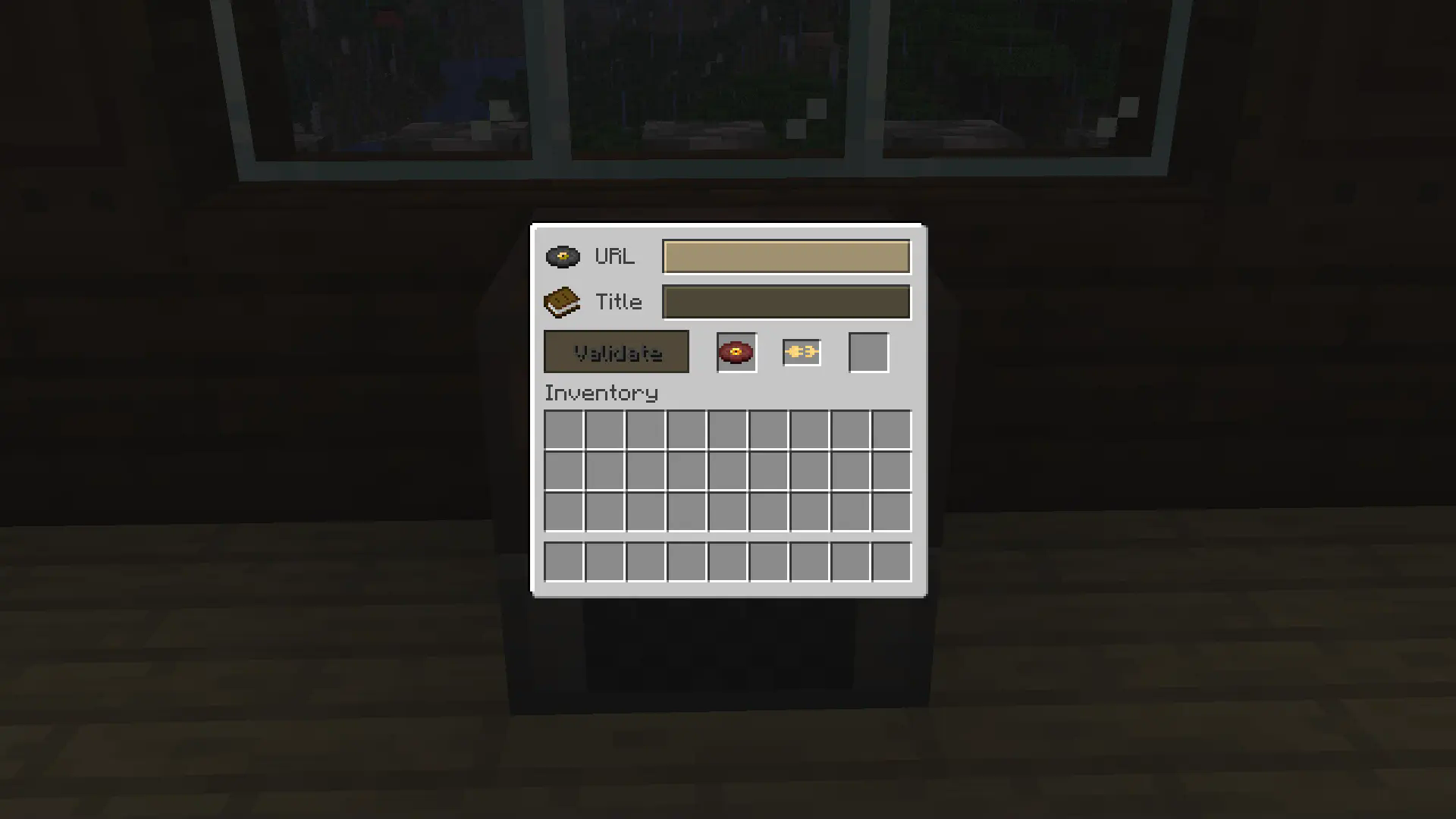
- If a disc already has a URL attached to it, you can leave the URL blank in the GUI to reset the disc to its original state
- Config option for specifying the permission level required to interact with the Disc Writer block
- Config option for adjusting the bitrate of the downloaded
.mp3file, ranging from64(worst quality) to320(best quality) - Compatible with Music Discs added by other mods, including AudioPlayer Blanks
- In-game configuration is available via Mod Menu if installed
Important Information
3 external programs will be downloaded to Minecraft’s run directory under the apps folder:
- YT-DLP, which downloads audio and video files from various supported websites
- FFmpeg, which processes audio and video files
- FFprobe, a command-line tool to display media information
Use of this mod implies agreeing to the automatic download and use of these programs.
This software is intended solely for personal use to get audio content from sources that you own or have the rights to access and use. The developer of this software is not responsible for any misuse of this tool by users. Each user is solely responsible for ensuring their use of this mod complies with all applicable copyright laws and the terms of service of any content provider. Use responsibly.
- A Disc Writer’s GUI can only be opened if no other players are using that Disc Writer.
- Downloads are temporarily saved in
<worldfolder>/downloading_discs_downloads/before being copied to<world folder>/audio_player_data/.
Config:
These options can be changed:
- Disc Writer chat output
- Disc Writer minimum permission level for use
- Downloaded audio bitrate
- Connection attempt timeout length
- Download attempt timeout length
- URL input character limit
- Title input character limit
Default .minecraft/config/downloadingdiscs.json:
{
  "discWriterOutput": "ON_COMPLETE",
  "discWriterMinimumPermissionLevel": 0,
  "downloadedAudioBitrateKbps": 192,
  "connectionAttemptTimeoutSeconds": 10,
  "downloadTimeoutMinutes": 5,
  "discWriterUrlCharacterLimit": 200,
  "discWriterTitleCharacterLimit": 50
}
Music Disc maximum duration and maximum file size are handled by AudioPlayer’s config, .minecraft/config/audioplayer/audioplayer-server.properties:
Support
Mod versions prior to 1.21.8-1.0.1 are no longer supported.
If you have a bug report, feature request, or any other type of issue, please post on our GitHub issues page. This is an issues page for all of our mods, so be sure to include the mod’s name and version in your post. We appreciate all feedback!
If you’d like to support development, you can leave a tip at our BuyMeACoffee. Only if it’s within your means- otherwise, using, sharing, and enjoying the mod is support enough. Thank you!
Credits
YT-DLP program maintained by various users and released under the Unlicense license.
FFmpeg and FFprobe programs maintained by the FFmpeg team and released under the GPL-3.0 license.
This project would not be possible without AudioPlayer, created by henkelmax
Inspired by VinURL Music by Plompii, which is a fork of URL Music Discs by Hoofer.
常见问题
Downloading Discs 支持哪些 Minecraft 版本?
Downloading Discs 支持 Minecraft Java 版 1.21.7–1.21.11,共 4 个版本,可用的加载器:Fabric。下载时注意选择和你游戏版本一致的文件。
Downloading Discs 怎么安装?
先用 PCL2 或 HMCL 启动器安装对应版本的 Fabric,再把下载的 .jar 文件放进游戏目录的 mods 文件夹,重新启动游戏即可。开启了版本隔离的,mods 文件夹在 versions/版本名 下面。运行环境:客户端和服务端都要装。
Dented Modding 的其他作品
查看全部 →
Kelvin’s Better Player Animations (Port)
Kelvin's Better Player Animations 的 1.20.x 移植版。

Best Bundles
收纳袋才是大自然设想中的收纳方式。可染色,容量提升至 4 倍!无需启用实验性数据包即可使用收纳袋。现已更新至 1.21.11!
Best Bundles
收纳袋才是大自然设想中的收纳方式。可染色,容量提升至 4 倍!无需启用实验性数据包即可使用收纳袋。现已更新至 1.21.11!

Ruined Portals Only
限制传送门只能在废弃传送门结构的边界框内点燃,让探索成为必需,并限制前往下界的方式。 可配置主世界和下界的规则。现已支持模组结构和生物群系!
评论
登录后评论和评分