
截图

介绍
Double Slabs
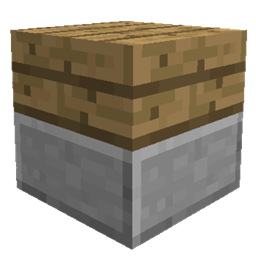
For the longest time I’ve been mildly infuriated by Minecraft slabs. Why on earth can’t we place different types of slabs on top of each other??!! It makes zero sense to me so that’s why I created this mod.
Double slabs is all about improving the vanilla and modded slabs through minor tweaks to their behaviour.
Features
- Mixed Double Slabs – Have you ever wanted to place two slabs of different slab types on top of each other?? Well now you can!
- KleeSab like behaviour on Mixed Double Slabs (or two double slabs which are of the same type if the replace same type option is true). This means that slabs now break separately when mining a double slab and the speed of mining of the individual slab depends on which slab you are looking at and which tool you are using. For example: if you have a mixed oak slab and stone slab, trying to mine the oak slab with a pickaxe will be quite slow but mining the oak slab with an axe will be quicker and vice versa. This a survival mode feature only.
- Vertical slabs (excluding 1.21 versions) – Simply hold sneak when holding a regular slab to place a vertical version! This also works with combining two vertical slabs including vertical slabs from Quark, just ensure you are not holding sneak to combine!
- Mod Compatibility – both the mixed double slab and vertical slab feature works with many other mods. Some mods require additional work to be supported.
Can I use this in my modpack?
Of course! This is the main reason I made this mod!
Showcase your creation here!
The popularity of this mod has blown me away (thank you so much!), so if you’ve created something using Double Slabs, be sure to send me a private message with an image and I might showcase your creation here! I’m sure you’re all much better builders than I am!
常见问题
Double Slabs 支持哪些 Minecraft 版本?
Double Slabs 支持 Minecraft Java 版 1.12–1.21.1,共 29 个版本,可用的加载器:Fabric / Forge / NeoForge。下载时注意选择和你游戏版本一致的文件。
Double Slabs 怎么安装?
先用 PCL2 或 HMCL 启动器安装对应版本的 Fabric / Forge / NeoForge,再把下载的 .jar 文件放进游戏目录的 mods 文件夹,重新启动游戏即可。开启了版本隔离的,mods 文件夹在 versions/版本名 下面。运行环境:客户端和服务端都要装。

评论
登录后评论和评分