
截图
介绍
Disenchant On Anvil
Ever had a good enchantment stuck on an item you don’t want anymore?
Disenchant On Anvil adds a simple way to move enchantments from an item onto a book using a regular Minecraft anvil. No new blocks or complicated menus — it just works through the normal anvil screen.
How it works 🔨
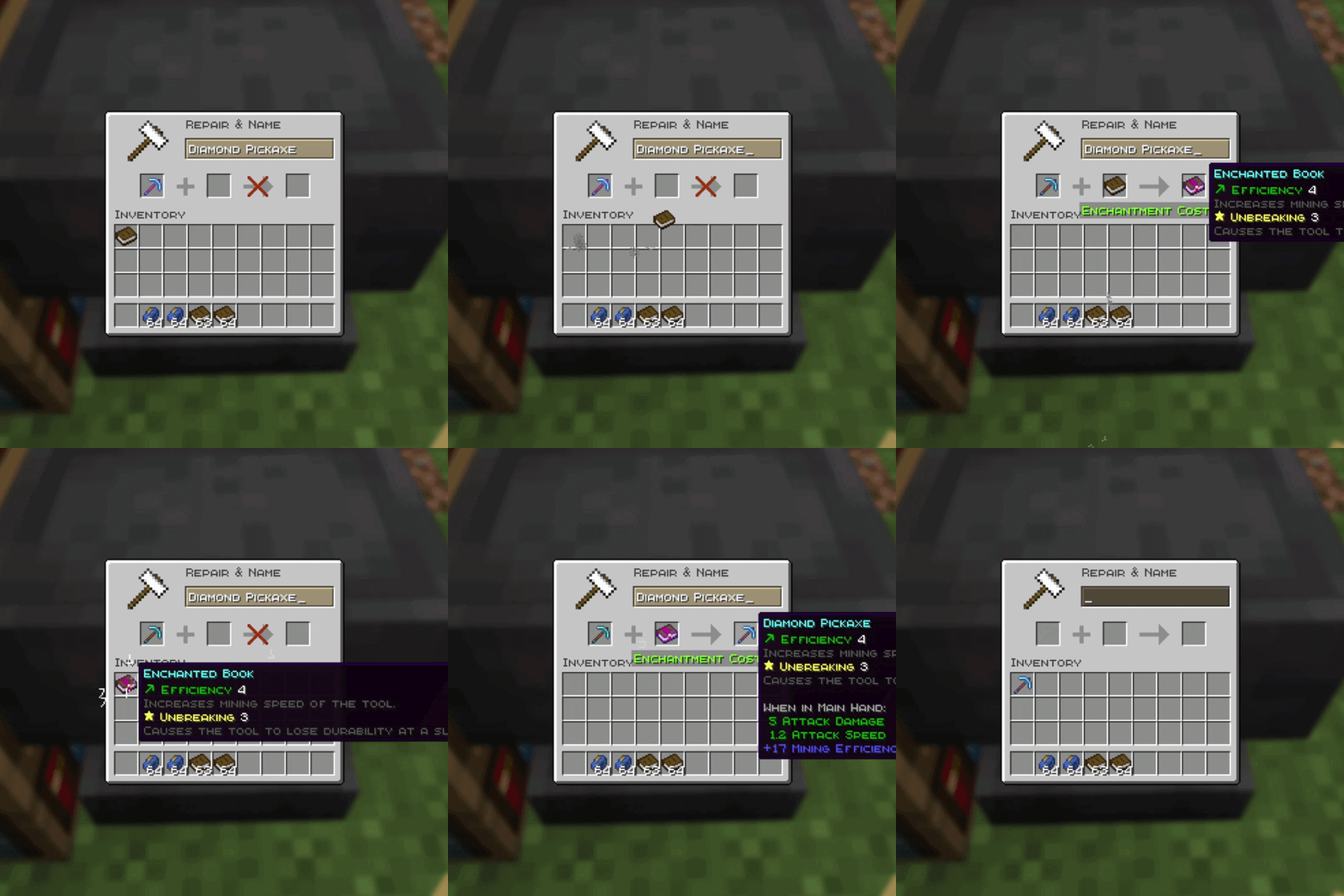
Put your enchanted item in the left slot of an anvil and a normal book in the right slot.
The anvil will let you transfer the enchantments onto the book for 3 experience levels.
Once you take the enchanted book, the enchantments are removed from the original item. The item itself isn’t destroyed, so you can keep using it or enchant it again later.
Features
- Transfer enchantments from items onto books
- Costs 3 XP levels
- Uses only one normal book
- Transfers multiple enchantments at once
- Curses are transferred too
- The original item stays intact
- The item can be enchanted again afterwards
- Works with tools, weapons, armor, elytra, shields and other enchantable items
- Supports compatible modded items and enchantments
- Uses Minecraft’s normal anvil compatibility rules
Example
Got an old diamond pickaxe with Efficiency V, Unbreaking III and Mending?
Instead of throwing it away or losing the enchantments, put the pickaxe and a book into an anvil. Pay 3 levels and you’ll get a book containing those enchantments while keeping the now-disenchanted pickaxe.
You can then use that book on another compatible item.
Compatibility
Mod loader: Fabric
Environment: Client and Server
Currently available for:
- Minecraft 26.2
- Minecraft 26.1.x
- Minecraft 1.21.11
- Minecraft 1.21.1
- Minecraft 1.20.1
The mod is meant to stay small and close to vanilla. It doesn’t add another disenchanting station or change the whole enchanting system — it just gives the anvil one extra useful job.
Made by SleepyDuck 💤🦆
常见问题
Disenchant On Anvil 支持哪些 Minecraft 版本?
Disenchant On Anvil 支持 Minecraft Java 版 1.20.1–26.2,共 7 个版本,可用的加载器:Fabric。下载时注意选择和你游戏版本一致的文件。
Disenchant On Anvil 怎么安装?
先用 PCL2 或 HMCL 启动器安装对应版本的 Fabric,再把下载的 .jar 文件放进游戏目录的 mods 文件夹,重新启动游戏即可。开启了版本隔离的,mods 文件夹在 versions/版本名 下面。运行环境:客户端和服务端都要装。
SleepyDuck 的其他作品
查看全部 →
Mojang Better Intro
为 Minecraft 添加可配置的动画启动画面和资源包加载画面!

FrameGuard
Helps reduce chunk-loading stutters while moving by pacing chunk work around your frame time.

Panorium
Capture, organize, preview, and use custom Minecraft panoramas across the entire menu flow.
评论
登录后评论和评分