
Discord Chat Link
Links your personal Minecraft client and discord channel with bi-directional communication.
截图


介绍
Discord Chat Link
This mod creates personal bi-directional communication between your Minecraft client and discord.
Plus, it adds several handy discord commands.
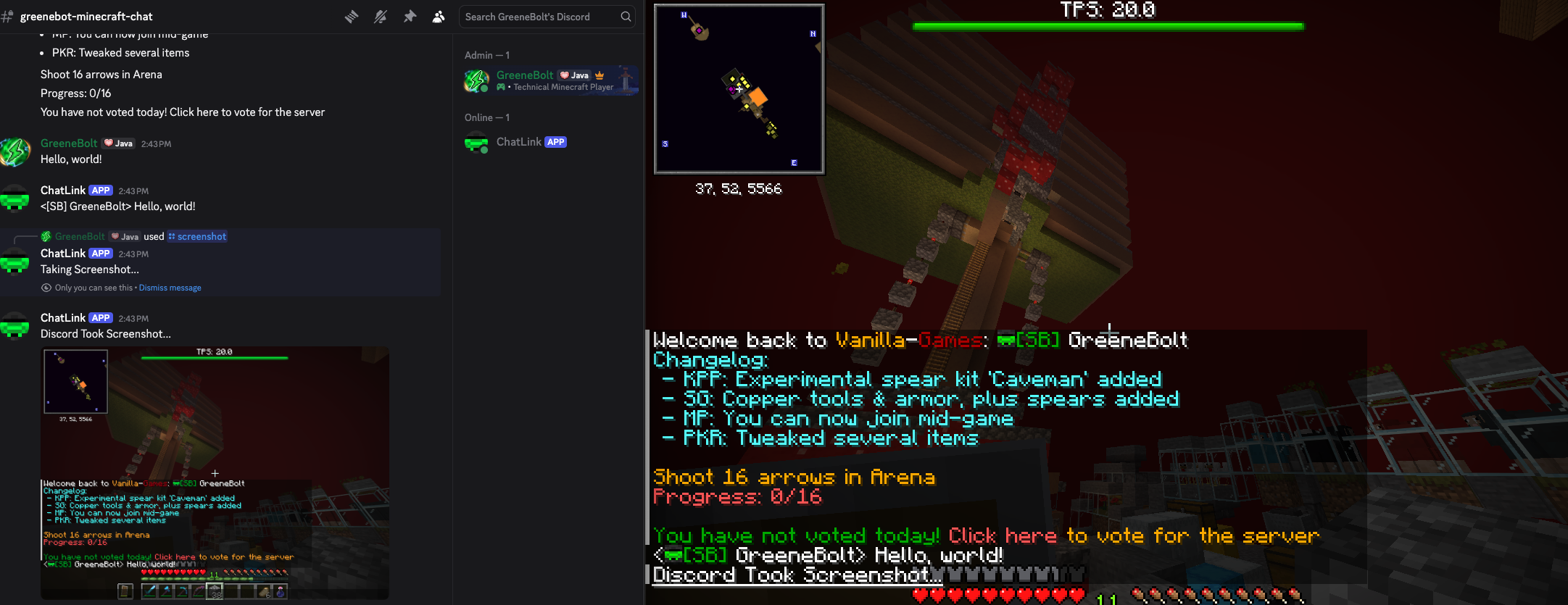
Minecraft Commands:
- /set-discord-bot-token -> Defines the token for your firt time using the mod.
- /stop-discord-bot -> Stops the discord bot.
- /start-discord-bot -> Starts the discord bot.
Discord Commands:
- /setchannel -> Selects the current discord channel as the default.
- /health -> Displays your current player health.
- /hunger -> Displays your current player hunger.
- /quit -> Leaves the current world (singleplayer or multiplayer server).
- /screenshot -> Takes and displays an in-game screenshot to discord.
Set-Up
Note:
Currently, the 1.21.11 release doesn’t work with the latest version of fabric api. Please use https://modrinth.com/mod/fabric-api/version/0.141.2+1.21.11 until I release a patch. Thank you to Ritziy for alerting me to this issue. 🙂
常见问题
Discord Chat Link 支持哪些 Minecraft 版本?
Discord Chat Link 支持 Minecraft Java 版 1.21.11–26.3,共 6 个版本,可用的加载器:Fabric。下载时注意选择和你游戏版本一致的文件。
Discord Chat Link 怎么安装?
先用 PCL2 或 HMCL 启动器安装对应版本的 Fabric,再把下载的 .jar 文件放进游戏目录的 mods 文件夹,重新启动游戏即可。开启了版本隔离的,mods 文件夹在 versions/版本名 下面。运行环境:仅客户端。
GreeneBolt 的其他作品
查看全部 →
Auto Trade
Automatically trade away specified items with one click!

Panic Button
This mod adds a configurable key-bind to leave, save and quit, disconnect, exit, (whatever you call it) for version 26.3

VGMod
This mod adds additional client side functionality to the Vanilla Games Minecraft server.
评论
登录后评论和评分