
截图
介绍
中文介绍正在准备中,下面暂时显示原文。
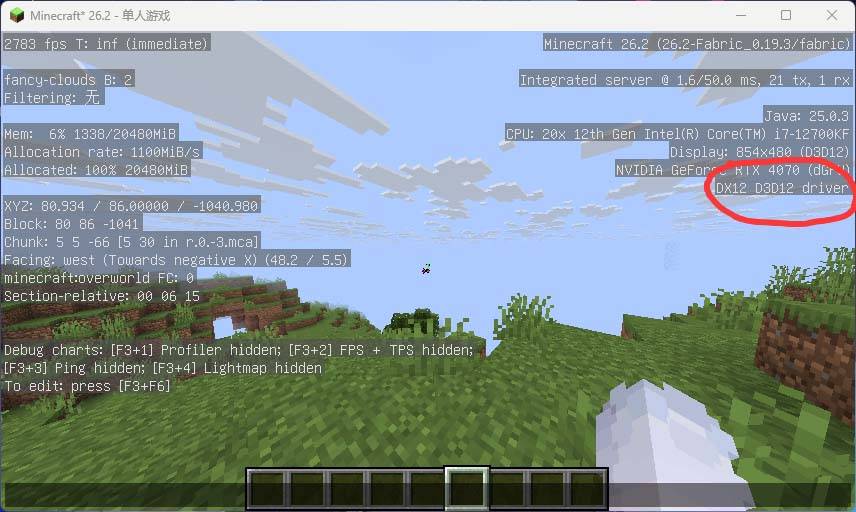
DirectX Engine
D3D12 Rendering Backend
Replaces OpenGL/Vulkan with a native C++ D3D12 rendering backend by implementing Mojang’s official GpuBackend / GpuDeviceBackend interface. Zero custom render loops — fully takes over the official Minecraft rendering pipeline.
Features
- Full render pipeline takeover:Mixin-based API selection override, no
RenderSystemrewrite, relies on Minecraft’s official rendering engine - Complete shader compilation chain:GLSL → SPIR-V (shaderc) → HLSL SM5.1 (spvc) → DXBC (D3DCompile),supports all official shaders
- 4-stage self-test:Resource creation / command submission / pipeline compilation / swapchain verification — auto-fallback to OpenGL on any failure
- Async rendering infrastructure:Per-worker mirror descriptor heaps + Bundle recording + Fence event-driven sync (ASYNC-01/03/04/05 fixed)
- AA mode selection:None / FXAA / SMAA / TAA, settings persisted to
config/gl4dx12.properties
What’s Fixed
| Issue | Status |
|---|---|
| done World rendering black screen | level=null root cause identified and fixed, terrain/chunks/entities now render |
| done NDC Y-flip | GUI atlas and character rendering inverted — fixed |
| done Lightmap V-flip | Daytime terrain brightness issue fixed |
| done CS_OWNDC window compatibility | Swapchain creation failure on certain Windows window classes fixed |
| done Descriptor misalignment | SRV written to currently active heap (cross-frame residue causing black screen) |
| done Depth testing | Reverse-Z comparison function fixed + pre-clear removed |
System Requirements
- OS:Windows 10 (1809+) / Windows 11
- GPU:DirectX 12 Feature Level 11_0 or above (DX12 recommended)
- RAM:8 GB+ recommended
- Java:JDK 26 (build) / Java 21+ (runtime)
- Storage:~50 MB (including prebuilt DLL)
Environment Variables (Debug)
| Variable | Description |
|---|---|
DX12_LOG_VERBOSE=1 |
Enable verbose logging, also writes to %TEMP%\dx12-native.log |
DX12_DIAG_GREEN=1 |
Green-shader diagnostic (verify pipeline compilation) |
DX12_DBG_DISABLE_DEPTH=1 |
Force-disable depth testing (debug depth config issues) |
Known Limitations
- Windows only (D3D12 platform restriction)
- Async rendering Java layer still in development (C++ infrastructure complete)
- No external contributions accepted at this time (in-development project)
License
MIT License
Credit: 爱睡觉的白洲梓 / xiaozi Graphics Development Team
常见问题
DirectX Engine 支持哪些 Minecraft 版本?
DirectX Engine 支持 Minecraft Java 版 26.2,可用的加载器:Fabric。下载时注意选择和你游戏版本一致的文件。
DirectX Engine 怎么安装?
先用 PCL2 或 HMCL 启动器安装对应版本的 Fabric,再把下载的 .jar 文件放进游戏目录的 mods 文件夹,重新启动游戏即可。开启了版本隔离的,mods 文件夹在 versions/版本名 下面。



评论
登录后评论和评分