
截图
介绍
中文介绍正在准备中,下面暂时显示原文。
DIPrinter Mod Features
DIPrinter is a Fabric client-side mod for Minecraft that provides two automated building modes (“Dik” and “Beta”), along with aura‑based auto‑building, helper block management, preview rendering, and extensive configuration options.
🧱 Building Modes
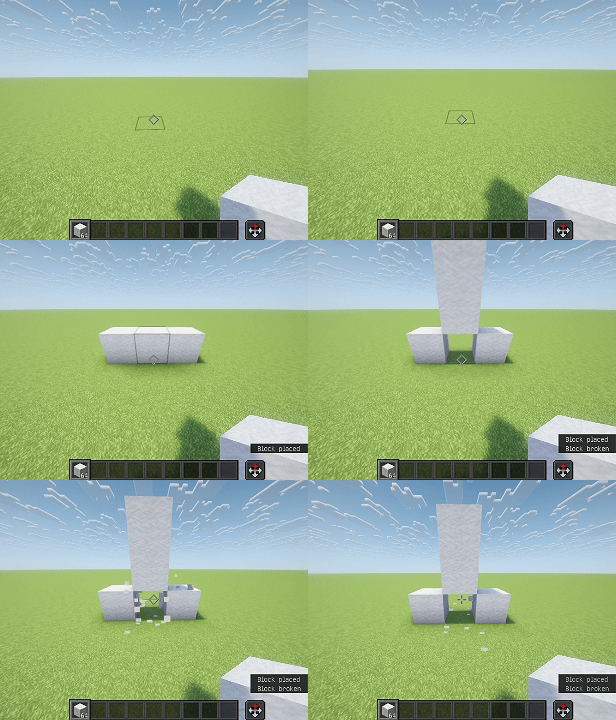
Dik Mode
- Builds a structure resembling a “Dik”:
- Starts with a helper block (the base).
- Adds two side blocks (“wings”) to the left and right.
- Extends forward for a configurable length (default 3 blocks, max 4, min 2).
- Triggered by right‑clicking on a block while holding a block item.
- Can be enabled/disabled via hotkey.
Beta Mode
- Builds a different multi‑block pattern:
- A central column of building blocks (2 high).
- Two side arms at the middle level.
- Two side arms at the top level.
- A top cap.
- Triggered similarly with a right‑click.
- Also togglable via hotkey.
✨ Aura (Auto‑Building)
- Dik Aura and Beta Aura automatically scan the area around the player (configurable radius, 3–7 blocks).
- When a valid placement spot is found, the corresponding structure is built automatically without manual clicking.
- Scans once every 500 ms to avoid performance issues.
- If both auras are enabled, you can choose which one takes priority.
🔧 Helper Blocks & Breaking Assistance
- Some positions in the structures are marked as helper blocks (temporary).
- After placing all building blocks, the helper blocks are automatically broken.
- Softest‑block selection – the mod can automatically choose the easiest‑to‑break block from your inventory for helper blocks.
- Best‑tool selection – when breaking helpers, the mod automatically switches to the most effective tool for that block.
- Breaking is done with simulated player interactions (left‑click continues).
🎮 Configuration & Controls
- GUI – press D + C (default) to open the full configuration screen, organised into three tabs:
- Construction – enable/disable Dik/Beta modes and auras.
- Misc – placement delay, player rotation, Dik length, aura radius, helper block preferences, etc.
- Render – structure preview and aura preview toggles.
- All hotkeys can be rebound through the in‑game controls menu (malilib integration).
👁️ Preview Rendering
- Structure Preview – when aiming at a block and ready to build, a translucent overlay shows exactly where each block will be placed (building blocks and helpers).
- Aura Preview – while an aura is active, the next structure to be built is shown transparently around the player until it is placed or cancelled.
🧠 Other Features
- Player Rotation – automatically rotates the player to face each placement position (can be disabled).
🛠️ Requirements
- Fabric Loader
- Fabric API
- malilib (required for config GUI and keybindings)
📄 AI Generated Contents
This mod is totally generated by DeepSeek V4-Pro. (Including this document)
常见问题
DiPrinter 支持哪些 Minecraft 版本?
DiPrinter 支持 Minecraft Java 版 1.21.4,可用的加载器:Fabric。下载时注意选择和你游戏版本一致的文件。
DiPrinter 怎么安装?
先用 PCL2 或 HMCL 启动器安装对应版本的 Fabric,再把下载的 .jar 文件放进游戏目录的 mods 文件夹,重新启动游戏即可。开启了版本隔离的,mods 文件夹在 versions/版本名 下面。运行环境:仅客户端。
评论
登录后评论和评分