
DialogueUtils
A Pixelmon side mod that allows you to easily create helpful menus using Pixelmon's Dialogue, Choice Dialogue, and Input Dialogue screens
截图
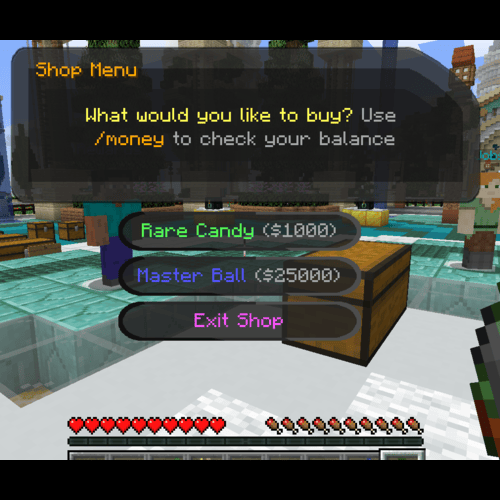

介绍
DIALOGUEUTILS 1.2.1
This mod does not modify Pixelmon or its behavior.
For Support, contact @infidelrick on Discord
Dialogue Utils is a server-side mod using the PixelmonAPI for generating dialogues, choice menus, input screens, and notice overlays in-game.
FEATURES
- Simple Dialogues: Display basic text-based dialogues
- Choice Dialogues: Provide players with multiple options to choose from
- Input Dialogues: Allow players to input custom text with commands
- Notice System: Display various types of overlays including text, Pokémon, and items
- PlaceholderAPI Integration: Support for PlaceholderAPI in all dialogue and notice text
COMMANDS
SIMPLE DIALOGUE: /dutil simple <player> <title> <message>
Description: Display a simple dialogue box to the player.
Permissions Required: dialogueutil.simple
Example:
/dutil simple PlayerName "&eSafari Zone" &eGood Luck {player} &aCatch what you can before your timer runs out. Add more time with &e/safari buy #CHOICE DIALOGUE: /dutil choice <player> <configId>
Description: Send a choice menu to a player using a pre-configured dialogue in dialogues.yml. Choices can be configured to run commands, have pokedollar costs, and/or permission requirements.
Permissions Required: dialogueutil.choice
Example:
/dutil choice PlayerName shop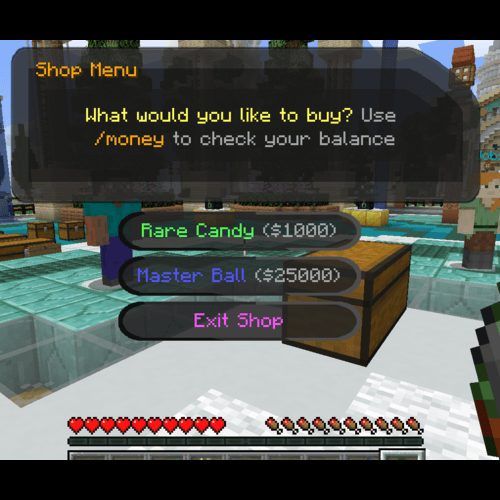
INPUT DIALOGUE: /dutil input player|console escape|stay <targetPlayer> <title> <message> <command>
Description: Create an input dialogue for the target player, allowing them to input text.
Options:
player|console: Execute the command as the player or the consoleescape|stay: Determine whether the menu closes when “Escape” is pressedtitle & message: Put in quotes if more than 1 wordcommand: Can use {player} and {input} for placeholders
Permissions Required: dialogueutil.input.player or dialogueutil.input.console
Example:
/dutil input player escape Player123 "&9What's your favorite color?" "Please provide feedback:" msg {player} {input} is a good choice!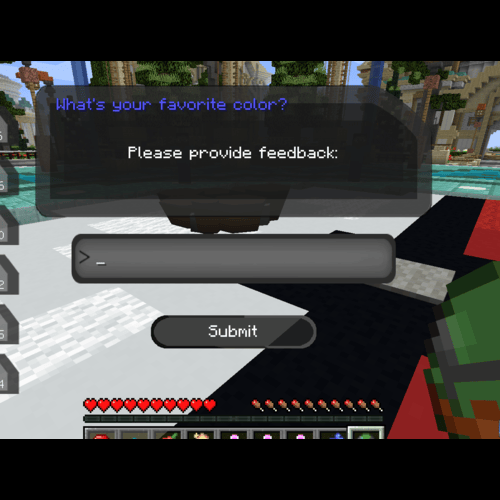
NOTICE COMMANDS
The notice system allows you to display overlays with various types of content.
TEXT NOTICE: /dnotice direct text <player> <duration> <lines>
Description: Display a text-based notice overlay
Permissions Required: dialogueutil.notice.text
Example:
/dnotice direct text PlayerName 10 "&6Welcome!\n&eEnjoy your stay"POKEMON NOTICE: /dnotice direct pokemon <player> <layout> <duration> <pokemon> <use3d> <lines>
Description: Display a notice with a Pokémon sprite or 3D model
Permissions Required: dialogueutil.notice.pokemon
Example:
/dnotice direct pokemon PlayerName LEFT_AND_RIGHT 10 "pikachu growth:ginormous" true "&6Special Pikachu!\n&eCheck it out"ITEM NOTICE: /dnotice direct item <player> <layout> <duration> <lines> <itemWithNbt>
Description: Display a notice with an item
Permissions Required: dialogueutil.notice.item
Example:
/dnotice direct item PlayerName LEFT_AND_RIGHT 10 "&6Master Ball\n&eUltimate catching power" "pixelmon:poke_ball{PokeBallID:\"master_ball\"}"NOTICE FROM CONFIG: /dnotice config <player> <configId>
Description: Display a pre-configured notice from notices.yml
Permissions Required: dialogueutil.notice.config
Example:
/dnotice config PlayerName welcomeOTHER NOTICE COMMANDS:
/dnotice hide– Hide the current notice/dnotice list– List available notice configurations/dnotice reload– Reload notice configurations/dnotice help– Show notice command help
RELOAD COMMANDS
/dutil reload– Reload dialogue configurations/dnotice reload– Reload notice configurations
CONFIGURATION FILES
config.yml
Controls general settings and default messages.
# Enable/Disable Debug messages
debug: false
messages:
  noMoney:
    title: "§cNot Enough Money"
    message: "§cYou need {price} to select this option!"
  noPermission:
    title: "§cPermission Error"
    message: "§cYou don't have permission: {permission}"
dialogues.yml
Define configurations for choice menus.
dialogues:
  shop:
    title: "&6Shop Menu"
    message: "&eWhat would you like to buy? &7Use &6/money &7to check your balance"
    choices:
      - text: "&aRare Candy &7($1000)"
        commands:
          - "[console]broadcast {player} got some candy"
          - "[console]give {player} pixelmon:rare_candy 1"
        price: 1000
        permission: "shop.rare_candy"
        failureTitle: "&cNo Permission"
        failureMessage: "&cYou need the &6shop.rare_candy &cpermission!"
notices.yml
Configure different types of notices.
notices:
  welcome:
    type: text
    duration: 10
    lines:
      - "&6&lWelcome to the server!"
      - "&eThank you for joining us"
      - "&aEnjoy your stay"

  professor_pikachu:
    type: pokemon
    layout: LEFT_AND_RIGHT
    duration: 12
    pokemon: "pikachu growth:ginormous form:phd"
    use3d: true
    lines:
      - "&6&lBalance:"
      - "&e%vault_eco_balance%"

  master_ball:
    type: item
    layout: LEFT_AND_RIGHT
    duration: 8
    item: "pixelmon:poke_ball"
    nbt: "{PokeBallID:\"master_ball\"}"
    name: "&dMaster Ball"
    lines:
      - "&6&lMaster Ball"
      - "&eThe ultimate Pokeball"
PERMISSIONS
Dialogue Permissions
dialogueutil.simple– Use simple dialoguesdialogueutil.choice– Use choice dialoguesdialogueutil.input.player– Use input dialogues as playerdialogueutil.input.console– Use input dialogues as consoledialogueutil.admin– Access administrative commands
Notice Permissions
dialogueutil.notice.text– Use text noticesdialogueutil.notice.pokemon– Use Pokémon noticesdialogueutil.notice.item– Use item noticesdialogueutil.notice.config– Use configured noticesdialogueutil.notice.admin– Access notice admin commands
DEPENDENCIES
- NeoForge: 21.1.172 or later
- Minecraft: 1.21.1
- Pixelmon: 9.3.16 or later
- PlaceholderAPI (Optional) – For placeholder support
- LuckPerms (Optional) – Give command access to non-op players
FEATURES & NOTES
- Color codes with & are supported in all text
- PlaceholderAPI placeholders are supported in all text (%placeholder%)
- Multiple notice layouts available: LEFT_AND_RIGHT, LEFT, RIGHT
- NBT data support for item notices
- Command execution after notice display
- Configurable duration for all notices
- 3D model support for Pokémon notices
常见问题
DialogueUtils 支持哪些 Minecraft 版本?
DialogueUtils 支持 Minecraft Java 版 1.16.5–1.21.1,共 2 个版本,可用的加载器:Forge / NeoForge。下载时注意选择和你游戏版本一致的文件。
DialogueUtils 怎么安装?
先用 PCL2 或 HMCL 启动器安装对应版本的 Forge / NeoForge,再把下载的 .jar 文件放进游戏目录的 mods 文件夹,重新启动游戏即可。开启了版本隔离的,mods 文件夹在 versions/版本名 下面。运行环境:仅服务端。
infidelrickmc 的其他作品
查看全部 →
Colomon
Colomon is a Server based around Pixelmon Reforged (Neoforge), here you can find info and install a modpack for connecting to our server!

ColoFixes
A small colleciton of client side fixes and QOL addons for Pixelmon, intended for the Colomon Modpack

ColoScoreboard
Dynamic, server dictated overlays, menus, and popups for Colomon
评论
登录后评论和评分