
截图
介绍
Declarative UI
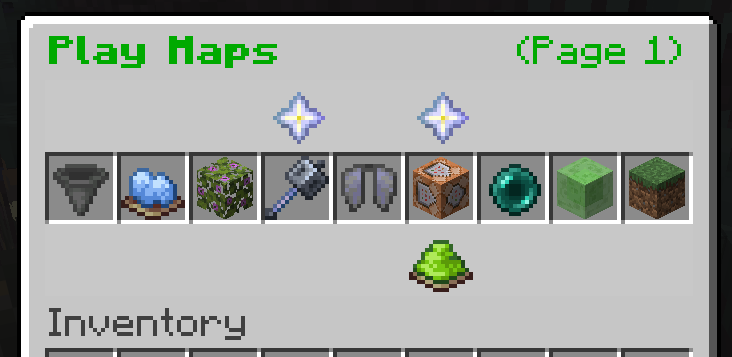
A data-driven UI mod for Minecraft using Fabric, making creation of GUIs easier and creating commands possible within a datapack.\
No need to learn Java or Kotlin.\
Containers also exist, so you could try making a sell gui, etc.
📖 Usage
To create a datapack, you can use /datapack create <id> <description>. You’ll find it in your world’s datapacks folder.\
To create a GUI, which also allows customized slot actions and titles, create a JSON file within its data/<namespace>/declarative_ui/menu folder you’ll create. For the format of the JSON, check the Menu Generator\
To create a Command, with or without parameters, follow previous steps but put the JSON within data/<namespace>/declarative_ui/command and check the Command Generator for the format.\
To create a container, create a JSON file within data/<namespace>/declarative_ui/container and put a number greater than 0 in a size field.
To handle a custom click action, create a JSON file within data/<namespace>/declarative_ui/custom_click_action and put a function path in a function field.
📖 Extra Commands
- Use
/item (modify|replace) containerfor command modification of player stored containers - Use
/declarative_ui open <targets> <menu>to open a menu /execute if container
📖 Loot Tables
- In 1.21.11+ you can choose the
declarative_ui:containerslot source in a slot entry
You can also download the .mcdoc and commands.json files for Spyglass here:
https://cdn.modrinth.com/data/5UTWPtx3/versions/ACQaQoYf/spyglass.zip?mr_download_reason=standalone
常见问题
Declarative UI 支持哪些 Minecraft 版本?
Declarative UI 支持 Minecraft Java 版 1.21.11–26.3,共 6 个版本,可用的加载器:Fabric。下载时注意选择和你游戏版本一致的文件。
Declarative UI 怎么安装?
先用 PCL2 或 HMCL 启动器安装对应版本的 Fabric,再把下载的 .jar 文件放进游戏目录的 mods 文件夹,重新启动游戏即可。开启了版本隔离的,mods 文件夹在 versions/版本名 下面。运行环境:仅服务端。
CJDev 的其他作品
查看全部 →
Ordinary Coins [Forge/Fabric]
A mod which adds coins which you could use in an economy on a server.

UUID Hex
High-performance library for formatting UUIDs into hexadecimal strings.

No Villages
Prevents Villages from generating
A* Pathfinding
Minecraft Pathfinder for Entities
评论
登录后评论和评分