
截图
介绍
dchook
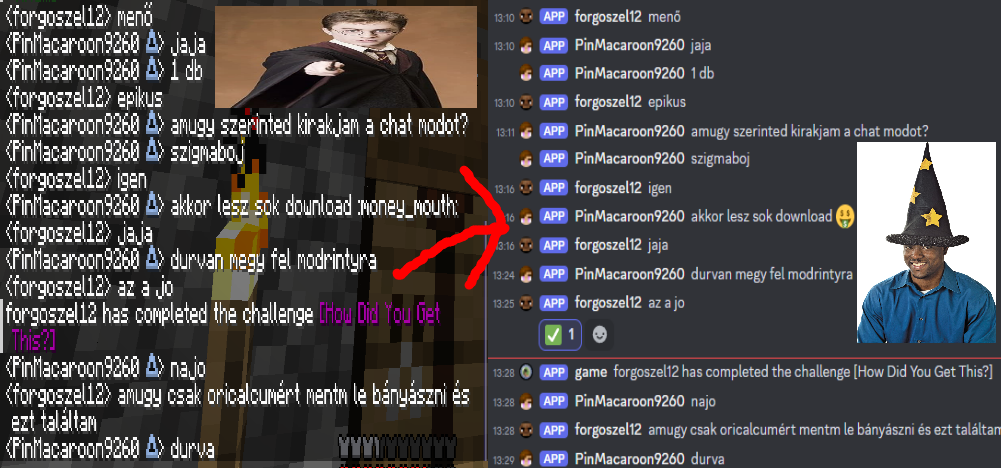
Send Minecraft chat messages to Discord server channels with ease! dchook is a
lightweight and simple mod for the fabric mod loader, and newer Minecraft versions (more supported versions coming soon).
Features
This mod offers:
- One-way chat message proxying or two-way if desired;
- Simple configuration;
- Straightforward features;
- Server-side, Discord Bot-less architecture.
Configurable and toggleable messages
Toggle server status messages such as: server staring, server started, server
stopping, server stopped.
Toggle whether users can make their messages unproxyable (ignored by the mod) by
applying two forward slashes (//) at the end of their chat messages.
Easy setup
Setting this mod up is just a matter of following the steps on the documentation page
“HELP, IT AINT WORKIN’, WHAT AM I SUPPOSD’ TO DO?”
Calm down, we’ll go step by step.
Check the config file.
- Did I paste the URL to the right place?
- Is it the right URL?
- Did I delete an
=? - Did I put an extra space somewhere?
- Did I accidentally turn the mod off?
Check the console of the server.
- Did my server say something about the webhook not being a valid API endpoint?
- Did my server say something about the webhook not being found or not having connection to Discord?
Still doesn’t work? Well, I (pin, the one who made this mod) am also a “human”,
so I make mistakes too. If you think I made one, report it to me! See the
sidebar for links!
Credits
- This mod uses simple-config for configuration file management.
- This mod uses crafthead‘s API for player chat icons.
常见问题
Discord Webhook Wizard 支持哪些 Minecraft 版本?
Discord Webhook Wizard 支持 Minecraft Java 版 1.8.8–1.21.11,共 62 个版本,可用的加载器:Fabric / Paper / Quilt / Spigot。下载时注意选择和你游戏版本一致的文件。
Discord Webhook Wizard 怎么安装?
先用 PCL2 或 HMCL 启动器安装对应版本的 Fabric / Paper / Quilt / Spigot,再把下载的 .jar 文件放进游戏目录的 mods 文件夹,重新启动游戏即可。开启了版本隔离的,mods 文件夹在 versions/版本名 下面。运行环境:仅服务端。
The ColonThree Gang 的其他作品
查看全部 →
Sequoia
Adds a really nice biome with some really tall trees!
Sequoia
Adds a really nice biome with some really tall trees!

Pyorite
Mod that adds mainly combat based items and features.

Voidable
Adds some new things that may or may not be connected to the void.
评论
登录后评论和评分