
Day Count – a day counter HUD (Forge/NeoForge/Fabric)
This mod adds a day counter with customizable location, size and color to the screen.
截图

介绍


Day Count (Forge / NeoForge / Fabric)
A lightweight HUD that displays the number of days passed in your Minecraft world. Useful for “100 Days” challenges or tracking long-term survival progress.
Features:
- Positioning: Adjust X and Y coordinates to place the counter anywhere.
- Appearance: Customizable text color and scale.
- Custom Text: The “Day: ” prefix can be replaced with any string.
- Background box: Add a background box to the day counter
Configuration:
Settings are located in your “/config“ folder:
- Forge / NeoForge: “
daycount-client.toml“ - Fabric: “
daycount.json5“
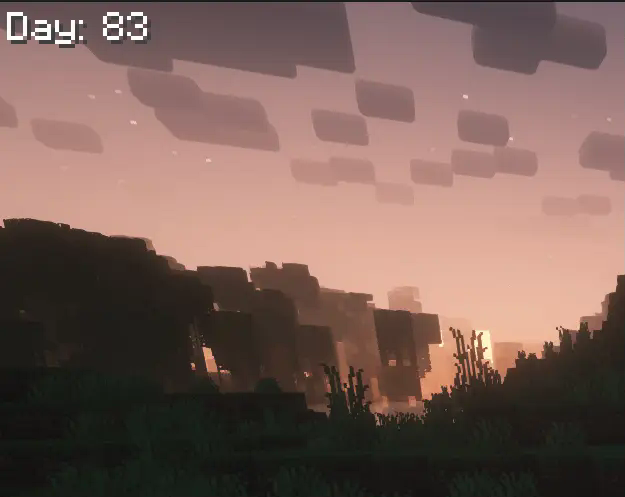
Background box (with transparency) version 1.5.0 and newer:

常见问题
Day Count – a day counter HUD (Forge/NeoForge/Fabric) 支持哪些 Minecraft 版本?
Day Count – a day counter HUD (Forge/NeoForge/Fabric) 支持 Minecraft Java 版 1.19–26.3,共 29 个版本,可用的加载器:Fabric / Forge / NeoForge。下载时注意选择和你游戏版本一致的文件。
Day Count – a day counter HUD (Forge/NeoForge/Fabric) 怎么安装?
先用 PCL2 或 HMCL 启动器安装对应版本的 Fabric / Forge / NeoForge,再把下载的 .jar 文件放进游戏目录的 mods 文件夹,重新启动游戏即可。开启了版本隔离的,mods 文件夹在 versions/版本名 下面。运行环境:仅客户端。
PeteMC 的其他作品
查看全部 →
MineTraps
这个模组为游戏添加了几种新的陷阱!

Mutants and Zombies
This mod adds new Mutant and Zombie mobs.

Undead Nights – Zombie Horde Nights / Hordes
This Mod adds Horde Nights to the game, with hordes of Zombies hunting the player in a Zombie Apocalypse.

Day Count
A mod that displays the day count in the top left.
评论
登录后评论和评分