
Day Time Count
作者:duchiru
This utility mod adds a simple counter to the game screen, helping players track the current day and time.
截图

介绍
中文介绍正在准备中,下面暂时显示原文。
Day Time Counter
Day Time Counter is a lightweight utility mod that adds a clean, minimal display to the top-left corner of your
screen, showing the current day and in-game time.
Features
- Real-time Day & Time Display: Instantly see the current in-game day and time.
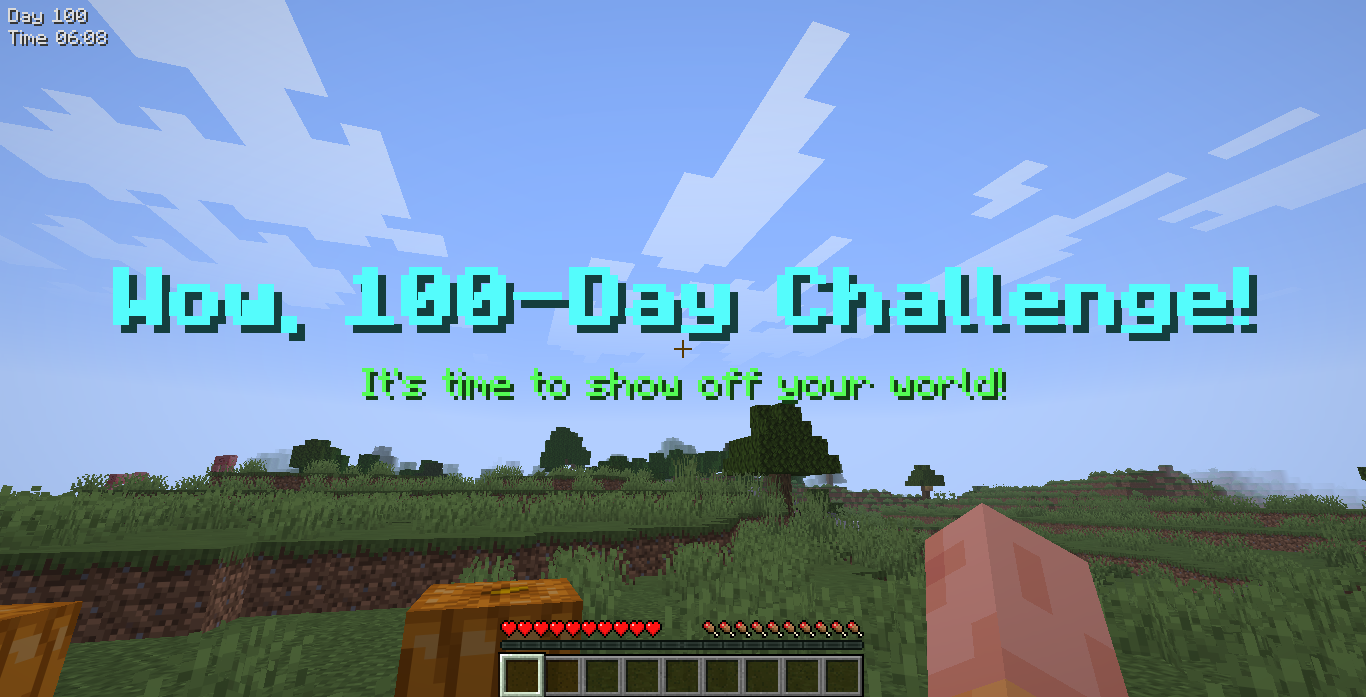
- Milestone Celebrations: When you reach survival milestones (10, 50, 100 and so on), there will be a “cheer” screen title and a celebratory sound effect to mark your progress.
- Fully Customizable: Adjust the display’s position, font size, and color to fit your preferences.
Requirements
- Fabric API 0.145.4 or higher
Configuration
The mod’s configuration file is located at config/daytimecount.json.
{
  "tracker_style": "default (default | compact | day_only | time_only)",
  "tracker_position": "top_right (top_left | top_right | bottom_left | bottom_right | hotbar)",
  "tracker_text_color": "#FFFFFF (#RRGGBB or #AARRGGBB)",
  "tracker_text_scale": "1.0 (0.5 to 3.0)",
  "milestones": {
    "100": {
      "title": "Wow, 100-Day Challenge!",
      "subtitle": "It\u0027s time to show off your world!",
      "title_color": "AQUA",
      "subtitle_color": "GREEN",
      "sound": "ui.toast.challenge_complete"
    }
  }
}
tracker_text_color supports either #RRGGBB (alpha defaults to FF) or #AARRGGBB.
Preview
常见问题
Day Time Count 支持哪些 Minecraft 版本?
Day Time Count 支持 Minecraft Java 版 1.21.11–26.1.2,共 4 个版本,可用的加载器:Fabric。下载时注意选择和你游戏版本一致的文件。
Day Time Count 怎么安装?
先用 PCL2 或 HMCL 启动器安装对应版本的 Fabric,再把下载的 .jar 文件放进游戏目录的 mods 文件夹,重新启动游戏即可。开启了版本隔离的,mods 文件夹在 versions/版本名 下面。运行环境:仅客户端。
评论
登录后评论和评分