
截图

介绍
中文介绍正在准备中,下面暂时显示原文。
Day Counter
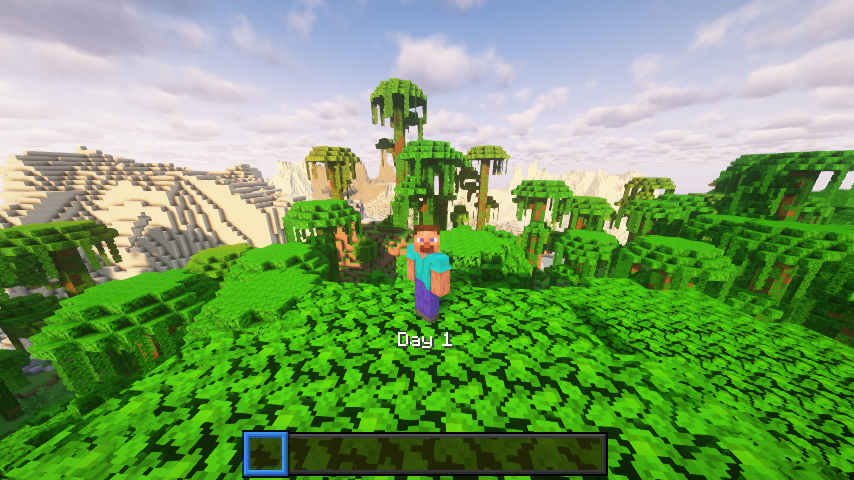
A lightweight Minecraft 1.21.5 datapack that displays the current in‑game day number above your hotbar. No commands, functions, or dependencies, just a simple day tracker.
What It Does
- Shows “Day X” (where X is the current day) in the action bar every time the sun rises.
- Works in any world type (survival, hardcore, creative).
Example Uses
- YouTubers – Let viewers see which day of your survival series they’re watching.
- Challenge runs – Keep track of how many days you’ve survived without building a clock.
- Casual players – Know when to celebrate milestones like Day 100.
Installation
- Download the DayCounter datapack ZIP or clone from the repo.
- Put the
DayCounterfolder into your world’sdatapacks/directory. - Start Minecraft 1.21.5 or newer, then run:
/reload- Verify it’s active:
/datapack listYou should see DayCounter enabled.
Usage
- Load into your world.
- Each new day you’ll see the “Day X” update above your hotbar.
- No further setup needed.
Details
Pack format: 71 (1.21.5)
Namespace: daycounter
License
This datapack is released under the MIT License. Feel free to modify and share.
常见问题
Day Counter 支持哪些 Minecraft 版本?
Day Counter 支持 Minecraft Java 版 1.0–26.2,共 111 个版本,可用的加载器:Fabric / Forge / NeoForge / Quilt。下载时注意选择和你游戏版本一致的文件。
Day Counter 怎么安装?
先用 PCL2 或 HMCL 启动器安装对应版本的 Fabric / Forge / NeoForge / Quilt,再把下载的 .jar 文件放进游戏目录的 mods 文件夹,重新启动游戏即可。开启了版本隔离的,mods 文件夹在 versions/版本名 下面。运行环境:客户端 / 服务端。
Kxffie 的其他作品
查看全部 →
Crafting+
by Kxffie
319 Quick and Enhanced Crafting Recipes
11.8万
2 个月前
Modrinth

Nostalgic Fishing
by Kxffie
Bring Back Old Fishing!
7.8万
1 年前
Modrinth

More Blocks
by Kxffie
Get More Bang for Your Buck!
2.9万
1 年前
Modrinth

Gunpowder Crafting
by Kxffie
A way to craft gunpowder and flint.
9,429
1 年前
Modrinth
评论
登录后评论和评分