
介绍
Datapack Portals
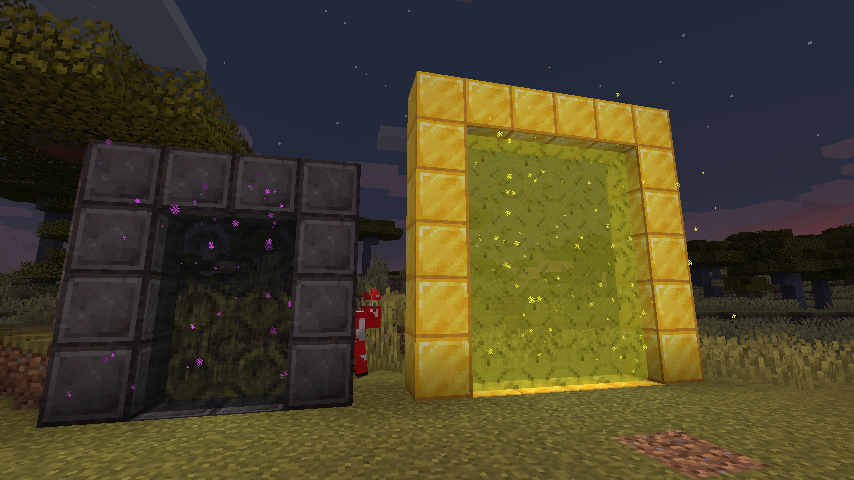
Create custom portals using CustomPortalApi with datapacks.
Inside your datapack create a “portals” folder, this is where you’ll put all your custom portals. There is no set limit of allowed portals, as long as there aren’t any duplicate frame blocks.
Here is an example file:
stoneendportal.json
{
“block”: “minecraft:stone”,
“dim”: “minecraft:the_end”,
“r”: 66,
“g”: 135,
“b”: 245
}
- block: the block used for the frame.
- dim: the dim id to travel to
- r, g, b: the color to tint the portal
There are also some optional arguments
- ignitionType: the type of ignition to use. Options are “BLOCK”, “FLUID”, “ITEM”.
- ignitionSource: the id for block/item/fluid for ignition of the portal, the only supported block being fire : “minecraft:fire”. All items and fluids are supported.
- returnDim: the dimmension to return to, allows for specifying a location other than the overworld to return to
That is all! Portals will function exactly like vanilla nether portals do
常见问题
Datapack Portals 支持哪些 Minecraft 版本?
Datapack Portals 支持 Minecraft Java 版 1.16.3–1.21.1,共 14 个版本,可用的加载器:Fabric。下载时注意选择和你游戏版本一致的文件。
Datapack Portals 怎么安装?
先用 PCL2 或 HMCL 启动器安装对应版本的 Fabric,再把下载的 .jar 文件放进游戏目录的 mods 文件夹,重新启动游戏即可。开启了版本隔离的,mods 文件夹在 versions/版本名 下面。运行环境:客户端 / 服务端。
kyrptonaught 的其他作品
查看全部 →
ToolTipFix
修复工具提示超出屏幕边缘的问题。
Inventory Sorting
快速、简单且轻量的物品栏整理

Enchanted ToolTips
在工具提示中显示附魔信息!

QuickShulker
无需放置即可快速打开潜影盒(及更多容器)
评论
登录后评论和评分