
Data Config
A mod that gives Minecraft datapacks a visual graphical configuration interface. Datapack authors only need to write simple JSON configurations, and players can adjust datapack parameters directly through the Cloth Config interface in-game, without manuall
截图

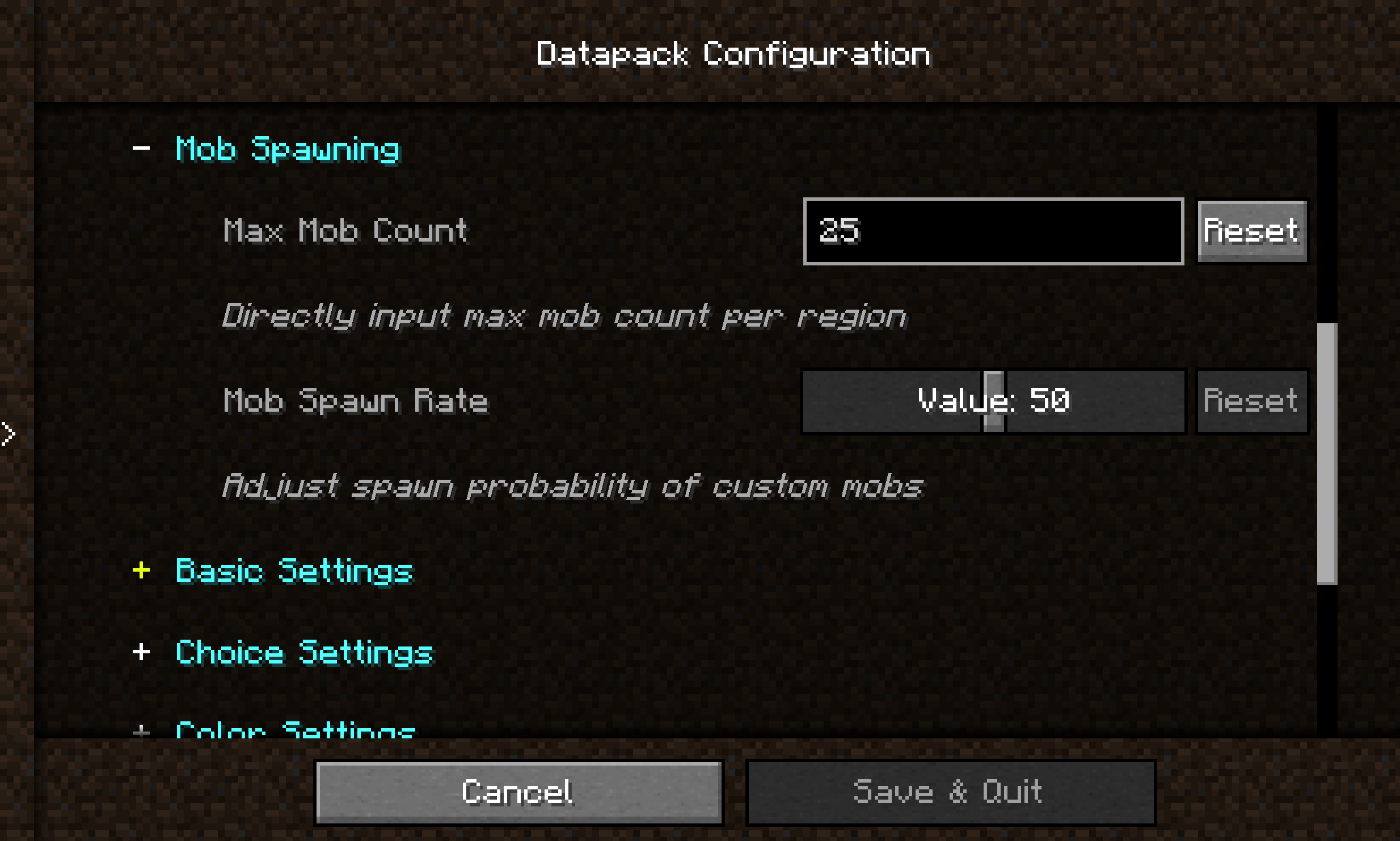

介绍
Introduction
Datapack Config Mod is a utility mod for Minecraft Forge 1.20.1 that provides datapack developers with a convenient graphical configuration interface.
By integrating the Cloth Config API, the mod allows players to modify datapack parameters directly in-game without manually editing JSON files or restarting the game.
Main Features
🎨 Graphical Configuration Interface
- Uses Cloth Config to provide a user-friendly interface
- Supports 10+ configuration types: sliders, text boxes, dropdown menus, color pickers, etc.
- Changes take effect immediately — no game restart required
🌍 Full Localization Support
- Bilingual interface (Chinese and English)
- Config option names, descriptions, and tooltips can be set per language
📦 Global Datapack Loading
- Automatically loads
.zipdatapacks fromconfig/datapack-config-mod/ - Each datapack can be toggled on/off via the config interface
- Datapacks are loaded with the highest priority
🔧 Main Menu Shortcut
- A “Datapack Config” button is added to the top‑right corner of the main menu for one‑click access
Supported Configuration Types
| Type | Description |
|——|————-|
| boolean | Boolean toggle |
| int / slider | Integer input / slider |
| double / double_slider | Floating‑point input / slider |
| string | Text input |
| enum / enum_selector | Dropdown menu / enum selector |
| color | Color picker |
Quick Start
For Datapack Authors
Create a datapack_config.json file in the root directory of your datapack:
{
  "config": {
    "spawn_rate": {
      "type": "slider",
      "default": "50",
      "min": 0,
      "max": 100,
      "name": {
        "zh_cn": "生物生成率",
        "en_us": "Mob Spawn Rate"
      },
      "filePath": "data/mydatapack/config.json",
      "key": "spawn_rate"
    }
  }
}
常见问题
Data Config 支持哪些 Minecraft 版本?
Data Config 支持 Minecraft Java 版 1.20.1–1.21.11,共 5 个版本,可用的加载器:Forge / NeoForge。下载时注意选择和你游戏版本一致的文件。
Data Config 怎么安装?
先用 PCL2 或 HMCL 启动器安装对应版本的 Forge / NeoForge,再把下载的 .jar 文件放进游戏目录的 mods 文件夹,重新启动游戏即可。开启了版本隔离的,mods 文件夹在 versions/版本名 下面。运行环境:客户端和服务端都要装。
wonderful_Ai_Chen 的其他作品
查看全部 →
Epic Terrain
这个数据包是我通过数据包练习写出来的。 因为厌倦了原版地形,又一直想要一个高效且真实的地形,所以我开始重构原版地形。

Epic Terrain Compatible
Epic Terrain biome-compatible version

Cataclysm Dimension
Place each structure from the L_Ender 's Cataclysm mod into different dimensions

Better Underground Caves
Optimize the original cave terrain and add large underground cave terrain.
评论
登录后评论和评分