
介绍
Get a server today and play with your friends! Click HERE or below banner & Use Code GAMERPOTION to get 25 off!





DarkZoom
Activate zoom mode and zoom in on the area you are viewing | View Changelog
Server side is supported. You can install this on the server and not need to have it installed on the client.
Created by the same authors who made DarkRPG (for a full RPG experience, get the DarkRPG modpack and enjoy quests and rpg gameplay)
Features
(Your vanilla experience will be further enhanced thanks to these features)
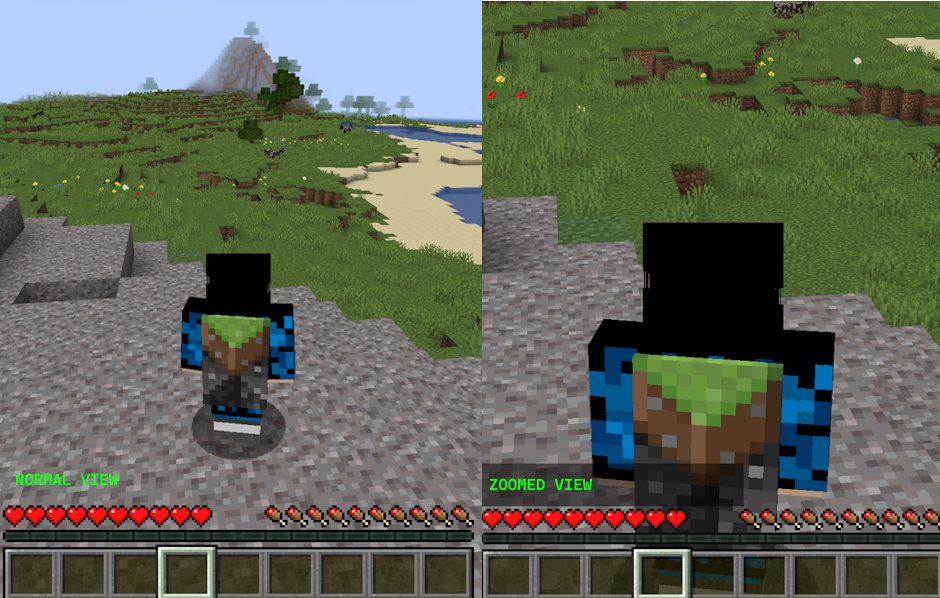
This simple and basic mod allows you to zoom in on an area using a command. This works server-side as well so you don’t need this installed on the client. Simply use the trigger command /trigger darkzoom and you will enter a zoomed mode which will show you a zoomed view of what you are seeing. This effect lasts for 2 seconds and can be reactivated again.
Note: This makes use of the in-game FOV function. Make sure your FOV slider is at 100% for this to work correctly.

Permission – Feel free to use in your modpack.
Click the banner below to get your server today! or go to BisectHosting.com and make sure to use the code ‘gamerpotion‘ to get your 25% off.
常见问题
DarkZoom 支持哪些 Minecraft 版本?
DarkZoom 支持 Minecraft Java 版 1.20.1–26.2,共 8 个版本,可用的加载器:Fabric / Forge / NeoForge / Quilt。下载时注意选择和你游戏版本一致的文件。
DarkZoom 怎么安装?
先用 PCL2 或 HMCL 启动器安装对应版本的 Fabric / Forge / NeoForge / Quilt,再把下载的 .jar 文件放进游戏目录的 mods 文件夹,重新启动游戏即可。开启了版本隔离的,mods 文件夹在 versions/版本名 下面。运行环境:客户端和服务端都要装。
GamerPotionDev 的其他作品
查看全部 →
Lazyboy’s No Global Sounds
Stop global sounds like the wither's spawning, ender dragon death, end portal activation.

Lazyboy’s No Fire Spread
Stops fire from spreading in the world.

DarkSmelting
Smelt Armor, Tools and Weapons into their equivalent ingots

DarkBosses
Shows boss summoning information and grants extra xp for defeating bosses
评论
登录后评论和评分