
截图
介绍
中文介绍正在准备中,下面暂时显示原文。
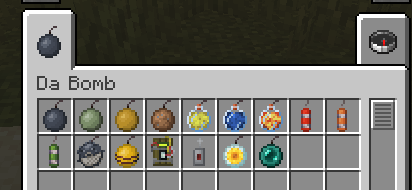
Ever thought “Minecraft needs more explosives”? Well this mod is Da Bomb and adds more explosives to the world of Minecraft.
These bombs can be used for mining, getting rid of water, placing liquids and more.
The current list of bombs:
- Bomb – A regular throwable explosive
- Bouncy Bomb – A bouncier version of the Bomb
- Sticky Bomb – A sticky version of the Bomb, sticking to any surface you throw it at (and mobs)
- Dirt Bomb – An explosive that places dirt wherever it can without destroying existing blocks unless replace-able (like grass)
- Dry Bomb – An explosive that gets rid of any fluid in it’s explosion radius
- Water Bomb – An explosive that places water in any non-solid block in it’s explosion radius
- Lava Bomb – An explosive that places lava in any non-solid block in it’s explosion radius
- Dynamite – An improved throwable explosive (Bigger radius than a regular bomb)
- Bouncy Dynamite – A bouncier version of Dynamite
- Sticky Dynamite – A sticky version of Dynamite, sticking to any surface you throw it at (and mobs)
- Fish Bomb – Similar to the Bomb but slightly stronger and sticks to surfaces / mobs
- Bee Bomb – An explosive that spawns angry bees
- C4 and Detonator – An explosive which can be stuck to surfaces / mobs and detonated using the detonator
- Flower Bomb – An explosive that places random flowers in it’s explosion radius
- Ender Bomb – An explosive that teleports any mob in the explosion radius to a random location within 64 blocks

Need a server? Get 20% off your first month by using promo code “mrbysco”
For questions feel free to join my Discord.

Want to support me?
 -Mrbysco
常见问题
Da Bomb 支持哪些 Minecraft 版本?
Da Bomb 支持 Minecraft Java 版 1.18.2–26.1.2,共 15 个版本,可用的加载器:Forge / NeoForge。下载时注意选择和你游戏版本一致的文件。
Da Bomb 怎么安装?
先用 PCL2 或 HMCL 启动器安装对应版本的 Forge / NeoForge,再把下载的 .jar 文件放进游戏目录的 mods 文件夹,重新启动游戏即可。开启了版本隔离的,mods 文件夹在 versions/版本名 下面。
Mrbysco 的其他作品
查看全部 →
Bad Wither No Cookie – Reloaded
by Mrbysco, kreezxil
本地化凋灵和末影龙的死亡音效。
1.4亿
5 个月前
Modrinth · CurseForge
Just Enough Professions (JEP)
by Mrbysco, ShyNieke
一个为 JEI 添加职业工作站的附属模组
1.2亿
1 个月前
CurseForge · Modrinth

生活调味料:胡萝卜版 Spice of Life: Carrot Edition
by lordcazsius, Mrbysco
一款围绕食物展开的模组,探索新食物会获得奖励,而不是受到惩罚!
9808万
1 个月前
CurseForge

Measurements
by Mrbysco
允许使用卷尺测量距离。
4416万
1 个月前
CurseForge · Modrinth
评论
登录后评论和评分