
Custom Time Cycle
Allows the day and night durations of Minecraft days to be customised, without changing tick speed.
截图


介绍
Custom Time Cycle






Custom Time Cycle is a mod that allows changing the duration of Minecraft days and nights using a simple
command, without changing tick speed. It is available for both Fabric and NeoForge. It can be used on servers (without
being required on player clients), and in singleplayer.
Since Minecraft 26.1, Custom Time Cycle allows changing the duration/rate of change between every time marker for a clock, which are
data-driven. This allows very granular control over the rate at which time for a clock progresses.
The mod also applies a small fix to villager behaviour, so that they still properly spawn iron golems with longer day/night durations
than vanilla.
License
This mod is licensed under GNU LGPLv3.
Donating
If you like this mod, consider donating.
Discord
For support and/or any questions you may have, feel free to join my discord.
Version support
| Minecraft Version | Status |
|——————-|————–|
| 26.3.x | ✅ Current |
| 26.2.x | ✔️ Available |
| 26.1.x | ✔️ Available |
| 1.21.11 | ✔️ Available |
| 1.21.9+10 | ✔️ Available |
| 1.21.6+7+8 | ✔️ Available |
| 1.21.5 | ✔️ Available |
| 1.21.4 | ✔️ Available |
| 1.21.2+3 | ✔️ Available |
| 1.21+1 | ✔️ Available |
| 1.20.5+6 | ✔️ Available |
| 1.20.4 | ✔️ Available |
| 1.20.1 | ✔️ Available |
I try to keep support up for the latest drop of Minecraft. Updates to newer Minecraft
versions may be delayed from time to time, as I do not always have the time to immediately update my mods.
Unsupported versions are still available to download, but they won’t receive new features or bugfixes.
NeoForge ports are available for Minecraft 1.21+1 and for Minecraft 1.21.9 onwards.
Usage
Mod builds can be found on the releases page, as well as on Modrinth.
On Fabric, the Fabric API is required. When installed server-side, the mod is not required on clients.
Durations of time markers can be configured for each periodic world clock and are saved across server restarts / world saves.
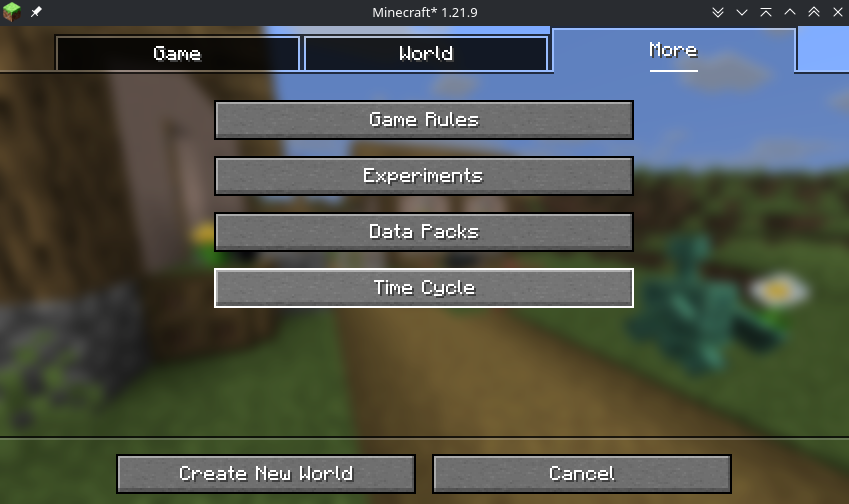
For clients, the time cycle of a world can be configured upon creation, by selecting the “More” tab at the top, then
clicking the “Time Cycle” button. You can also configure default time cycle durations for all new created worlds, in the mod’s
global configuration screen. This can be accessed on Fabric using the ModMenu mod, and on NeoForge using the built-in mod menu.
Global configuration is stored in .minecraft/config/customtimecyle.json.
The mod also adds a simple command, /timecycle, which can be used to alter the time cycle on servers and existing singleplayer worlds.
Its usage is as follows:
/timecycle status- Shows a simple status message displaying which time durations and rates are currently in use in the current dimension.
/timecycle set <dayduration> <nightduration>- Modifies the durations of the Minecraft day and night in the current dimension.
/timecycle set from <from> to <to> duration <duration>- Modifies the duration in ticks between 2 time markers in the current dimension.
/timecycle set from <from> to <to> rate <rate>- Modifies the rate at which time progresses between 2 time markers in the current dimension.
/timecycle reset- Resets the rates of all time markers in the current dimension.
/timecycle of <clock> ...- Allows running all of the above commands, but for that specific clock instead of the one of the current dimension.
The rate modifications the mod makes apply on top of the vanilla /time rate command.
Using the /timecycle command requires the timecycle.command permission or operator level 2.
Modpack developers can also include the following file in the config folder to preconfigure time cycle durations for
worlds on servers or clients:
{
  "daytime": <day time ticks>,
  "nighttime": <night time ticks>
}
How it works (technical explanation)
Since Minecraft 26.1, the game now has a “clock” concept. In vanilla, there are only 2 clocks, and only 1 that matters here:
the minecraft:overworld clock, for the overworld dimension.
Clocks in Minecraft control timelines, and can progress at a custom rate, though
by default, they progress at the same rate as the server’s tick rate: 20 ticks per second. In vanilla, this rate can
be configured for the entire clock, using the /time rate command.
This mod simply allows configuring the rate at which a clock progresses on a time marker
basis. Time markers mark a certain moment along the clock, such as minecraft:day for the start of the day,
or minecraft:midnight for midnight. You’ll have seen these in the /time set command too. The mod adds 2 custom time
markers for the vanilla minecraft:overworld clock, customtimecycle:sunrise and customtimecycle:sunset. These
are added primarily for legacy reasons, and are used for the /timecycle set <dayduration> <nightduration> command.
As was said before, this mod can work on any clock, as long as it is a periodic one, like minecraft:overworld. This makes
it work well with custom dimensions added by datapacks/mods that use their own clock.
常见问题
Custom Time Cycle 支持哪些 Minecraft 版本?
Custom Time Cycle 支持 Minecraft Java 版 1.20.1–26.3,共 21 个版本,可用的加载器:Fabric / NeoForge。下载时注意选择和你游戏版本一致的文件。
Custom Time Cycle 怎么安装?
先用 PCL2 或 HMCL 启动器安装对应版本的 Fabric / NeoForge,再把下载的 .jar 文件放进游戏目录的 mods 文件夹,重新启动游戏即可。开启了版本隔离的,mods 文件夹在 versions/版本名 下面。运行环境:仅服务端。
eclipseisoffline 的其他作品
查看全部 →
Geyser
一个允许你使用 Minecraft 基岩版连接 Minecraft Java 版服务器的桥接/代理。
Jukebox Custom Disc Fix
这个模组修复了 MC-260346 漏洞:自定义音乐唱片在唱片机中播放时,会在原版唱片本该结束的位置被截断。

Modify Player Data
This mod allows Minecraft's data commands (/data, /execute store, etc.) to modify player data

Floodgate
Hybrid mode mod to allow for connections from Geyser to join online mode servers.
评论
登录后评论和评分