
截图
介绍
Coordinates are an essential part of the multiplayer experience. There’s no other way to efficiently communicate the location of something to someone who doesn’t share your knowledge. This information, being so essential, does not belong in the debug screen, along with information that is either useless or potentially oppositional to a positive user experience. As such, we the community have created a vast number of mods to display your coordinates through other means over the years. This mod’s niche in this sea of coord mods is that of customisability, hence its namesake.
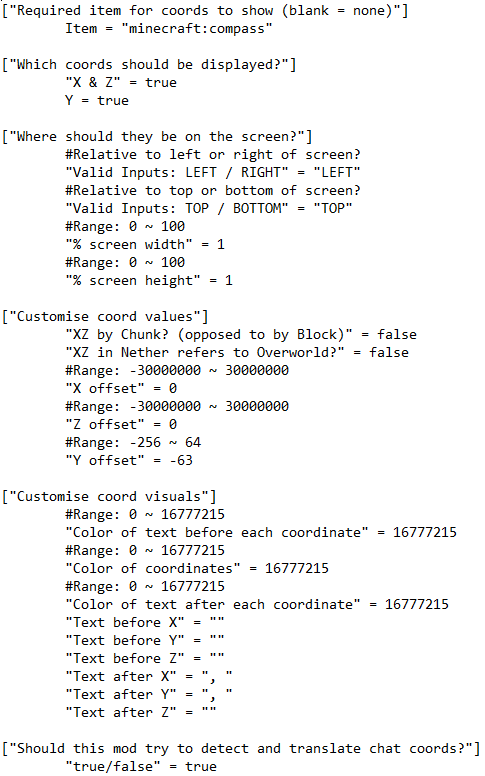
Originally being a backend function, coords struggle to hold meaning, especially after the introduction of -64 < y < 0. You can now be in control of that meaning. For example, you can change Y 0 to be sea level, so your Y-coord can communicate where you are regards to it. Importantly, this is only visual, so it doesn't effect how the game operates in the background.
/cc share and automatic chat coord interpretation allows you to communicate with others who don’t share the same customisations as you, without any unwarranted confusion.
This mod also comes with integration with Xaero’s minimap, the custom coords are shown in the info display.
This mod is still in development. Please be aware that it may not work as intended. Post any bugs, queries, or gripes to the Issue page.
FAQ:
The following features are currently planned for modification or introduction:
常见问题
CustomCoords 支持哪些 Minecraft 版本?
CustomCoords 支持 Minecraft Java 版 1.18.2,可用的加载器:Forge。下载时注意选择和你游戏版本一致的文件。
CustomCoords 怎么安装?
先用 PCL2 或 HMCL 启动器安装对应版本的 Forge,再把下载的 .jar 文件放进游戏目录的 mods 文件夹,重新启动游戏即可。开启了版本隔离的,mods 文件夹在 versions/版本名 下面。运行环境:仅客户端。


评论
登录后评论和评分