
Custom Window Title
Client-side mod to change window title (including special tokens) and window icon. Supports Forge & Fabric.
截图
介绍
Installation
The mod supports NeoForge and Fabric (*) mod loaders. Follow either mod loader’s installation guide, then download the mod file for your Minecraft version, and install it into the .minecraft/mods folder.
(*) Fabric API is not required.
Configuration
Run the game once to create the configuration file. By default, the window title will be set to Minecraft __. Unlike in vanilla 1.15.2 onwards, the title will not change when you enter a world/server.
To change the title or icon, navigate to the .minecraft/config folder, and open customwindowtitle-client.toml in a text editor. You will see the following entries:
title = 'Minecraft {mcversion}'
icon16 = ''
icon32 = ''
Only edit text inside quotes or apostrophes.
Changing the Title
You can use the following special tokens in the _title_ configuration entry:
{mcversion}– current Minecraft version{modversion:<mod_id>}– version of installed mod with the identifier<mod_id>{username}– current username
If any of the tokens aren’t working, search the game log for CustomWindowTitle and you should see the reason, otherwise please file an issue on the issue tracker with as many details as possible.
Changing the Icon
Minecraft 1.21+
This feature is only available in Custom Window Title 1.4.0 and newer.
Create a square PNG image whose dimensions are a power of two, such as 32×32 or 48×48. Put the PNG file into the .minecraft/config folder, either directly or into a subfolder.
The icon must be saved with transparency even if it doesn’t use it, otherwise the icon may be corrupted or not appear at all. In Krita, for example, you must check _Store alpha channel (transparency)_ when saving.
The _icon_ configuration entry points to the PNG file relative to .minecraft/config.
For example, if you placed the icon into .minecraft/config/customwindowtitle/icon.png, then the configuration entry should look like this:
icon = 'customwindowtitle/icon.png'Minecraft 1.20
This feature is not available in Minecraft 1.20.
Minecraft 1.19 and older
Instead of one icon configuration entry, there are two configuration entries icon16 and icon32 for icons with dimensions 16×16 and 32×32.
Screenshots
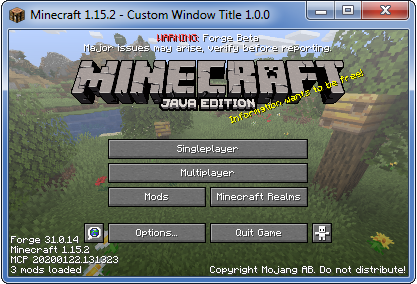
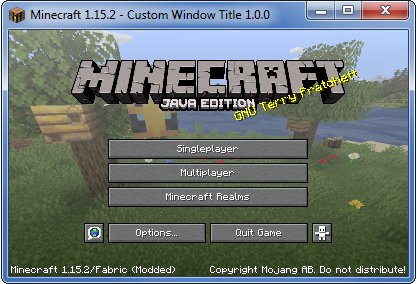
These screenshots were taken using the following example configuration:
title = "Minecraft {mcversion} - Custom Window Title {modversion:customwindowtitle}"
常见问题
Custom Window Title 支持哪些 Minecraft 版本?
Custom Window Title 支持 Minecraft Java 版 1.8.9–1.21.11,共 45 个版本,可用的加载器:Fabric / Forge / NeoForge。下载时注意选择和你游戏版本一致的文件。
Custom Window Title 怎么安装?
先用 PCL2 或 HMCL 启动器安装对应版本的 Fabric / Forge / NeoForge,再把下载的 .jar 文件放进游戏目录的 mods 文件夹,重新启动游戏即可。开启了版本隔离的,mods 文件夹在 versions/版本名 下面。运行环境:仅客户端。
chylex 的其他作品
查看全部 →
Custom Window Title
Client-side mod to change window title (including special tokens) and window icon. Supports Forge & Fabric.

Hardcore Ender Expansion
Overhauls the End with many new areas to explore, bosses to fight and rewards to gain.

Music for Hardcore Ender Expansion
与硬核末地扩展整合的官方音乐资源包。

Resource Pack Organizer
Enhances the Resource Pack menu by adding folder support for easier pack organization, ability to search packs by name or description, new sorting options, and quick refresh button directly in the GUI. Supports Forge & Fabric.
评论
登录后评论和评分