
Custom Trades
Villager professions and trades defined in JSON: write your own or use the built-in 1.14 set, with XP-based levelling and the 1.14 trading screen.
截图
介绍
Custom Villagers lets you define villager professions in JSON files for Forge 1.12.2: which item or job block gives the profession, how the villager looks, and every trade of every level — items, amounts, enchantments, potions, dyed armour, treasure maps. The 13 professions of Minecraft 1.14–1.17 come out of the box as editable files, and villagers level up the 1.14 way: XP for every trade, new tiers at thresholds, the 1.14 trading screen with a scrollable offer list and an XP bar.
How it works
- Profession files: every
*.jsoninconfig/customvillager/professions/is one profession. On the first launch the mod puts the 13 professions of 1.14 there — armorer, butcher, cartographer, cleric, farmer, fisherman, fletcher, leatherworker, librarian, mason, shepherd, toolsmith, weaponsmith (trade tables from the Minecraft Wiki, items missing in 1.12.2 replaced) — together with aREADME.mdthat describes the format. Edit them, delete them, add your own. A file with a syntax error is skipped with a message in the log; unknown item, enchantment and potion ids are reported at startup. - Giving a profession — two modes (
professions.cfg).SNEAK_CLICK(default): sneak and right-click a villager that has never traded while holding the profession’s item — a furnace for the armorer, shears for the shepherd, and so on.BLOCK: place the profession’s job block near a villager, like a job site in 1.14 — the nearest villager within 8 blocks that has never traded takes the job and stays bound to the block until it dies or the block is broken; break it before the villager has traded and it goes back to a random vanilla profession, free to take another job. The bundled files use vanilla stand-ins as job blocks (furnace, bone block, daylight detector, hay bale, lily pad, dispenser, bookshelf, stone bricks, wool, anvil, iron block) —jobBlockaccepts any block, including blocks from other mods. A villager that has already traded keeps its profession; nitwits never take a job (configurable). - Levelling: Novice → Apprentice → Journeyman → Expert → Master at 10 / 70 / 150 / 250 XP. A trade where the villager pays emeralds gives 2 / 10 / 20 / 30 / 30 XP by tier, a trade where it sells an item gives 1 / 5 / 10 / 15 / 30 — the 1.14 numbers, and any trade can set its own
xp. The level-up happens a couple of seconds after you close the screen, with the regeneration effect and particles, just like vanilla. Sneak and right-click a villager with an empty hand to see its level and XP. - Random offers:
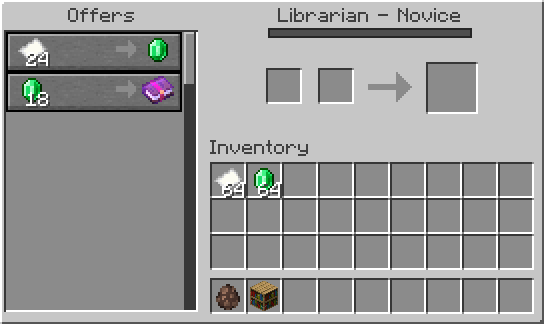
pickgives a villager that many random trades out of the level’s pool (the bundled files use 2, as in 1.14); amounts, enchantments, potions and colours are rolled once per villager — two librarians never sell the same books. - Trading screen: the 1.14 one — offer list with a scrollbar, out-of-stock marks, item tooltips, the villager’s level in the title and an XP bar with a preview of what the selected trade gives; a click moves the payment from your inventory into the slots (up to a full stack). Prefer the classic window?
modernTradeGui=falsekeeps the 1.12 screen and only adds the level and the XP bar. - Levelling and the screen also apply to vanilla 1.12 villagers and to villagers from other mods (they keep their own trades). Both can be switched off in the config.
The file format
The same reference is in config/customvillager/professions/README.md next to the files.
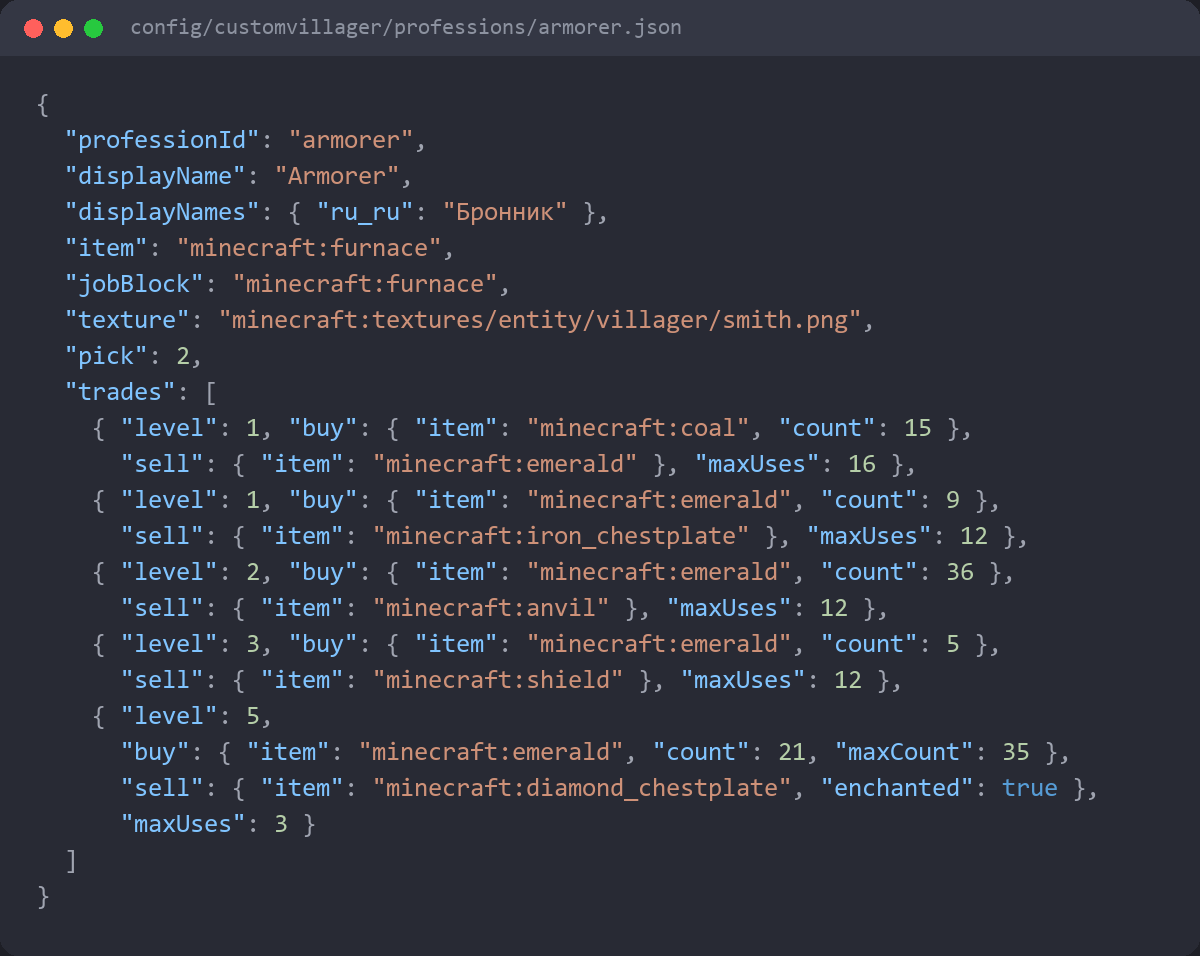
{
“professionId”: “armorer”,
“displayName”: “Armorer”,
“displayNames”: { “ru_ru”: “Бронник” },
“item”: “minecraft:furnace”,
“jobBlock”: “minecraft:furnace”,
“texture”: “minecraft:textures/entity/villager/smith.png”,
“zombieTexture”: “minecraft:textures/entity/zombie_villager/zombie_smith.png”,
“pick”: 2,
“trades”: [
{ “level”: 1, “buy”: { “item”: “minecraft:coal”, “count”: 15 }, “sell”: { “item”: “minecraft:emerald”, “count”: 1 }, “maxUses”: 16 }
]
}
常见问题
Custom Trades 支持哪些 Minecraft 版本?
Custom Trades 支持 Minecraft Java 版 1.12.2,可用的加载器:Forge。下载时注意选择和你游戏版本一致的文件。
Custom Trades 怎么安装?
先用 PCL2 或 HMCL 启动器安装对应版本的 Forge,再把下载的 .jar 文件放进游戏目录的 mods 文件夹,重新启动游戏即可。开启了版本隔离的,mods 文件夹在 versions/版本名 下面。
Kirtren 的其他作品
查看全部 →
Not Enough Totems
Craft new Totems of Undying with extra effects: fire, storm, stasis, mirror, teleport home and more.

Enderbook
Bind magic pages to places or players and teleport from your Enderbook for Ender Shards - a Warp Book remake with brewing and teleport plates.

Blueprint Crew: Builders
Hire builders from huts, draw a blueprint in a 3D editor and let a crew of up to eight build it block by block from your chests

Wand Craft
22 craftable wands: potion effects, lightning and telekinesis, plus a staff that unmakes everything for 190 blocks except whoever's soul shard is inside it.
评论
登录后评论和评分