介绍
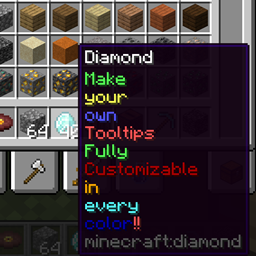
Make your own Tooltips via Json Files in the Config Folder.
Intended for modpacks.
To better understand the structure of the files the mod generates an example File on Startup.
Here are some basics:
If you want your own Default Settings the structure of the JSON must be the following:
{ “default”:{
“color”: “green”,
“state”: “replace”
},
“tooltips”: [
//write your tooltips here
]
}
In the default settings you can define the default color and the default position where the tooltips are added, optionally you can replace existing tooltips. These attributes can also be defined individiually in every tooltip.
If you don’t want to set your own Default Settings just write the array:
[
//write your tooltips here
]
<span style="font-family: arial, helvetica, sans-serif;"> </span>
The structure of every single tooltip has a targeted item, or item tag and a text component:
{
“item”: “minecraft:diamond”,
“text”: {“tooltip”: “write your text here”}
},
for more complex tooltips you can set the “text” field as an array to have different colors in your tooltip:
{
“tag”: “minecraft:planks”,
“text”: [
{“tooltip_line”: “Complex tooltip”, “color”: “blue”},
{“tooltip”: “Tooltip”, “color”: “#ff7029”}
],
“state”: “top”
}
With “tooltip_line” the following tooltip will be one line below.
With color you can specify an RGB code or alternativly some colors can be written.
常见问题
Custom Tooltips 支持哪些 Minecraft 版本?
Custom Tooltips 支持 Minecraft Java 版 1.18.2,可用的加载器:Forge。下载时注意选择和你游戏版本一致的文件。
Custom Tooltips 怎么安装?
先用 PCL2 或 HMCL 启动器安装对应版本的 Forge,再把下载的 .jar 文件放进游戏目录的 mods 文件夹,重新启动游戏即可。开启了版本隔离的,mods 文件夹在 versions/版本名 下面。
评论
登录后评论和评分