Custom Server MOTD
Gives you many options to customize your servers appearance from the server menu.
截图


介绍
Custom MOTD
This mod gives you access to customize your server join screen.
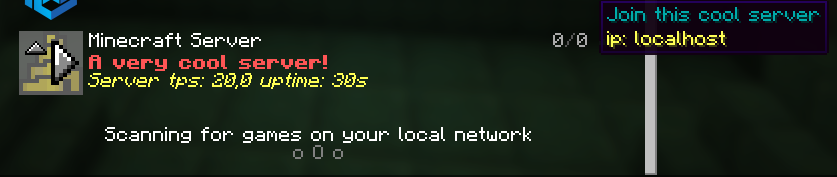
You can change your MOTD, icon, player count, max players and the hover players.
It also supports Placeholder API.
The icon is now a link instead of locally. Why?, this is because you can now have a link that has a changing picture, and it will update to it every 10 sec.
Important If you don’t want one of the features you can easily turn them off bye commenting out them in the config.
Example

Config
In your motd if you use placeholders you need to place it between two “”, For example “%server:time%”
#Motd text (uses vanilla system, use this tool https://mctools.org/motd-creator), You can also use the normal vannila color codes. They are located here (https://minecraft.wiki/w/Formatting_codes)
motd: A minecraft server

# From here remove "#" if you want to use a feature

#Potho link (use this if you want to change the photo at the same time as the server is running)

#link-to-photo: link

#If you want to change the max player count, (Only visual, not changing your player count)
#max-player-count: 420

#If you want to change the current player count, (Only visual)
#player-count: 69

#Hover text for player amount, max 12, (Only visual)
#plyer-list:
  #- steve
Looking for a server?
Get BisectHosting and save 25% off for new customers using code Lukas at checkout. Thanks for your support – it helps me develop this and other mods I make! #ad

常见问题
Custom Server MOTD 支持哪些 Minecraft 版本?
Custom Server MOTD 支持 Minecraft Java 版 1.20.3–1.21.11,共 14 个版本,可用的加载器:Fabric。下载时注意选择和你游戏版本一致的文件。
Custom Server MOTD 怎么安装?
先用 PCL2 或 HMCL 启动器安装对应版本的 Fabric,再把下载的 .jar 文件放进游戏目录的 mods 文件夹,重新启动游戏即可。开启了版本隔离的,mods 文件夹在 versions/版本名 下面。运行环境:仅服务端。
lukasabbe 的其他作品
查看全部 →
Bookshelf Inspector
查看雕纹书架中的任意一本书。

Simple Voice Chat No Mic
Adds a way to message a whole group if you don't have a microphone. When you are in a group you can now use /msgvc
Closes recipe book
The recipe book menu closes after you have used it.

Copper Grates Bubble
This mod allows soul sand and magma blocks effects to go thru copper grates
评论
登录后评论和评分