
Custom Lights
Colored lights with shapes, atmosphere and animations, a visual editor and a server plugin in real time. Works with Sodium and shaders.
截图
介绍

CustomLights
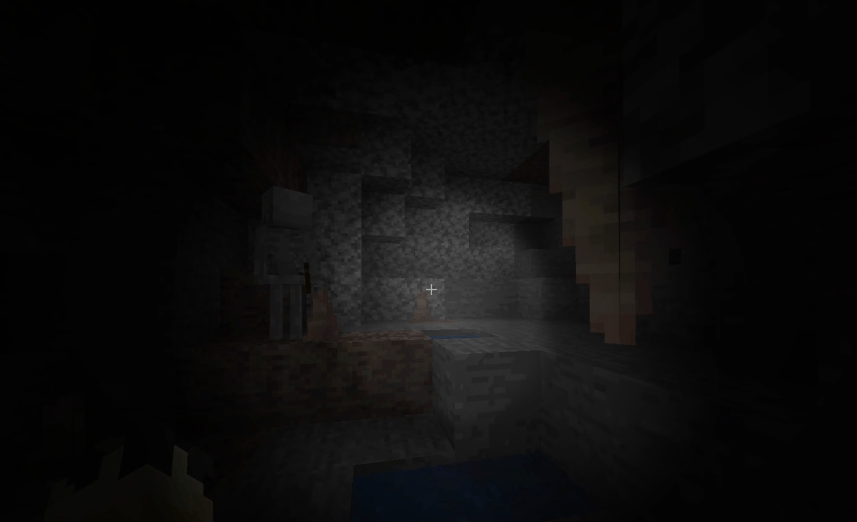
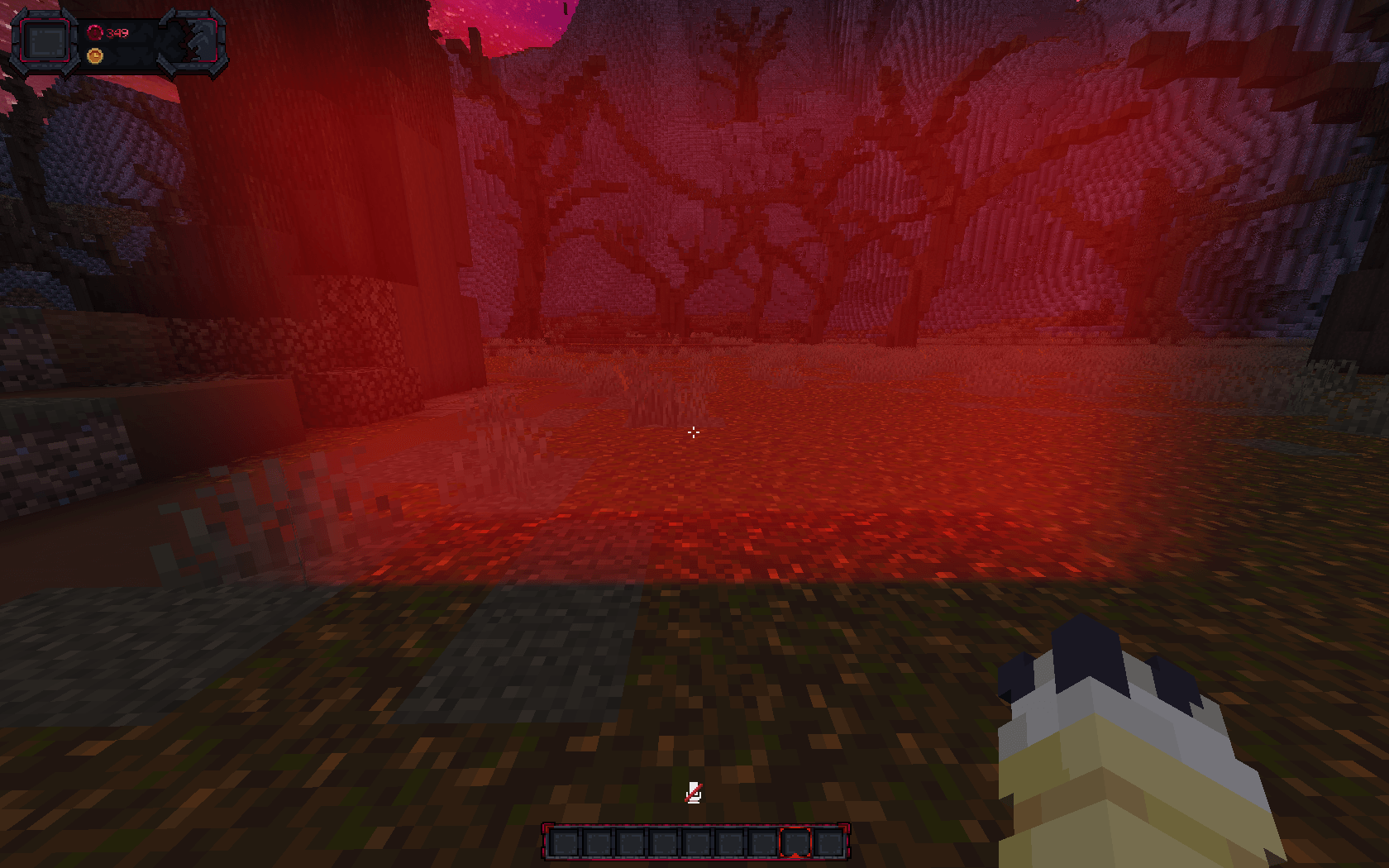
Create colored lights with shapes, glowing atmosphere and animations anywhere in the world: spotlights, cones, beams, sirens, a real flashlight, 13 special shapes that move on their own, and lights on items, blocks, particles, entities and model bones. Use client commands, the visual editor with gizmo, or control everything from a server with the CustomLights plugin.
Lights are drawn on top of the finished frame, so they light blocks, entities, players, held items and your own hand alike, and cost nothing when you cannot see them.
Supported versions
| Loader | Versions |
|---|---|
| Fabric | 1.20.1 · 1.20.4 · 1.21.1 · 1.21.4 · 1.21.5 · 1.21.8 · 1.21.11 · 26.2 |
| NeoForge | 1.20.1 · 1.20.4 · 1.21.1 · 1.21.4 · 1.21.5 · 1.21.8 · 1.21.11 · 26.2 |
| Forge | 1.20.1 · 1.20.4 |
Compatibility
| Fabric | NeoForge | Forge | |
|---|---|---|---|
| Sodium | Sodium | Sodium / Embeddium | Embeddium |
| Shaders | Iris + any shader pack | Iris / Oculus + any shader pack | Oculus + any shader pack |
- Sodium / Embeddium: fully supported, lights follow Sodium’s own culling, so lights hidden in chunks Sodium doesn’t draw cost nothing
- Shaders: fully supported and tested with Complementary Reimagined. The light is added on top of the shader’s image, stays aligned with the world and your camera, and works with the shader’s own lighting

Base command
/customlightFeatures
- 26 shapes:
spherepadconeinverted_conespotlightflashlightsirenbeamringboxstarcrosstriangle, plus 13 special ones, each with a ready-made look - Special shapes that animate themselves:
fireportallightningaurorarippleplasmatornadosingularityruneflaremistcometlaser_door. Their shape changes every frame, each light on its own clock, so two fires never burn the same way - Volumetric atmosphere: beams and glows in the air, with any color (names, HEX or
party) and dark lights that darken instead of lighting - Luminosity: burns the middle of a light towards white and lifts what it touches, for a light that reads as a real source instead of a tint
- Stretch, pivot, angle and direction on every shape, and Through blocks on/off so walls can stop a light
- Real shadows: a light that does not pass through blocks is traced half a block at a time, so slabs, stairs and walls cast the shadow of their real shape, and it lands on the exact pixel the block covers
- Follow lights on a player, an entity (UUID) or every entity with a tag
- Realistic flashlight: white by default, a bright hotspot with a soft halo around it, from your eyes and glued to the camera
- Give flashlights to anyone: hand the flashlight to another player, an entity (UUID) or every entity with a tag, from commands, the editor or the server plugin, so everyone sees who holds it
- Save as many flashlights as you want: a follow light with the
flashlightshape shines from its target’s eyes where it looks, each with its own ID and group - 30+ looping animations: movement, flicker, pulse, strobe, rainbow, disco, police, stage presets (
ballyhoo,search,chase,rotation…), color transitions and size pulses - Move any light to a point with
smooth,linear,steporbounceeasing - Object lights: give a light to any item (per display context, like Blockbench), block, particle, entity, special target (beacon beams, lit blocks, burning or glowing entities, hostile mobs…) or bone
- Model lights: a bone named
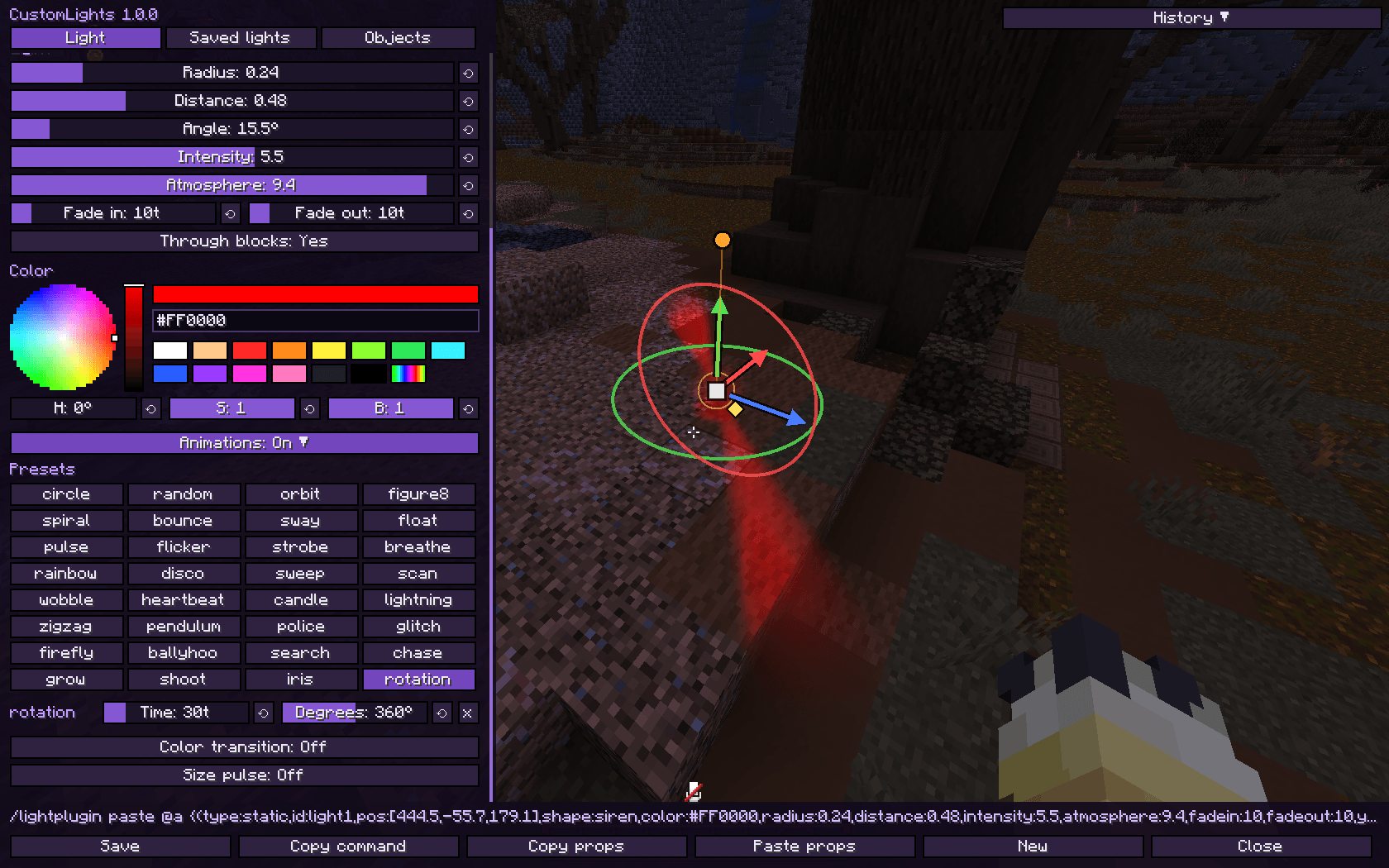
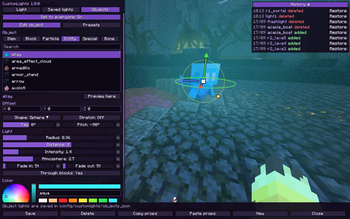
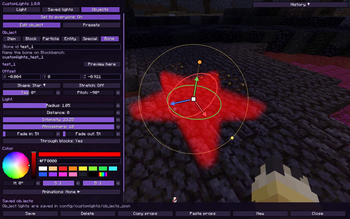
customlights_<id>in GeckoLib, ModelEngine or item models becomes a light that follows its animation - Visual editor with an Axiom-style gizmo, live preview, color wheel, groups, presets, undo/redo and history
- Copy / paste lights as one command, like FogTools
- Groups to turn sets of lights on/off or freeze their animations
- Developer API: one small builder class for other mods, the same on Fabric, NeoForge and Forge
- Performance first: half-resolution lighting, off-screen and hidden lights are skipped, 4 quality levels (
mediumby default) - Compatible with Sodium and shaders (Iris / Oculus, Embeddium on 1.20.x)
- Lights are saved per world and per dimension
- Server control with the CustomLights plugin (Paper): lights for all players, saved on the server, and editing from the editor for operators
Special shapes
fire portal lightning aurora ripple plasma tornado singularity rune flare mist comet laser_door
These move by themselves and come with their own colour and animations when you pick them. In the editor they are the ones written in yellow in the shape list. Everything they set is a normal value, so you can change the colour, the size or any of their animations afterwards, or drop them entirely.
Visual editor
Press J (Controls → CustomLights) or run /customlight editor [id]. You can keep walking while it is open.
- Gizmo in the world: drag the arrows to move along an axis, the square to move freely, the rings to turn and tilt, the knob to aim, the diamond to change the radius, the cyan squares to stretch and the purple diamond to move the pivot. Hold Ctrl to snap
- Light tab: type (static, follow, flashlight), shape, color wheel, sliders for every value, animations, Player position / view / camera buttons
- Pivot sliders: with Stretch: On, the X/Y/Z of the point the stretch grows from. Put it at the bottom of a beam and the beam only grows upwards
- Flashlight Target: pick who holds the flashlight from a list (you, online players, the entity you look at,
tag:), with Tab completion - Saved lights tab: every light in groups you can fold, rename, turn on/off or freeze, with drag and drop
- Objects tab: pick an item, block, particle, entity, special target or bone from a searchable list with icons (mods included), with a 3D preview in front of you
- Presets of object lights you can save, load and share as files
- Copy props / Paste props copy the look of a light onto another one
- Ctrl+S saves, Ctrl+Z / Ctrl+Y undo and redo, and History keeps the last 8 saved or deleted lights
- The bottom bar shows the equivalent command: Copy command to use it in chat or command blocks
- On servers with the plugin, operators get Set to everyone: saving sends the light or object light to every player
Examples
Orange glowing ball:
/customlight set lamp ~ ~1 ~ sphere orange 1 3 2 2 10 10Campfire that burns by itself:
/customlight set bonfire ~ ~ ~ fire orange 0.7 0.35 3 2 10 10Summoning circle on the ground:
/customlight set circle ~ ~ ~ rune aqua 2.4 0.35 2.8 1.5 10 10Laser door across a corridor:
/customlight set door 0.5 70 8.5 laser_door lime 1.4 0.05 3.6 3 10 10 0 -90Stage spotlight pointing down, sweeping around:
/customlight set stage 0.5 75 8.5 spotlight white 1.5 1 4 4 20 20 0 90
/customlight animate stage search 80 30
Rotating police siren:
/customlight set siren1 0.5 70 12 siren red 0.5 0.3 2.6 2.5 10 10
/customlight animate siren1 rotation 40 360
A lamp with a white hot core:
/customlight set core 0.5 70 0.5 sphere red 1 3 2.5 3 10 10
/customlight luminosity core 6
A beam that grows upwards from its base:
/customlight set pillar 0.5 70 0.5 beam gold 0.6 1.5 2 7 10 10
/customlight stretch pillar 1 3 1
/customlight pivot pillar 0 -1 0
Light that follows a player, hidden from their own first person view:
/customlight follow aura Steve 0 1 0 sphere aqua 1.5 2 2 1 10 10 falseParty lights on every entity with a tag:
/customlight follow party tag:dancer 0 2 0 sphere party 1 2 3 2 10 10
/customlight animate party disco 20
Flashlight, then hand it to another player:
/customlight flashlight white 1 8
/customlight flashlight target Steve
Saved flashlight on a player:
/customlight follow torch2 Steve 0 0 0 flashlight white 1 8 2.8 0.35 0 0Move a light with a bounce:
/customlight move lamp ~ ~3 ~ bounce 40Copy and paste a light:
/customlight paste {(type:static,id:lamp,pos:[0.5,70,8.5],shape:cone,color:warm,radius:3,distance:1.5,intensity:2,atmosphere:4,fadein:10,fadeout:10,yaw:0,pitch:90,presets:[pulse:60:0.9],colors:[warm:20,magenta:40])}Commands
/customlight set <id> <x> <y> <z> <shape> <color> <radius> <distance> <intensity> <atmosphere> <fade_in> <fade_out> [yaw] [pitch]
/customlight follow <id> <player|uuid|tag:<tag>|@self> <offX> <offY> <offZ> <shape> <color> <radius> <distance> <intensity> <atmosphere> <fade_in> <fade_out> [yaw pitch] [visible_firstperson]
/customlight move <id> <x> <y> <z> <smooth|linear|step|bounce> <time>
/customlight remove <id|all|flashlight> [fade_out]

/customlight model_id <id> <x> <y> <z> <shape> <color> <radius> <opacity> <light> <fade_in> <fade_out> [distance] [yaw] [pitch]
/customlight model_remove <id|all> [fade_out]

/customlight flashlight <color> <scale> <distance> [intensity] [atmosphere] [camera_delay] [angle] [target]
/customlight flashlight target <player|uuid|tag:<tag>|@self>
/customlight flashlight off

/customlight animate <id> <preset[+preset...]> [time] [amount]
/customlight animate <id> add <preset> [time] [amount]
/customlight animate <id> remove <preset>
/customlight animate <id> color_transition <color1> <ticks1> <color2> <ticks2> [...]
/customlight animate <id> size <radius> <distance> <time>
/customlight animate <id> animation_radius <radius> [time]
/customlight animate <id> stop [all|preset|color|size|radius]

/customlight stretch <id> <x> <y> <z>
/customlight pivot <id> <x> <y> <z>
/customlight luminosity <id> <0-10>
/customlight angle <id> <degrees>
/customlight seethrough <id> <true|false>

/customlight group add|remove <group> [lights...]
/customlight group modify <group> on|off|animations on|animations off|rename <name>
/customlight group list

/customlight copy [id]
/customlight paste [light]
/customlight list
/customlight editor [id]
/customlight toggle
/customlight quality <low|medium|high|ultra>
/customlight stats
Options
| Option | Values |
|---|---|
| shape | sphere pad cone inverted_cone spotlight flashlight siren beam ring box star cross triangle fire portal lightning aurora ripple plasma tornado singularity rune flare mist comet laser_door |
| color | white warm cold red crimson orange lava gold yellow lime green teal aqua cyan blue navy purple magenta pink soul shadow black, HEX #RRGGBB or party |
| radius | Size of the fully lit shape |
| distance | How far the light blurs out past the shape. 0 = hard edge |
| intensity | Brightness. Dark colors darken instead |
| atmosphere | 0–10, light scattered in the air |
| luminosity | 0–10, how hot the middle of the light burns. It holds a white core that grows with the value and eases back to the light’s own colour further out |
| fade_in / fade_out / time | Ticks (20 ticks = 1 second) |
| yaw / pitch | Where the light points (yaw 0 = south, pitch 90 = down) |
| angle | 1–170°, how wide cones, spotlights, flashlights and sirens open |
| stretch | -64–64 on the shape’s own X/Y/Z |
| pivot | -64–64, the point the stretch grows from, on the shape’s own X/Y/Z (0 0 0 = its middle) |
| visible_firstperson | false hides a follow light from the followed player in first person |
| quality | low · medium (default) · high · ultra |
Animations
| Kind | Presets |
|---|---|
| Movement | circle random orbit figure8 spiral bounce sway float zigzag firefly |
| Intensity | pulse flicker strobe breathe heartbeat candle lightning glitch |
| Color | rainbow disco police |
| Direction | sweep scan wobble pendulum |
| Stage | ballyhoo search chase grow shoot iris rotation |
Combine presets with + (circle+pulse), each with its own time and amount. Every preset loops smoothly without jumps.
Object lights
- Items: the light sits inside the item model and moves with it, in the display contexts you turn on (first person, third person, head, ground, item frame), optionally only for one custom model data. Also in first person with shader packs
- Blocks: any block becomes a light where it is placed. Crowds of blocks merge so it stays fast
- Particles and entities carry their light while they live
- Special:
beacon_beamend_gateway_beamend_crystal_beamconduitlit_blocksburning_entityglowing_entitycharged_creeperenchanted_itemenchanted_gearhostile_mobsanimalsplayersprojectilesbossesitem_entities - Bones: name a bone
customlights_<id>in Blockbench (GeckoLib, ModelEngine or item models) and it becomes the light<id>, following the animation
Object lights are shared by every world in config/customlights/objects.json.
Tips
- Coordinates accept
~and~1.5; whole numbers on x/z are centred on the block like/tp /customlight pastewithout text reads the clipboard, so long lights work past the 256 character chat limittag:<tag>follow lights work on their own in singleplayer; on servers the plugin sends the tagged entities/customlight toggleturns every light off and on,/customlight quality lowfor weaker PCs- With a shader pack, the light is added on top of the shader’s image
- Turn Through blocks off on a lamp in a room and its light stops at the walls, with slabs and stairs cutting the shape they really have
For developers
Other mods can place lights through com.cotii.customlights.api.CustomLights, the same class on Fabric, NeoForge and Forge. Lights made this way are the player’s own: saved with the world, shown in the editor and usable in groups.
CustomLights.light("mymod:bonfire")
        .at(12.5, 64, -30.5)
        .style("fire")     // the shape with the look and animations the editor gives it
        .radius(1.4f)
        .luminosity(4)
        .add();

CustomLights.light("mymod:torch")
        .follow("@self", 0, 0, 0)
        .style("flashlight")
        .cameraDelay(2)
        .throughBlocks(false)
        .add();

CustomLights.remove("mymod:torch", 6);
The repository has the full list, the dependency snippet for each loader and a longer example of a flashlight bound to a custom item.
CustomLights Plugin (servers)
With the plugin on a Paper server, send lights to players with the mod (Fabric, NeoForge or Forge). Players without the mod can still join normally.
- Every client command, as
/lightplugin(alias/lpl) with a target:@a,all, a player name or a selector - Lights are saved on the server, sent again when players join, and lights removed while a player was away are gone for them too
- Object lights and presets from the editor are shared with everyone
- Operators can edit server lights from the editor (Set to everyone)
- Tab completes everything: players, ids, groups, shapes, colors, coordinates, presets
- Permission:
customlights.admin(default: OP)
Plugin commands
/lpl set <targets> <id> <x> <y> <z> <shape> <color> <radius> <distance> <intensity> <atmosphere> <fade_in> <fade_out> [yaw] [pitch]
/lpl follow <targets> <id> <target> <offX> <offY> <offZ> <shape> ... [yaw pitch] [visible_firstperson]
/lpl move <targets> <id> <x> <y> <z> <smooth|linear|step|bounce> <time>
/lpl remove <targets|all> <id|all> [fade_out]
/lpl model_id <targets> <id> <x> <y> <z> <shape> <color> <radius> <opacity> <light> <fade_in> <fade_out> [distance] [yaw] [pitch]
/lpl model_remove <targets> <id|all> [fade_out]
/lpl animate <targets> <id> <preset[+preset]> [time] [amount]
/lpl stretch <targets> <id> <x> <y> <z>
/lpl pivot <targets> <id> <x> <y> <z>
/lpl luminosity <targets> <id> <0-10>
/lpl angle <targets> <id> <degrees>
/lpl seethrough <targets> <id> <true|false>
/lpl group <targets> list | add <group> [ids] | remove <group> [ids] | modify <group> on|off|animations <on|off>
/lpl flashlight <targets> <color> <scale> <distance> [intensity] [atmosphere] [camera_delay] [angle] [holder] | target <holder> | off
/lpl object list | object remove <key|all>
/lpl preset list | preset remove <name|all>
/lpl paste <targets> {(...)}
/lpl list [targets]
/lpl reload
Plugin examples
/lpl set @a spawnlight 0 72 0 beam gold 0.8 1 3 4 20 20
/lpl animate @a spawnlight breathe 60
/lpl set @a gate 0 70 20 portal purple 1.8 0.7 2.4 3.5 20 20
/lpl luminosity @a gate 5
/lpl follow @a crown Steve 0 2.3 0 sphere gold 0.4 1 3 2 10 10
/lpl move @a spawnlight ~ ~5 ~ smooth 60
/lpl flashlight @a white 1 8 2.8 0.35 0 40 Steve
/lpl remove all
常见问题
Custom Lights 支持哪些 Minecraft 版本?
Custom Lights 支持 Minecraft Java 版 1.20.1–26.2,共 8 个版本,可用的加载器:Fabric / Forge / NeoForge。下载时注意选择和你游戏版本一致的文件。
Custom Lights 怎么安装?
先用 PCL2 或 HMCL 启动器安装对应版本的 Fabric / Forge / NeoForge,再把下载的 .jar 文件放进游戏目录的 mods 文件夹,重新启动游戏即可。开启了版本隔离的,mods 文件夹在 versions/版本名 下面。
Cotii_ 的其他作品
查看全部 →
Custom Waypoints
This mod allows you to create custom waypoints with extensive customization and utilities using commands.
CustomSkyboxes
Custom Skyboxes is a mod that allows you to change the sky,clouds, sun, moon, rain, snow, and stars and custom rifts or Geckolib Models in the sky in real time with a texture or GIF with Commands!

Animated Items
Turn any item into a 3D animated GeckoLib model with just a resource pack: first person animations, your skin on the arms, camera moves, combos and keybinds. Client side.
评论
登录后评论和评分