
Custom Interaction Sounds
Minecraft Forge singleplayer/multiplayer mod to add custom sounds to player interactions with blocks, items and entities.
截图
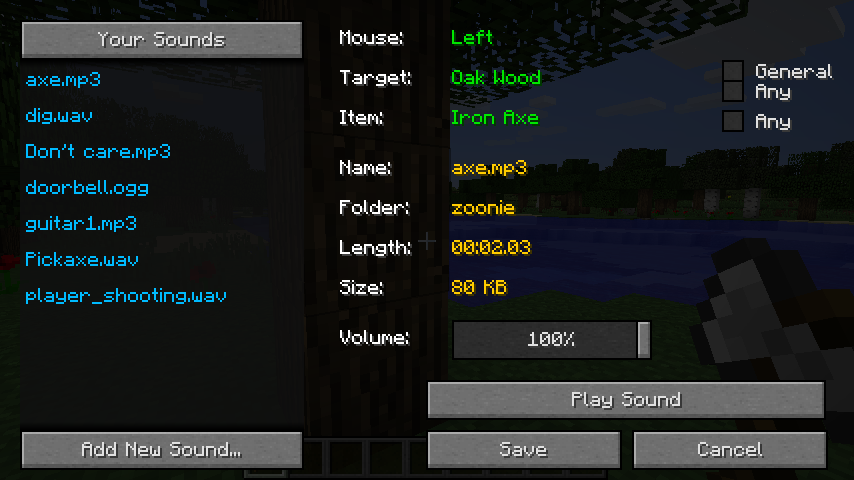
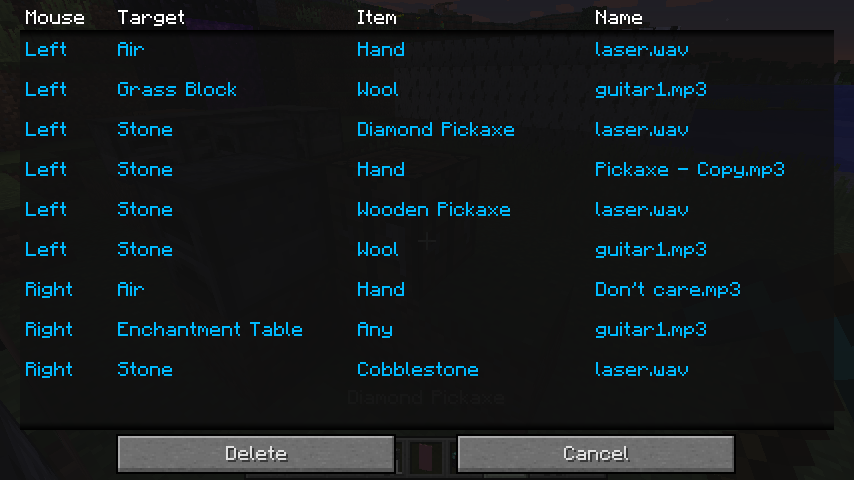
介绍

Custom Interaction Sounds allows you to play your own custom sounds when you interact in Minecraft using the left and right click of your mouse. These sounds are played to everyone when both server and clients have the mod installed.
Usage
Holding the ‘R’ key while clicking brings up the menu to assign either an existing sound or a new sound from your file system to the current interaction.
The ‘L’ key displays a list of your interactions and their assigned sounds.
- Sounds are loaded and saved to ‘~Minecraft~Install~Folder~/sounds/Custom Interaction Sounds/’ which is also where the interaction->sound mappings file is located(CustomInteractionSounds.json).
- Adding a sound in the game will save it within a folder named by your Minecraft account name.
- Any sound directly within ‘/sounds/’ or a sub directory will be loaded.
- The format of sounds can be mp3, wav or ogg.
- Any sound used by someone on the server is available for everyone else to use.
Client Config
The config file for the client has the option to mute the default sounds normally played when you left or right click a block and also has the option to mute the custom sounds of other players in multiplayer.
Server Config
The config file for the server allows you to specify the length of sounds that can be played on the server. There is also the option to force all players to play the same sounds for the same interactions. This is done by merging the ‘sounds’ folder from a client into the ‘sounds’ folder of the server. The server will then be able to load the copied over mappings file and all the required sounds.
Open Source
https://github.com/zoonie/CustomInteractionSounds
Minecraft Forum Link
常见问题
Custom Interaction Sounds 支持哪些 Minecraft 版本?
Custom Interaction Sounds 支持 Minecraft Java 版 1.7.10–1.8,共 2 个版本,可用的加载器:Forge。下载时注意选择和你游戏版本一致的文件。
Custom Interaction Sounds 怎么安装?
先用 PCL2 或 HMCL 启动器安装对应版本的 Forge,再把下载的 .jar 文件放进游戏目录的 mods 文件夹,重新启动游戏即可。开启了版本隔离的,mods 文件夹在 versions/版本名 下面。
评论
登录后评论和评分