
介绍
Custom Hitboxes!
This mod is a complete overhaul of minecraft’s hitboxes, allowing you to customize them along with added functionalities, such as specific team colors per hitbox, or damage colors.
Features
Hitbox styles
Every style has a live preview in the menu, so you can see your changes as you make them.
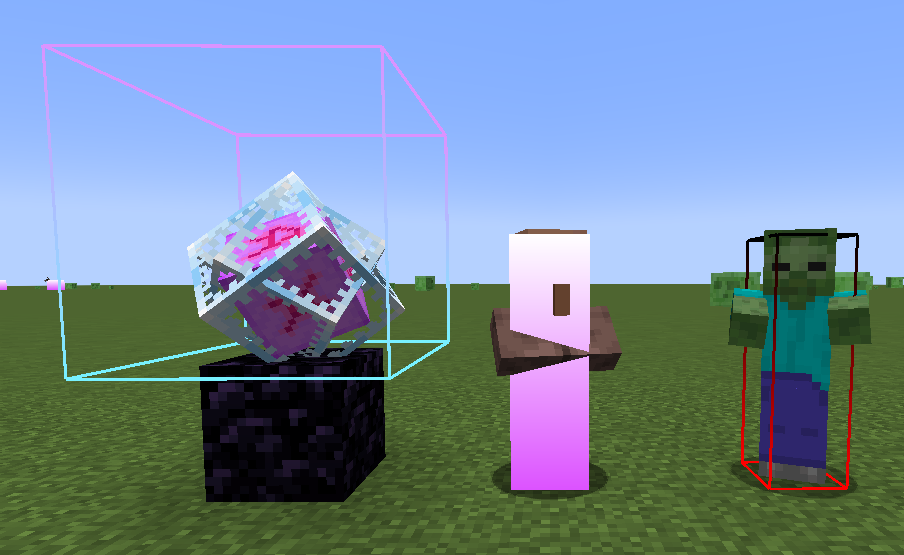
- Lines: width, colour, and an optional gradient into a second colour towards the top.
- Fill: a filled hitbox with its own colour and optional gradient.
- Rainbow colours: any colour can be set to rainbow from the colour picker.
- Look vector: a line showing where the entity is looking, with adjustable length, colour and an optional arrow.
- Eye height: a thin box at the entity’s eye level, outlined or filled.
Highlights
Recolour a hitbox while the entity is:
- Hurt: during its damage tick.
- Targeted: while your crosshair is on it.
- In range: while it’s within your reach.
Hitbox vanishing (idea from pCrit)
Hide hitboxes when an entity gets within a set distance, to cut the clutter (like end crystal or player hitboxes) at the range you PvP at. Turn on Vanish Fade to have them fade out gradually instead of disappearing at once.
Per-entity styles
Add any entity on the Entities page to give it its own style. Turn on Only Listed Entities to draw hitboxes only for the entities you’ve added.
Team styles
Teams are shared across all WalksyLib mods. Put players in a team once, then turn on Apply Team Style in Custom Hitboxes to give that team’s players their own hitbox style. This is great for teamfights.
General
- A keybind to toggle hitboxes on and off.
- Show hitboxes automatically when the game starts.
- Choose whether to show your own hitbox.
- Only show player hitboxes while they’re gliding.
Examples of gradient hitboxes:
Credits
- Mod: Walksy
常见问题
Custom Hitboxes 支持哪些 Minecraft 版本?
Custom Hitboxes 支持 Minecraft Java 版 1.21–26.3,共 17 个版本,可用的加载器:Fabric。下载时注意选择和你游戏版本一致的文件。
Custom Hitboxes 怎么安装?
先用 PCL2 或 HMCL 启动器安装对应版本的 Fabric,再把下载的 .jar 文件放进游戏目录的 mods 文件夹,重新启动游戏即可。开启了版本隔离的,mods 文件夹在 versions/版本名 下面。运行环境:仅客户端。
Walksy 的其他作品
查看全部 →
WalksyLib
我的模组用的配置/实用工具前置库

Shield Statuses
显示盾牌状态,并以颜色区分。此模组由 Walksy 移植到新版本并进一步改进。

Shield Fixes
修复了盾牌音效问题,并修正了玩家盾牌格挡时动画显示异常的故障。

Crosshair Addons Public
满足特定条件时,在准星周围显示实用图标。
评论
登录后评论和评分