
Custom Disenchanter
Precision enchantment removal - keep what you want, remove what you don't.
截图


介绍
Custom Disenchanter
Overview
Custom Disenchanter is a next-generation Minecraft mod that completely redefines enchantment management.
Unlike the vanilla Grindstone, which removes _all_ enchantments, this mod introduces a dedicated Disenchanter Block — allowing you to selectively extract enchantments from your items with full control.
Features
- Selective Enchantment Removal — Remove specific enchantments without affecting others
- Intuitive GUI — Easy-to-use interface for managing your enchanted items
- Custom Creative Tab — Access all disenchanter-related items quickly
- Full Capability Support — Inventory persists properly and supports hoppers
- Multiplayer Ready — Works flawlessly in single-player and server environments
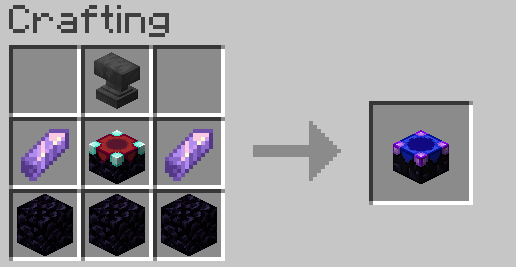
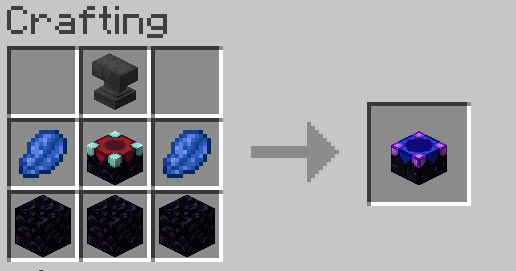
Crafting Recipes
Recipe (Minecraft 1.17+)
Recipe (Minecraft 1.16.5 & below)
How to Use
- Craft or obtain a Disenchanter Block
- Place it in your world
- Right-click to open the interface
- Important: You must have at least one book in your inventory to store removed enchantments
- Insert your enchanted item
- Select the enchantment(s) to remove
- Retrieve your modified item and the book containing the extracted enchantment(s)
Community & Support
Join our Discord community for help, feedback, and updates!

License & Credits
Developed by OSAMA
All rights reserved.
Feel free to share and use in your modpacks with credit.
常见问题
Custom Disenchanter 支持哪些 Minecraft 版本?
Custom Disenchanter 支持 Minecraft Java 版 1.16.5–26.3,共 19 个版本,可用的加载器:Fabric / Forge / NeoForge / Quilt。下载时注意选择和你游戏版本一致的文件。
Custom Disenchanter 怎么安装?
先用 PCL2 或 HMCL 启动器安装对应版本的 Fabric / Forge / NeoForge / Quilt,再把下载的 .jar 文件放进游戏目录的 mods 文件夹,重新启动游戏即可。开启了版本隔离的,mods 文件夹在 versions/版本名 下面。运行环境:客户端和服务端都要装。
OSAMA1 的其他作品
查看全部 →
LightAura
A mod that makes the player holding any light source, such as a torch , glowstone, etc, automatically illuminate the surrounding area.

ChainVein
"ChainVein" enhances mining efficiency in Minecraft by enabling vein mining. Mine connected blocks and ores and wood in a chain with a single keypress for a faster and more streamlined experience.

TimberReplant
Automatically fell entire trees and replant saplings with one block break! Sustainable forestry made easy with configurable settings and proper tool durability.

AutoSow
AutoSow automatically replants crops when harvested, making farming more efficient and enjoyable. Compatible with all vanilla crops and works with any tool or bare hands.
评论
登录后评论和评分