Custom Block Outline
作者:Fiverok
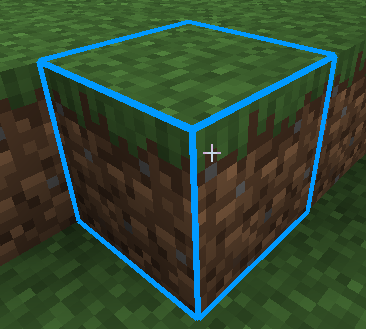
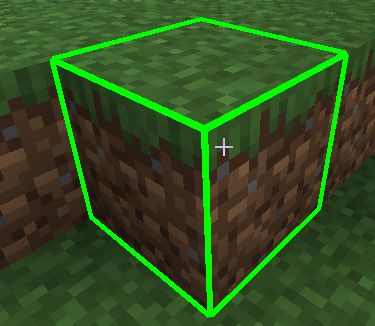
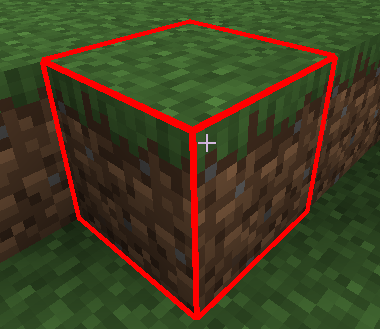
Custom Block Outline A simple yet highly useful client-side mod that replaces Minecraft's default, boring black block selection outline with a vibrant, fully customizable colored highlight!
截图
介绍
中文介绍正在准备中,下面暂时显示原文。
Custom Block Outline
A simple yet highly useful client-side mod that replaces Minecraft’s default, boring black block selection outline with a vibrant, fully customizable colored highlight!
Now you can perfectly see which block you are targeting, even in the deepest, darkest caves or while building complex structures.
🌟 Features:
- Color Selection on the Fly: Toggle between Cyan (Blue), Red, Green, or default Black directly in-game.
- Thickness Adjustment: Make the outline ultra-thin or thick and bold for maximum visibility.
- No Restarts Needed: All changes are applied instantly without reloading the world or restarting the game.
🎮 How to Use:
- Look at any block in the world.
- Press the K key on your keyboard to open the configuration menu.
- Select your preferred color or adjust the line thickness using the
+0.5/-0.5buttons. - Click Done to save and return to the game.
📌 Requirements:
- Minecraft Version: 1.20.1
- Mod Loader: Forge
- This is a Client-Side mod. You can safely use it on multiplayer servers without needing it installed on the server side.
常见问题
Custom Block Outline 支持哪些 Minecraft 版本?
Custom Block Outline 支持 Minecraft Java 版 1.20.1,可用的加载器:Forge。下载时注意选择和你游戏版本一致的文件。
Custom Block Outline 怎么安装?
先用 PCL2 或 HMCL 启动器安装对应版本的 Forge,再把下载的 .jar 文件放进游戏目录的 mods 文件夹,重新启动游戏即可。开启了版本隔离的,mods 文件夹在 versions/版本名 下面。运行环境:仅客户端。
评论
登录后评论和评分