
截图
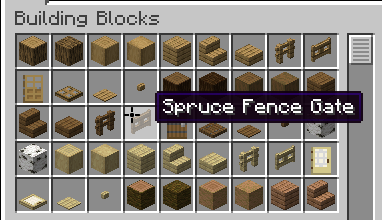


介绍
Cursor+
Replace Minecraft’s default mouse cursor with a custom one.
Cursor+ is a lightweight Fabric mod that changes the system cursor Minecraft uses in menus and GUI screens. Simply install the mod and the default cursor is replaced automatically.
Features
- Replaces Minecraft’s default mouse cursor.
- Works in menus, inventories, and other GUI screens.
- Lightweight with no unnecessary features.
- No configuration required.
- Client-side only.
Compatibility
- Minecraft: 1.21.1
- Loader: Fabric
Installation
- Install the Fabric Loader.
- Download Cursor+.
- Place the mod in your
modsfolder. - Launch the game.
FAQ
Does this replace the in-game crosshair?
No. Cursor+ only replaces the operating system cursor that Minecraft shows while navigating menus and GUI screens. The gameplay crosshair is unchanged.
Does this work on servers?
Yes. The mod is entirely client-side and can be used on any server.
Does this require any configuration?
No. Install the mod and it works automatically.
Planned Features
- Multiple cursor styles.
- Custom cursor packs.
- Cursor customization options.
- Configuration menu.
🤝 Support & Feedback
Found a bug? Report it via our Discord. If you enjoy the plugin, leaving a star or a review helps support future updates.
常见问题
Cursor+ 支持哪些 Minecraft 版本?
Cursor+ 支持 Minecraft Java 版 1.21.1,可用的加载器:Fabric。下载时注意选择和你游戏版本一致的文件。
Cursor+ 怎么安装?
先用 PCL2 或 HMCL 启动器安装对应版本的 Fabric,再把下载的 .jar 文件放进游戏目录的 mods 文件夹,重新启动游戏即可。开启了版本隔离的,mods 文件夹在 versions/版本名 下面。运行环境:仅客户端。
评论
登录后评论和评分