
Cursor Origin
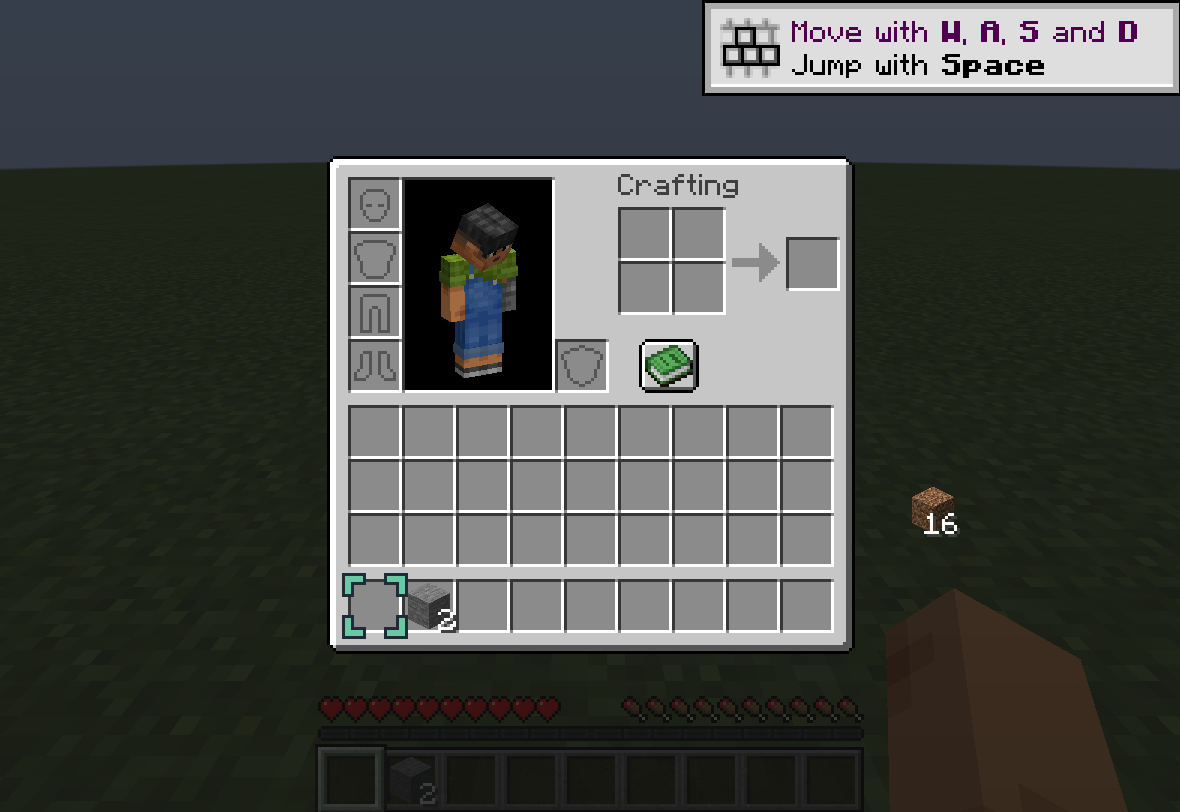
See where the stack on your cursor came from, without changing inventory controls.
截图
介绍
Cursor Origin
A quiet mint corner marker shows where the stack on your cursor came from. Pick up a stack or half a stack normally; place some elsewhere and the marker stays with the known remainder. No keybinds, commands, sorting, item movement, network messages or saved inventory history.
Supported scope
Vanilla player inventory (ordinary storage/crafting-input slots), chest, barrel and shulker screens. Exact vanilla screen/menu classes only. Custom, creative, result and armor slots are intentionally not tracked. Mouse/touchscreen mode is excluded on 1.21.1. The marker clears on collect-all, drag distribution, hotbar swaps, unsupported actions, unexpected cursor changes, closing screens and disconnecting. A plain swap to a different item updates the source marker.
This is a visual record of a locally observed click, not authoritative ownership of identical items. Server corrections may erase the marker. It cannot identify invisible server-side changes that leave an identical cursor stack. It does not predict destinations (Transfer Lens does that) or highlight all matching items.
Client-only, no server installation needed. Available for Minecraft 1.21.1, NeoForge 21.1.265+, Java 21. No 26.3 download is released. New beta; bugs may remain. Exact release tested in actual player inventory and chest, GUI scales 2/3, pickup/split/swap/partial placement and marker clearing. 39 production-tracker model assertions passed; these are not network tests. Co-load checked with Mouse Tweaks 2.26.1 and Transfer Lens. Remote-server latency, every container family, custom screens, every GUI scale/resource pack and all item components remain untested.
Original implementation and flat icon by RickCode, MIT. No borrowed game/mod artwork or source. Built using standard NeoForge/Mixin integration.
常见问题
Cursor Origin 支持哪些 Minecraft 版本?
Cursor Origin 支持 Minecraft Java 版 1.21.1,可用的加载器:NeoForge。下载时注意选择和你游戏版本一致的文件。
Cursor Origin 怎么安装?
先用 PCL2 或 HMCL 启动器安装对应版本的 NeoForge,再把下载的 .jar 文件放进游戏目录的 mods 文件夹,重新启动游戏即可。开启了版本隔离的,mods 文件夹在 versions/版本名 下面。
RickCode 的其他作品
查看全部 →
Wayfarer’s Ledger
A focused exploration mod with personal camps, biome surveys, milestone rewards, trail rations, and balanced recall.

Rail Trace
Inspect vanilla rail connections, open ends, slopes and loops with a bounded, read-only topology report.

Before You Go
Check expedition supplies, durability, free inventory slots and equipment before your next trip.

Last Good Tick
Record redstone signals before and after a stopped clock or stuck-high signal, then inspect the timeline.
评论
登录后评论和评分