
Cull Display Entities
Forces display entities to be culled, improving performance
截图
介绍
Cull Display Entities
Implements visibility bounding boxes for Display Entities.
Minecraft uses Frustum Culling, which in simple terms hides things that are behind the camera.
However, by default blockdisplay entities have this optimization disabled when the “width” and “height” tag are not set (see the Minecraft Wiki “Tags common to all display entities”).
Because most servers don’t set this property when using blockdisplay entities, this means that they won’t get culled on the client, when behind the camera. This
mod fixes that issue, by calculating the bounding box for unconfigured blockdisplay entities. This also has the advantage of culling the entities when
using Entity Culling.
This can improve performance, especially when the server/world you are playing in has a lot of display entities.
In some cases blockdisplayentities might be culled incorrectly, if the model displayed too large.
Mod OFF vs. ON
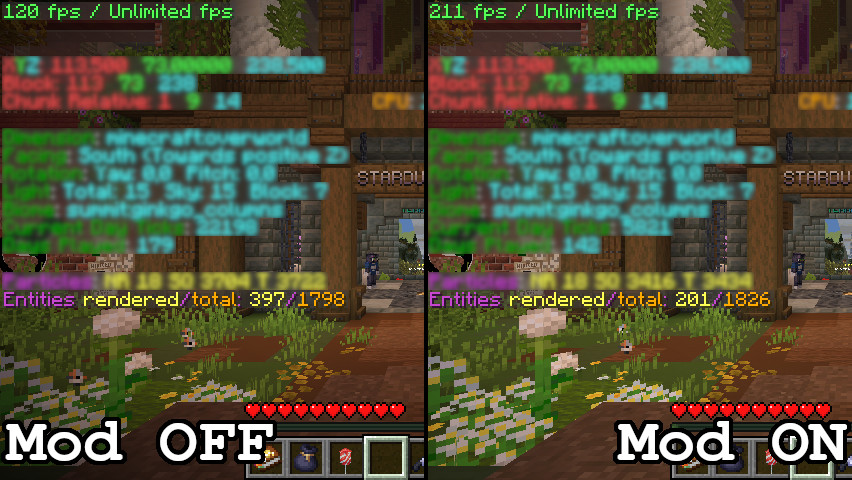
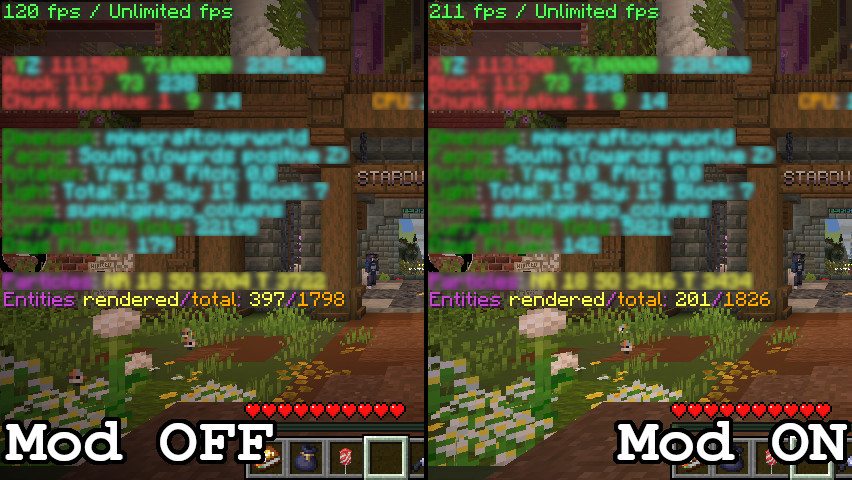
The above screenshots were taken on summit.smithed.net, a particularly heavy server to play on (wynncraft as well), unrelated information blurred to make the image easier to look at. This is an ideal case scenario with lots of display entities that couldn’t be culled before (down from 397 rendered entities to just 201, almost half!). Because of this, fps significantly improved as well, from 120 to 211. Depending on the server you are playing this mod might simply do nothing at all.
常见问题
Cull Display Entities 支持哪些 Minecraft 版本?
Cull Display Entities 支持 Minecraft Java 版 26.2–26.3,共 2 个版本,可用的加载器:Fabric。下载时注意选择和你游戏版本一致的文件。
Cull Display Entities 怎么安装?
先用 PCL2 或 HMCL 启动器安装对应版本的 Fabric,再把下载的 .jar 文件放进游戏目录的 mods 文件夹,重新启动游戏即可。开启了版本隔离的,mods 文件夹在 versions/版本名 下面。运行环境:仅客户端。
JustAlittleWolf 的其他作品
查看全部 →
Smooth Scrolling Refurbished
将游戏中的大多数滚动条改为平滑滚动。

Server Pinger Fixer
改善多人服务器列表的 Ping 行为

Centered Crosshair
将准星完美置于屏幕中央

Riding Mouse Fix
Fixes the sluggishness of the mouse when riding on entities.
评论
登录后评论和评分