
截图
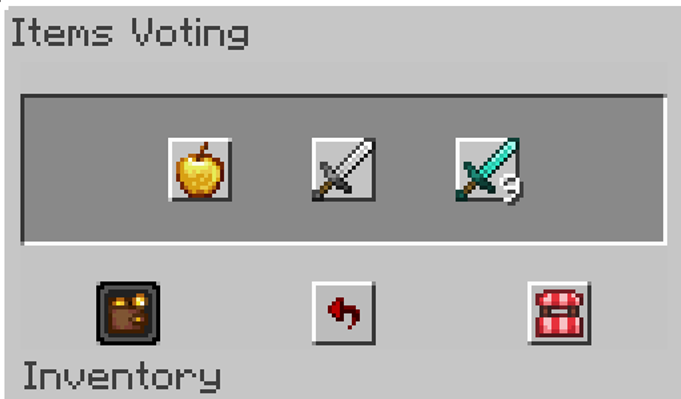
介绍
Cube Auto Vote
Stop clicking through the voting menu every single game.
When CubeCraft hands you the Voting item at the start of a match, Cube Auto Vote picks
your preferred options for you — Overpowered chests, Normal health, whatever you’ve
configured — the moment the item appears, and confirms the vote before the game starts.
Voting happens headlessly. No menu flashes open, nothing steals your screen, and your
camera never gets yanked away. Your vote is in within the same second the Voting item shows
up — you’ll only notice it because it’s already done.
Features
- Instant automatic voting — uses the Voting item in the very tick it appears (no start delay by default) and votes for every category you’ve configured
- Invisible by default — the voting menus are handled in the background; you can turn this off if you’d rather watch it happen
- Interference-proof — while the short vote sequence runs, movement and gameplay clicks are frozen exactly as if a GUI were open, so nothing you press can cancel the vote halfway through. Camera look and the ESC menu keep working, and chat or any menu you have open stays open
- Automatic retry — if the server never confirms your vote, the mod tries again when the game announces it’s starting in 5 seconds
- Layout editor — if CubeCraft moves its menu items, renames options or adds a game or category, fix it yourself in game by clicking the items in the real menus. No mod update needed
- In-game settings screen — configure everything from
/cubeautovote settingsor the config button in Mod Menu - Per-category choices — every game’s categories are configurable individually, and any category can be set to Don’t vote
- Only on CubeCraft — the mod checks the server address and does nothing anywhere else. It never touches your inventory in singleplayer or on other servers
Demo video
Supported games
| Game | Categories |
| — | — |
| Team EggWars | Perks · Items · Health |
| Solo SkyWars | Chest Items · Projectiles · Time |
| Lucky Islands (Solo & Team) | Blocks · Time |
| BedWars | Modifier |
| Pillars of Fortune | Game Mode · Map Mode |
| Lucky Pillars | Item Modifier · Block Mode |
| Disasters | Mode |
| Ender | Team |
Sensible defaults are pre-selected, so the mod is useful the moment you install it — but
you’ll probably want to set your own picks. Games and categories CubeCraft adds later can
be added in the layout editor.
Configuration
Open the settings with /cubeautovote settings, or through Mod Menu. You can adjust:
- Auto Vote — on/off
- Headless — vote invisibly, or let the menus open on screen
- Delay — extra wait after the Voting item appears (0–5000 ms, default 0)
- Menu timeout — how long to wait for each menu before giving up
- Game options — your preferred option for every voting category
- Voting layout editor — see below
Settings are saved to config/cubeautovote.json. Updating from 1.0.x? If you never
changed the old 250 ms default delay, it’s switched to 0 automatically; a delay you picked
yourself is kept.
Commands
| Command | What it does |
| — | — |
| /cubeautovote settings | Open the settings screen |
| /cubeautovote layout | Open the voting layout editor |
| /cubeautovote menus | List the voting menus seen this session, slot by slot |
| /cubeautovote status | Debug info: current state, detected game, open menu |
| /cubeautovote enable · disable · toggle | Turn auto-voting on or off |
| /cubeautovote headless | Toggle invisible voting |
| /cubeautovote delay <ms> · timeout <ms> | Adjust timings |
| /cubeautovote options | List every game, category and your current picks |
| /cubeautovote set <category> <option> | Set a pick from chat (with tab completion) |
Installation
- Install Fabric Loader for your Minecraft version
- Download the jar for your Minecraft version from the Versions tab — one jar covers 1.21.10–1.21.11, the other covers 26.1–26.3
- Drop it in your
modsfolder together with Fabric API
Client-side only — nothing to install on any server.
Requirements
| Minecraft | Java |
| — | — |
| 1.21.10 · 1.21.11 | 21+ |
| 26.1.x · 26.2 · 26.3 | 25+ |
Fabric Loader 0.16 or newer and Fabric API are required. Mod Menu
is optional and only adds the config button to the mod list.
If CubeCraft changes their menus
Open the layout editor with /cubeautovote layout (or the button in the settings):
- On CubeCraft, right-click the Voting item and open each voting menu once — the mod remembers what it sees (menus it opens invisibly while voting count too)
- Pick a game and a category, or add new ones
- Set slots by clicking the actual items in those remembered menus, or type the slot numbers in
- Hit Save — the layout is checked for mistakes and used immediately. If the Voting item is still in your hotbar, the mod votes again right away with the new layout
Reset to built-in goes back to the layout that ships with the mod. Your edits are kept
in config/cubeautovote_catalog.json, so you can also share that file or edit it by hand.
The mod also verifies an item’s name before clicking it and searches the menu if a slot
moved, so small layout changes usually fix themselves.

Note
This mod automates an in-game interaction. That may be against CubeCraft’s rules — use it
at your own risk. It only clicks the voting menus, does nothing that affects gameplay
itself, and stays completely inactive outside CubeCraft.
Credits
Voting menu layout and behavior reference: Cubepanion,
licensed under MIT.
常见问题
CubeCraft AutoVote 支持哪些 Minecraft 版本?
CubeCraft AutoVote 支持 Minecraft Java 版 1.21.6–26.3,共 11 个版本,可用的加载器:Fabric。下载时注意选择和你游戏版本一致的文件。
CubeCraft AutoVote 怎么安装?
先用 PCL2 或 HMCL 启动器安装对应版本的 Fabric,再把下载的 .jar 文件放进游戏目录的 mods 文件夹,重新启动游戏即可。开启了版本隔离的,mods 文件夹在 versions/版本名 下面。运行环境:仅客户端。
IDreamAboutYou 的其他作品
查看全部 →
Visible Durability
这款资源包会显示 Minecraft 中每件盔甲的耐久度,包括皮革、铜、锁链、铁、金、钻石和下界合金盔甲,甚至连海龟壳也包括在内,哈哈。

Armor Durability Numbers (1.8-1.21+)
查看各类盔甲的耐久状态:皮革、锁链、铁、金、钻石和下界合金。

CubeCraft Level + Rank
Shows CubeCraft player levels and rank colors in nametags and the tab list.

Larger Emeralds
Makes dropped emeralds larger.
评论
登录后评论和评分