
CreativeEasy
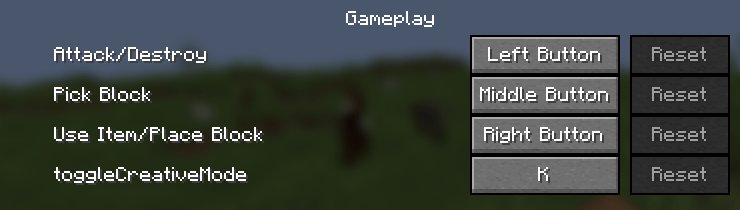
Instantly toggle between Survival and Creative mode with a single key press (Cheat-protected).
截图

介绍
CreativeEasy is a lightweight and efficient utility mod designed to streamline your building and testing workflow in Minecraft. No more typing long commands like /gamemode creative every time you need to fly or grab a block.
🚀 Key Features:
-
Instant Toggle: Switch between Survival and Creative modes by simply pressing the “K” key.
-
Permission System: To prevent abuse, the toggle only works if the player has Cheats Enabled or Operator Permissions (Level 2+). If cheats are off, the key does nothing!
-
Smart Logic: The mod detects your current state; if you are in Survival, it sets you to Creative. If you are already in Creative, it brings you back to Survival.
🛠️ How to use:
-
Make sure you are in a world with Cheats ON.
-
Press [K] on your keyboard.
-
Enjoy the speed of building without command menus! (Note: You can rebind the key to any other letter in the standard Minecraft Controls menu).
🔧 Technical Info:
-
Loader: NeoForge
-
Version: 1.21.1 (or your specific version).
-
Type: Client & Server Side.
常见问题
CreativeEasy 支持哪些 Minecraft 版本?
CreativeEasy 支持 Minecraft Java 版 1.21.1,可用的加载器:NeoForge。下载时注意选择和你游戏版本一致的文件。
CreativeEasy 怎么安装?
先用 PCL2 或 HMCL 启动器安装对应版本的 NeoForge,再把下载的 .jar 文件放进游戏目录的 mods 文件夹,重新启动游戏即可。开启了版本隔离的,mods 文件夹在 versions/版本名 下面。

评论
登录后评论和评分