
Creative Tab Optimizer
Save and reorder favorite creative tabs , and reduce creative inventory loading time with safe tab caching for haveay modpacks
介绍
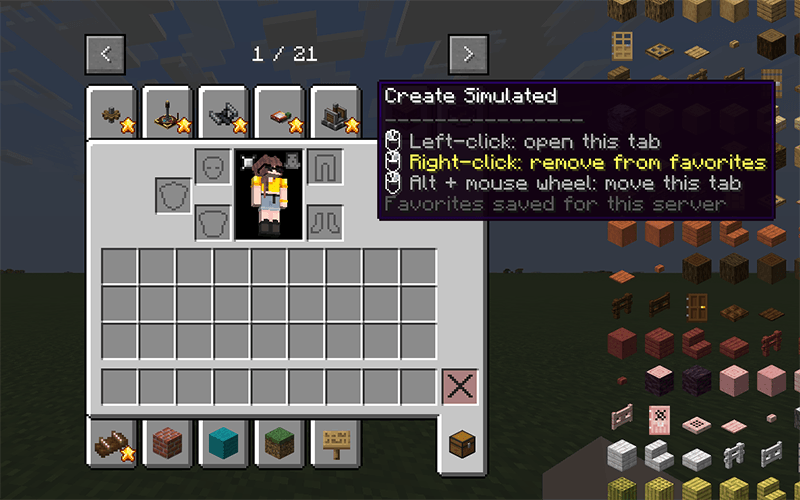
Creative Tab Optimizer is a client-side NeoForge mod for large creative inventories.
It adds global favorite tabs and caches creative tab contents after their first build to reduce later loading times.
Features:
- Add or remove favorites with right-click
- Reorder favorites with Alt + mouse wheel
- Share favorites across all servers and singleplayer worlds
- Move favorite tabs to the front of the creative inventory
- Cache complete creative tab contents
- Improve switching between a creative tab and the inventory tab
- Report slow tabs and mod namespaces in the client log
- Support optional JEI 19.53.x, JEIOptimizer, and ModernFix
- Clear invalid caches after reloads and disconnections
- Fall back to normal Minecraft behavior if the cached data cannot be used
How it works:
The first tab build runs normally on the client thread. The mod stores an immutable snapshot of the generated items and reuses it only when the server context, registries, permissions, feature flags, and reload state match.
Tab generators are never parallelized. Only safe operations on already generated data, such as indexing and deduplication, may run outside the client thread.
The mod is client-side only. It does not need to be installed on the server.
Platform: NeoForge/forge/fabric 1.21.1.
常见问题
Creative Tab Optimizer 支持哪些 Minecraft 版本?
Creative Tab Optimizer 支持 Minecraft Java 版 1.21.1,可用的加载器:Fabric / Forge / NeoForge。下载时注意选择和你游戏版本一致的文件。
Creative Tab Optimizer 怎么安装?
先用 PCL2 或 HMCL 启动器安装对应版本的 Fabric / Forge / NeoForge,再把下载的 .jar 文件放进游戏目录的 mods 文件夹,重新启动游戏即可。开启了版本隔离的,mods 文件夹在 versions/版本名 下面。
Yassouu__ 的其他作品
查看全部 →
Pint decorations
装饰家具模组

Holycube Additions
Holycube SMP 专用模组

Flanny FNAF
由社区打造的 FNAF 宇宙主题模组。

Mimz Pack – 3D color axolotl in buckets and cute mobs(Optifine)
桶中装着各种颜色的可爱动态美西螈,还有可爱的 3D 生物。
评论
登录后评论和评分