Creative Dimensions
This datapack/mod adds the creative dimension—a parallel dimension to the overworld where you can unleash your creativity in creative mode.
介绍
Creative Dimension
This datapack/mod adds the creative dimension—a parallel dimension to the overworld where you can unleash your creativity in creative mode.
How to use
- Craft a Creative Core using following recipe:
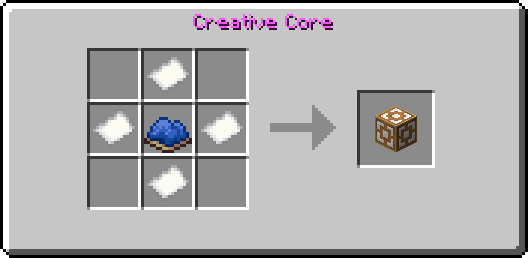
You can also run instead (does not work in 26.3) /loot give [target] loot creativedim:creative_core
- Store all your items in for example in a chest because when you leave the creative dimension your inventory will be wiped
- Holdrightclick the item for 5-10sec in the overworld (a warning will appear)
- After that you will ported into the creative dimension and your gamemode will be set to creative
- Holdrightclick the item for 5-10sec again
- You will now ported back into the overworld and your inventory will be cleared

Importan to know ⚠️
- After switching back to the overworld your inventory will be deleted to prevent cheating (to save your items store them for example in the enderchest before going to the creative dimension)
- Following items are disabled in the creative dimension to prevent cheating
- Eye of ender
- Enderchest
- This pack is only required on the server side (you need only to install it on your server or the host world)
Credits ♥️
🖌️Thanks to Foxeddev for making the cool Icon♥️
💡Big thanks to Kyoko883 Kyoko883 for the full idea of the creative dimension ♥️
常见问题
Creative Dimensions 支持哪些 Minecraft 版本?
Creative Dimensions 支持 Minecraft Java 版 1.21.4–26.3,共 13 个版本,可用的加载器:Fabric / Forge / NeoForge / Quilt。下载时注意选择和你游戏版本一致的文件。
Creative Dimensions 怎么安装?
先用 PCL2 或 HMCL 启动器安装对应版本的 Fabric / Forge / NeoForge / Quilt,再把下载的 .jar 文件放进游戏目录的 mods 文件夹,重新启动游戏即可。开启了版本隔离的,mods 文件夹在 versions/版本名 下面。
Tostbroti 的其他作品
查看全部 →
TNT extension
添加一些全新的爆炸物
TNT extension
添加一些新的爆炸物

Better Recipes (2.0)
添加便利性配方

Better recipes
A datapack wich adds a few quality of life recipes
评论
登录后评论和评分