
截图

介绍
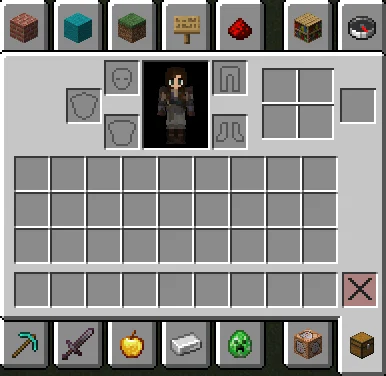
Add the survival crafting slots to the creative inventory screen. These slots are shown in all gamemodes except creative. They are generally only used in survival and adventure mode, however, their contents are tracked and can be modified by the server. Some players may find it useful to be able to view and interact with these slots even when in creative mode, which this mod allows.
Creative Crafting Grid will now prevent the client from moving items from the crafting grid back into the player’s inventory when closing the inventory. Toggle this functionality on or off with /creativecrafting sticky [true|false], view the current configuration with /creativecrafting sticky.
常见问题
Creative Crafting Grid 支持哪些 Minecraft 版本?
Creative Crafting Grid 支持 Minecraft Java 版 1.21.9–26.3,共 8 个版本,可用的加载器:Fabric。下载时注意选择和你游戏版本一致的文件。
Creative Crafting Grid 怎么安装?
先用 PCL2 或 HMCL 启动器安装对应版本的 Fabric,再把下载的 .jar 文件放进游戏目录的 mods 文件夹,重新启动游戏即可。开启了版本隔离的,mods 文件夹在 versions/版本名 下面。运行环境:仅客户端。
评论
登录后评论和评分