
截图
介绍
This mod does a low-hanging-fruit optimization for Create factory gauge rendering.
Why It was Slow
Factory Gauge is a block entity, and the base mod renderer does vertex transform for gauge paths every frame. this has very high overhead considering the path is mostly unchanged across frames. Existing approaches such as createbetterfps, Flerovium does not change this immediate mode model; This mod utilizes flywheel to provide instancing support.
Limitations
Item may have custom renderer. those item will fallback to slow path.
This mod is client only. it doesn’t optimize server ticks.
This mod is ad-hoc, low-hanging fruit optimization for create factory gauge rendering. it doesn’t provide a full solution to making your fps better.
This mod optimizes CPU frame time more than GPU frame time. if shader used, improvement may be small.
Evaluation
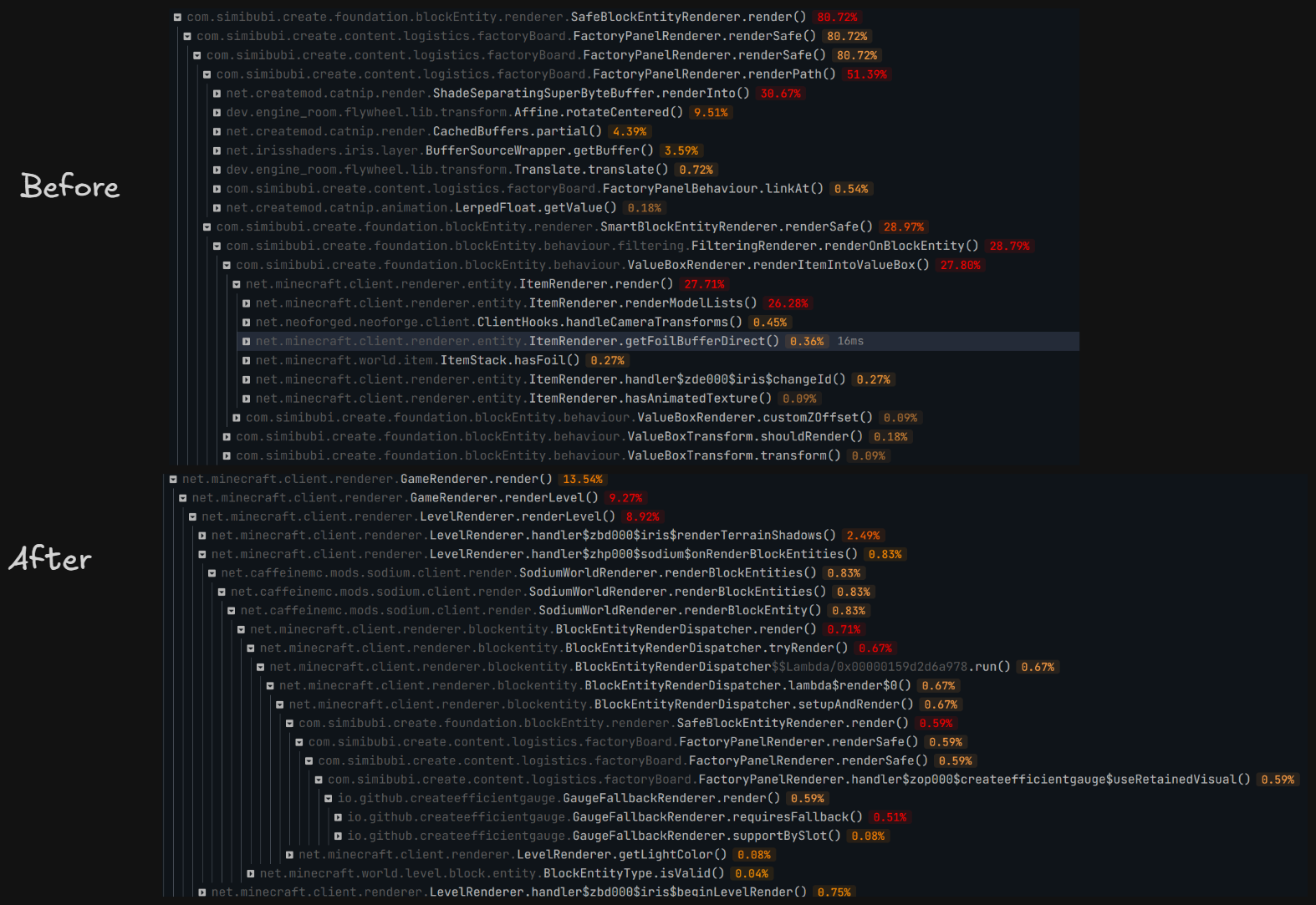
Evaluated in controlled scenario: superflat world, with a 10×30 wall, each block has 4 gauges. significant improvement in sparkc profiler. result in figure.
<img src="https://cdn.modrinth.com/data/iNk9ocsT/images/9ff9ca3a6cd2bd0cd34b435e5a3a87d70279a775.png" alt="A dark-themed performance profiler comparison labeled “Before” and “After.” In the “Before” section, Create mod factory panel rendering dominates the call tree, with SafeBlockEntityRenderer.render() and FactoryPanelRenderer.renderSafe() consuming about 80.72% of render time; major subcalls include FactoryPanelRenderer.renderPart() at 51.39%, a buffer render call at 30.67%, and value-box item rendering at roughly 28%. In the “After” section, the same rendering path appears deep within Minecraft’s normal level-rendering pipeline and uses only about 0.59% of total time, with the fallback gauge renderer around 0.51%, illustrating a dramatic reduction in rendering cost.” loading=”lazy”>
Evaluated in realworld scenario: referencial 80h+ survival world, same spot standing still. VSync off, max frame no limit, sodium: CPU render ahead 1 frame, photon shader ultra preset.after warm up, PresentMon shows (10s interval)
| Metric | Without | With | Change |
|—|—:|—:|—:|
| Avg frame interval MsBetweenPresents | 11.291 ms | 10.618 ms | Decreased by 0.673 ms, ~5.96% |
| Corresponding throughput | 88.57 FPS | 94.18 FPS | Increased by ~6.3% |
| p50 frame interval | 10.644 ms | 10.252 ms | Decreased by ~3.7% |
| MsGPUTime | 11.290 ms | 10.617 ms | Decreased by 0.673 ms |
| MsGPUBusy | 10.802 ms | 10.498 ms | Decreased by 0.304 ms, ~2.8% |
| MsGPUWait | 0.489 ms | 0.120 ms | Decreased by 0.369 ms, ~75% |
| MsGPULatency | 12.594 ms | 14.526 ms | Increased by 1.932 ms |
| MsInPresentAPI | 0.124 ms | 0.109 ms | Both very small |
| CPUUtilization reported by PresentMon | 29.10% | 20.16% | Decreased by ~31% |
常见问题
Create Efficient Visuals 支持哪些 Minecraft 版本?
Create Efficient Visuals 支持 Minecraft Java 版 1.21.1,可用的加载器:NeoForge。下载时注意选择和你游戏版本一致的文件。
Create Efficient Visuals 怎么安装?
先用 PCL2 或 HMCL 启动器安装对应版本的 NeoForge,再把下载的 .jar 文件放进游戏目录的 mods 文件夹,重新启动游戏即可。开启了版本隔离的,mods 文件夹在 versions/版本名 下面。运行环境:仅客户端。
评论
登录后评论和评分