
截图
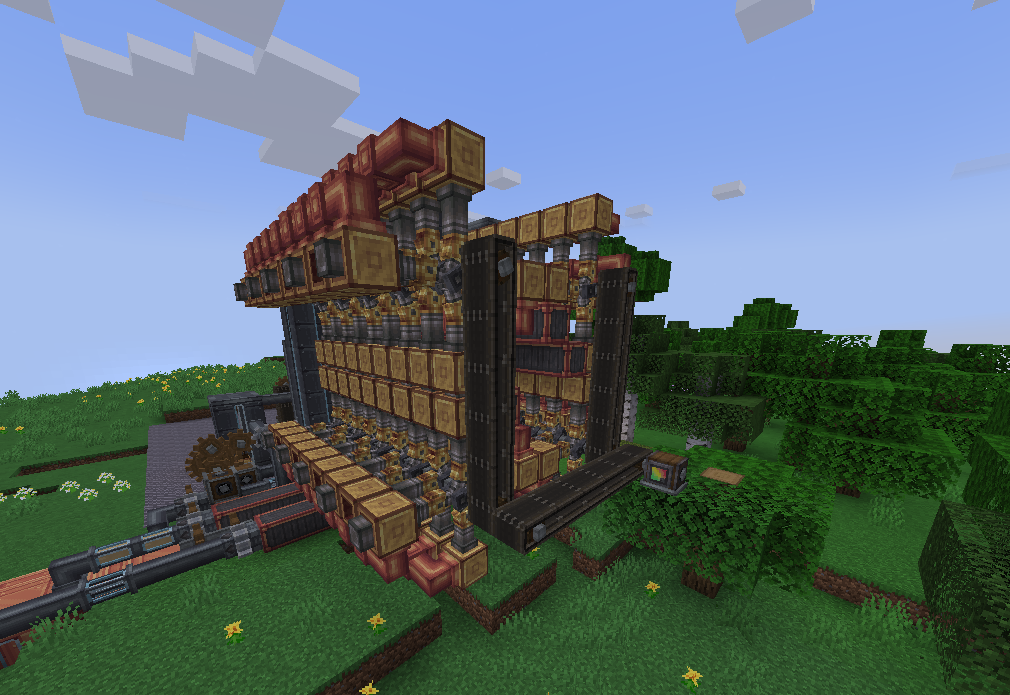
介绍
Features
Blocks/Items
The following blocks/items have been unified to work in all the processes and recipes present in the relevant mods.
Mods take priority as defined in the configuration section below, items from lower priority mods are hidden in JEI/REI/EMI.
- Coal Coke Dust – Immersive Engineering, TFMG
- All Copycat Blocks – Create: Copycats+, Create: Connected, CD&D
- Plastic Sheet – Pneumaticcraft, TFMG
- Six Way Gearbox – Create: Connected, Create Utilities
Fluids
The following fluids have been unified to work in all the processes and recipes present in the relevant mods.
- Crude Oil – Ad Astra, CDG, C:L&W, Destroy, Pneumaticcraft, TFMG
- Fuels – Ad Astra, CC&A, CDG, CSnR, Destroy, Create Garnished, Pneumaticcraft, TFMG
- Compatibility for fuels from other mods working in Ad Astra rockets can be disabled by enabling a datapack included in the mod.
- Currently only TFMG’s fuels work in its generators as TFMG does not have support for custom fuel types.(_A work-around could be found._)
- Kerosene, Molten/Liquid Plastic, Lubricant/Lubrication Oil – Pneumaticcraft, TFMG
Installation
The mod is currently only available for 1.20.1 and 1.21.1 (neo)forge. Fabric/Quilt versions will come soon.
Almost Unified and Create are required to be installed.

Curseforge Link: https://curseforge.com/minecraft/mc-mods/createaddoncompatibility
Compatibility Configuration
To change which mod has the priority in compatibility, modify the modPriorities in config/almostunified/unify.json, for more info look at this.
The default priority order from highest to lowest is
pneumaticcraft
copycats
create_connected
create_dd
tfmg
There are datapacks present in the mod which allow you to change certain things about compatibility between different mods.
They can be enabled during world creation or by using the /datapack enable command.
Suggestions / More Compatibility Features
I do have more compatibility features planned, but if you have any ideas, feel free to create an issue on GitHub or tell me in the Discord server.
Credits
Thanks to:
- Arthur Simão for the incredible logo!
- The creators of the various mods for which compatibility has been added in this mod.
- The AlmostReliable team for making Almost Unified, without which this mod would have been very difficult to make.
常见问题
Create: Addon Compatibility 支持哪些 Minecraft 版本?
Create: Addon Compatibility 支持 Minecraft Java 版 1.20.1–1.21.1,共 2 个版本,可用的加载器:Forge / NeoForge。下载时注意选择和你游戏版本一致的文件。
Create: Addon Compatibility 怎么安装?
先用 PCL2 或 HMCL 启动器安装对应版本的 Forge / NeoForge,再把下载的 .jar 文件放进游戏目录的 mods 文件夹,重新启动游戏即可。开启了版本隔离的,mods 文件夹在 versions/版本名 下面。运行环境:客户端和服务端都要装。
Amronos 的其他作品
查看全部 →
Create: Addon Compatibility
Adds compatibility between different create addons.

Reminiscent Create
[1.20.1] A modpack that hopes to provide an epic Create experience with all your favorite Create add-ons, Magic Mods, and many vanilla+ mods, while also keeping optimization in mind.
Reminiscent Create
[1.20.1] A modpack that hopes to provide an epic Create experience with all your favorite Create add-ons, Magic Mods, and many vanilla+ mods, while also keeping optimization in mind.

Reminiscent Vanilla
A purely client-side vanilla modpack with 100+ vanilla mods alongside optimization.
评论
登录后评论和评分